please immediately wash with clear water, and consult a doctor immediately if you feel unwell.
• When placing the laser toner cartridge, please keep it away from the area reachable by children.
12.2.2. Service Life of the Laser Toner Cartridge
Service life of the laser toner cartridge depends on the amount of toner that print jobs require.
When the LCD screen prompts that the toner is exhausted, it indicates that the cartridge life is expiring or has expired. To ensure
the print quality, please timely replace with new laser cartridge.
12.2.3. Replace Laser Toner Cartridge
Before replacing the laser toner cartridge, please pay attention to the following:
• The laser toner cartridge surface may contain toner. Please remove it carefully to avoid spilling.
• Put the removed laser toner cartridge on a piece of paper to avoid the toner from accidentally spilling.
• After removing the protective cover, please immediately install the laser toner cartridge into the printer, so as to
avoid photosensitive drum damage caused by exposing to too much direct sunlight or indoor light.
• While installing the laser toner cartridge, do not touch the surface of the photosensitive drum so as not to scratch it.
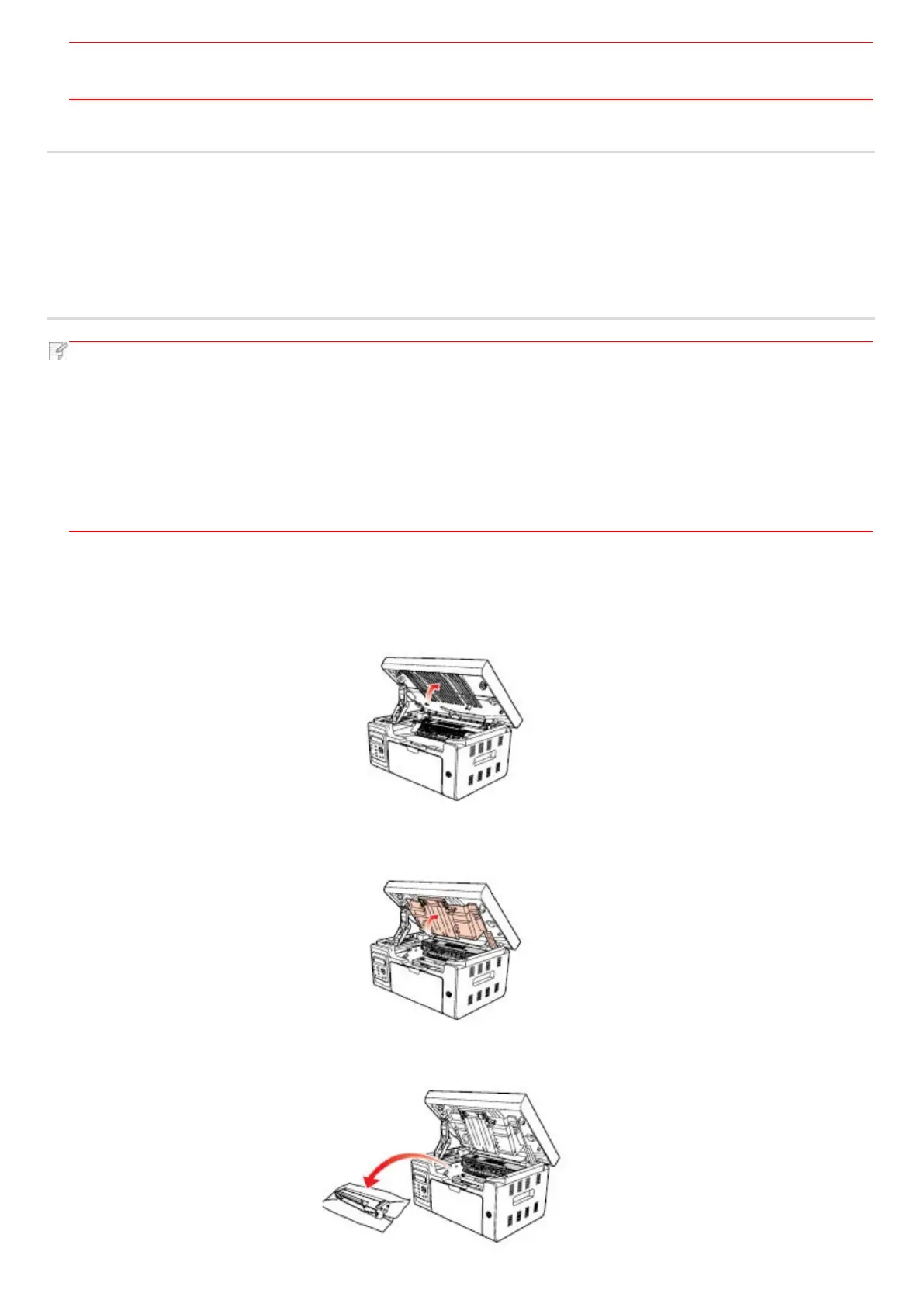
Replacement steps are as follows:
1. Turn off the printer and raise the scanning platform until it is locked.
2. Open the output bin by the upper right ridge of the concave section.
3. Remove the exhausted cartridge along the guides.



 To Next Page