26
Installation and commissioning
704 67 020 00 _ 111
GF Robimat XL / XM
OPERATING INSTRUCTIONS
When the machine leaves the factory it is manufactured, tested and despatched to factory settings. Transport, storage,
installation and products can aect mechanical features. These are beyond the control of the manufacturer.
Therefore in order to ensure trouble-free everyday operation, it is essential that adjustments and test vends are carried
out.
• Open the machine door.
• Insert the service key. Leave the sliding door unit shut! After a few seconds the lighting comes on and the lift
carries out a reference run.
XMOffset: 00.0mm
1:+ 7:- 9:Save
YMOffset: 00.0mm
1:+ 7:- 9:Save
XMScale: 00.0mm
1:+ 7:- 9:Save
YMScale: +2.0mm
1:+ 7:- 9:Save
Goto shelf: 25
Moving.....
Y-Value
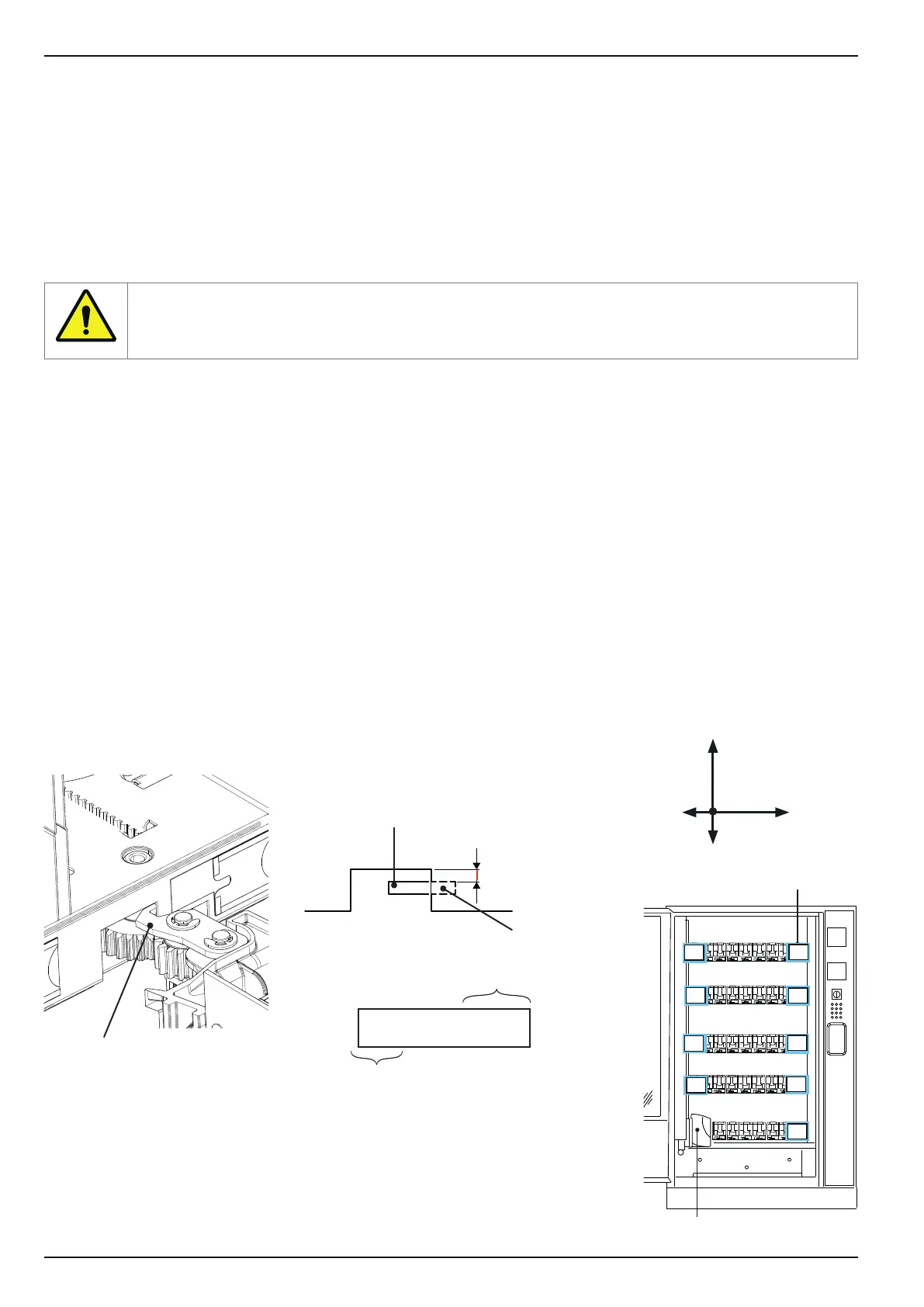
• [XMOset] - [YMOset] refers to the complete coordinate system
• [XMScale] - [YMScale] refers to the deviation at maximum deection from home
position. Interim values are approximate.
• Positive values (e. g. + 2 mm) mean "further to the right" or "higher".
• Negative values (e. g. - 3 mm) mean "further to the left" or "lower".
Home position, zero position
Maximum deection
10
18
20
28
30
38
40
48
58
centred!
Pendulum hook
Keep your distance and do not reach into the machine!
The reference run is complete when the product basket has returned to home position bottom left.
• Pull the sliding door unit out slightly, so that the service keypad is accessible.
• Press [ M ] - [ L ] - [ E ] - to access menu M10 [ROBIMAT].
• Press [ M ] several times to access sub-menu [MasterOset].
[ResetXY] - [AutoCong] - [HWAUTOMAT] - [MasterOset] - [HardwareTest] - [ResetXY] ...
Conrm by pressing [ E ].
• In the [MasterOset] menu use [ M ]:
[XMOset] - [YMOset] - [XMScale] - [YMScale] - [Goto shelf] - [XMOset] ...
• Select [Goto shelf] and then for example [ 5 ] - [ 0 ] - [ E ]; the basket then moves to container 50.
Using selection keys [ 1 ] or [ 3 ] you can move the pendulum hook in and out.
Look at the hooking in and out of the pendulum using an empty container in the middle. Check the height of the
pendulum hook! (see diagram)
The pendulum gear must swing in and out freely and must be at the correct height so that it does not drag. After
setting the pendulum hook, check positions 10, 18, 50 and 58 in the same way.
Bear in mind that, depending on the weight of the products, the roll bar may bend!
If the hook is too high, adjust the Y-value downwards [YMOset] (-direction) by pressing [7].
If the hook is too low, adjust the Y-value upwards [YMOset] (+ direction) by pressing [1].
Press [ E ] to save changes.
• To exit menu M10 [ROBIMAT], remove the service key.
Pendulum hook
X
Y
0
[ 1 ] key for + direction
centred!
approx. 2-3 mm



 To Next Page