1128500 WPC 2000 User Manual
2-52 Installation
Installing the Panel-mount Display
Mounting the Display
To install the panel-mount display in your enclosure or console, do the following, referring to
Figure 2-28, page 2-53 for mounting and cutout dimensions:
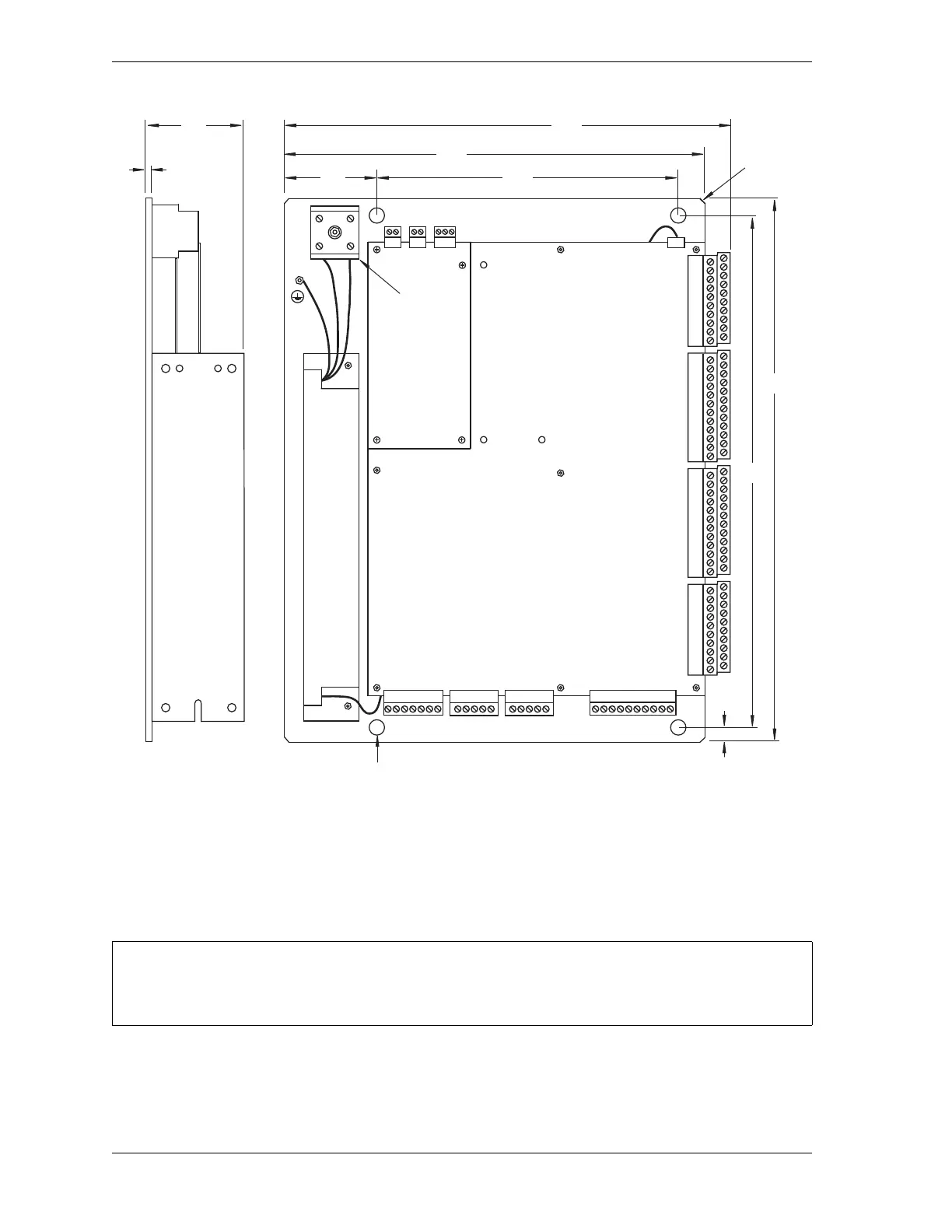
Figure 2-27. WPC 2000 Mounting Plate: Mounting Dimensions
Install the panel mount display at a height convenient for all users. Experiment to determine a
good height for every user before mounting the display.
TB105
TB104TB103TB102TB101
TB 109
.312
(7.92)
ID
4 places
45
o
x .125
(3.18)
4 places
TB 106
Dimensions: inches
(mm)
Allow 1 clearance on top, bottom, and left side
of mounting plate and above board/power supply.
Allow 2 1/2 clearance on right side (i.e., side to
which TB101-TB104 are connected).
.090
(2.3)
TB 107 TB 108
Input power
terminal
block
.25
(6.4)
10.65
(270.5)
10.00
(254.0)
2.25
(57.1)
7.00
(177.8)
13.00
(330.2)
12.25
(311.2)
2.67
(67.8)



 To Next Page