Page 37 of 46
WITT-GASETECHNIK GmbH & Co KG
Gas Safety- & Control Equipment
7.5.4 Expert Setup
Within the expert level the user has the possibility to set or change all parameters as well as reset
the MFA 9000 to its default parameters. Also within the expert level it is possible to change the
codes to access the operator and the expert level. Furthermore the subsequent equipment can be
tested for correct settings and connection by simulating alarm states and feed analog outputs.
This level is for advanced users or experts and should not be entered by normal operators. It is in
the expert’s responsibility to set the parameters properly.
7.5.4.1 Parameter
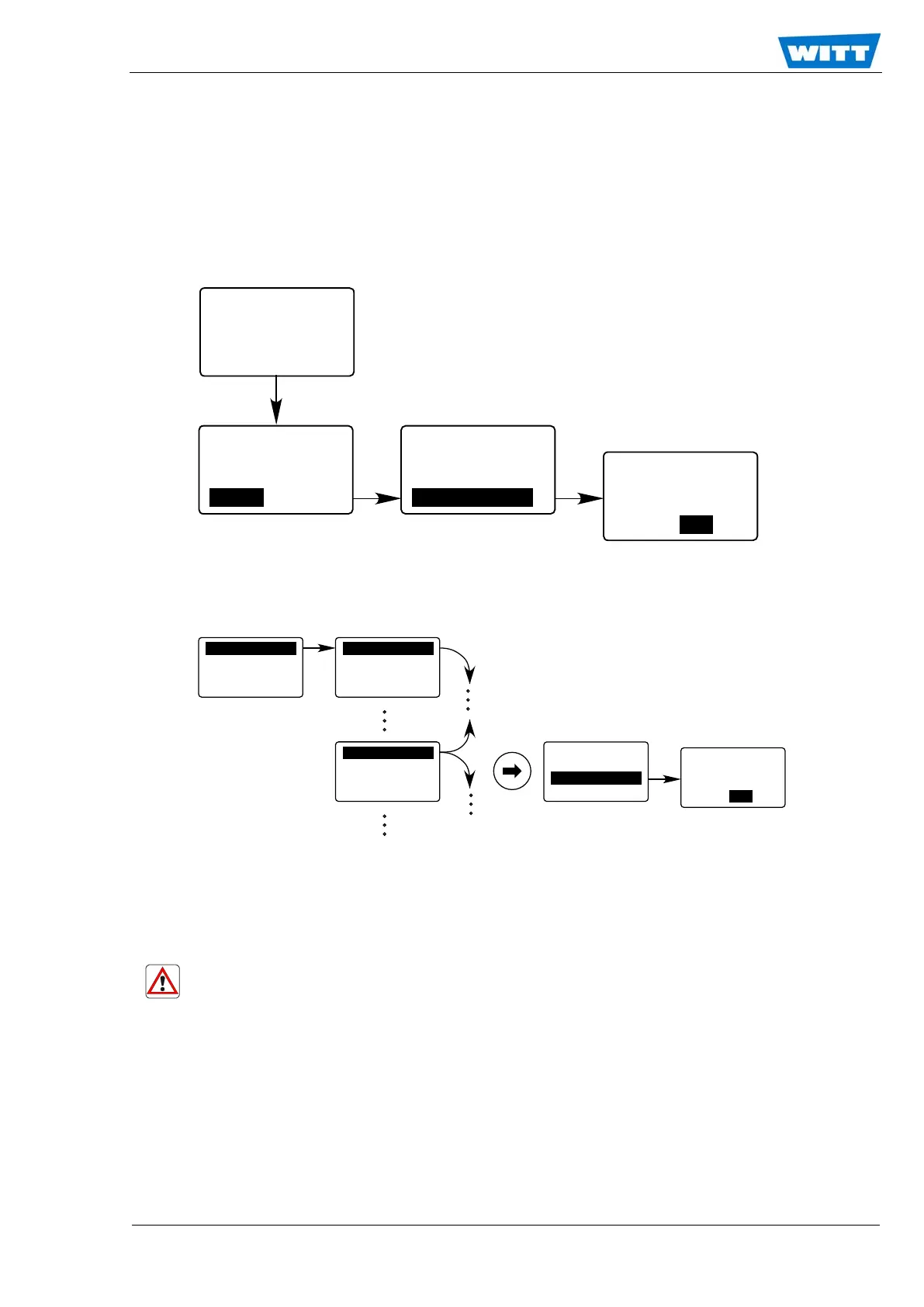
The configuration of the MFA 9000 is represented by a set of almost 200 parameters. The value of
these parameters defines the state of the system. Not all of the parameters are alterable. When a
parameter is alterable the third line shows “Change?”. To change the selected parameter mark this
line and press <ENTER>. Now the appropriate numerical submenu will appear to do the action. To
leave the expert level parameter menu mark the OK and press <ENTER>.
Caution!
Altering the value of one parameter in an improper way may lead to a complete breakdown
of the system.
Operation
Calibration
Diagnosis
Setup
Instr. Set.
Relay Set.
Output Set.
Expert Set.
A1 A2 Er
0.30
[%] H2/N2
Expert Code
set: 0.00000
new: 0.00000
ESC
/OK
P
a
r
a
m
e
t
e
r
A
cces
s M
od
e
s
Re
s
e
t
F
u
n
c
t
.
I
/O
Tes
t
Comp
o
u
n
d
p
p
m
s
e
t
:
2
10
5
.
1
3
-
----
---
---
-
P
0
00
O
K
LC
D
C
o
n
t
r
a
s
t
s
et
:
25
.000
0
Chan
ge ?
P
0
0
9
O
K
L
CD Co
ntr
ast
s
e
t:
2
5
.
0
0
0
0
n
e
w: 2
5.0
000
ES
C
/
O
K
LCD
Con
tra
s
t
s
e
t
:
2
5
.
0
00
0
C
han
ge ?
P0
09
O
K


 To Next Page