public 7
om_yxm_installation.fm document release 1.1 last updated 30/9/15
YOXIMO owner manual
Installing SIM and/or SAM – optional
To communicate via GSM/GPRS-EDGE-3G, you need a SIM installed in the YOXIMO terminal.
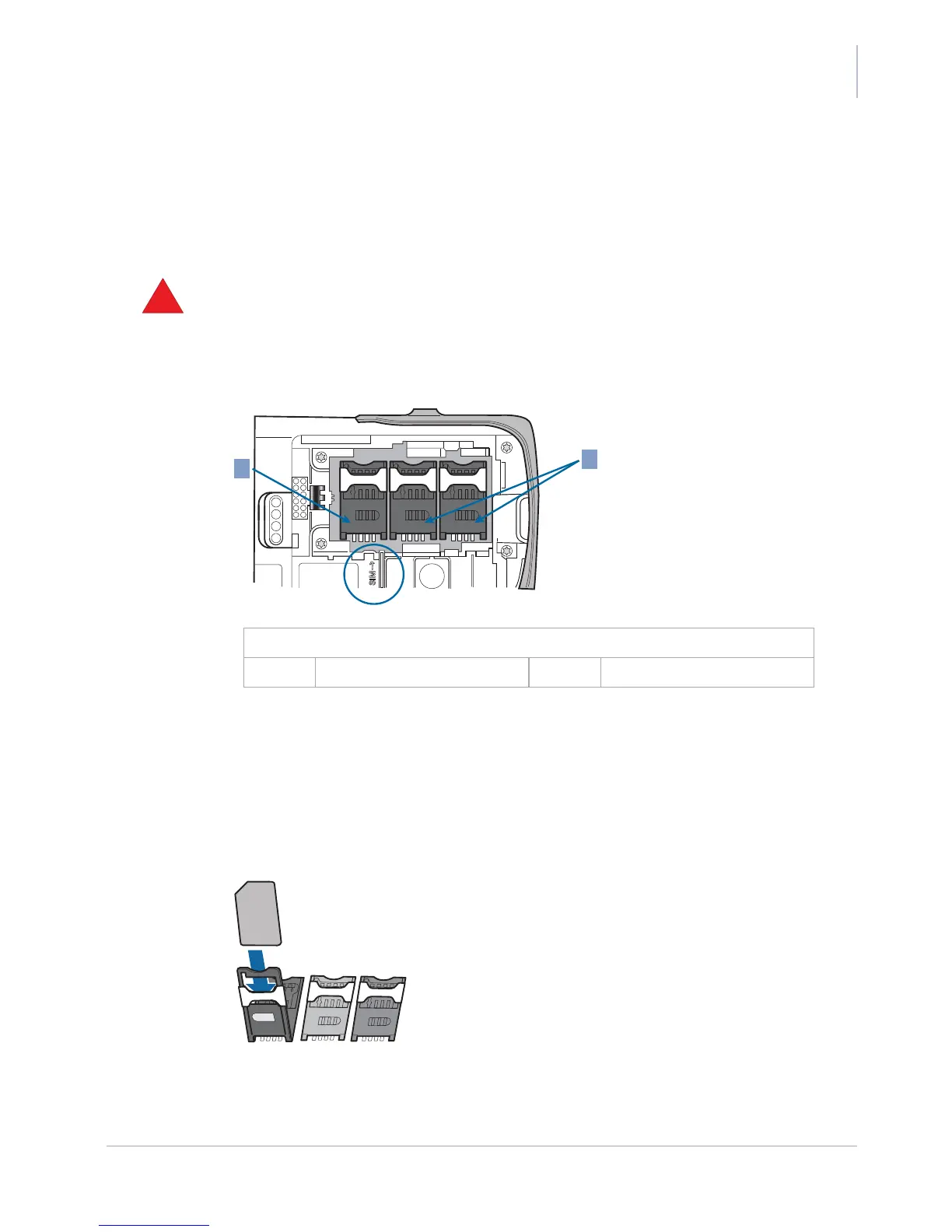
Some applications also require one or more SAMs to be installed. The SIM and SAM slots are
located inside the terminal underneath the battery.
• Make sure that the mains power adaptor is not connected to the YOXIMO.
• Avoid electrostatic discharge as it can severely damage the equipment. For guidelines on
minimising the risk of electrostatic discharge, see Safety recommendations, on page 37.
1. If you have already installed the battery, start by removing the battery cover and battery. See
Removing the battery, on page 10, for more information.
2. Open the correct holder for inserting the SIM or SAM.
– the SIM holder is the holder to the left, marked SIM
– the SAM slots are the two remaining holders
Shift the appropriate latch upwards, until you hear a click, then hinge the holder open.
3. Insert the SIM or SAM with the bevel in the direction as shown in the next figure. Make sure
the card is completely inserted.
Figure 5. Sliding a SIM/SAM card into its holder



 To Next Page