3-S50
L3130 · L3430 · L3830 · L4630 · L5030, WSM
TRANSMISSION
GST Valve Fine-adjustment
(Setting the function of proportional reducing valve)
• When the ECU or GST valve is replaced, this adjustment is
required.
1. Push down both the display mode switch and the travel speed
switch at once, continue holding switches, and then start the
engine.
2. Select Mode F by the procedure from 3 to 5 which has been
described to previous page.
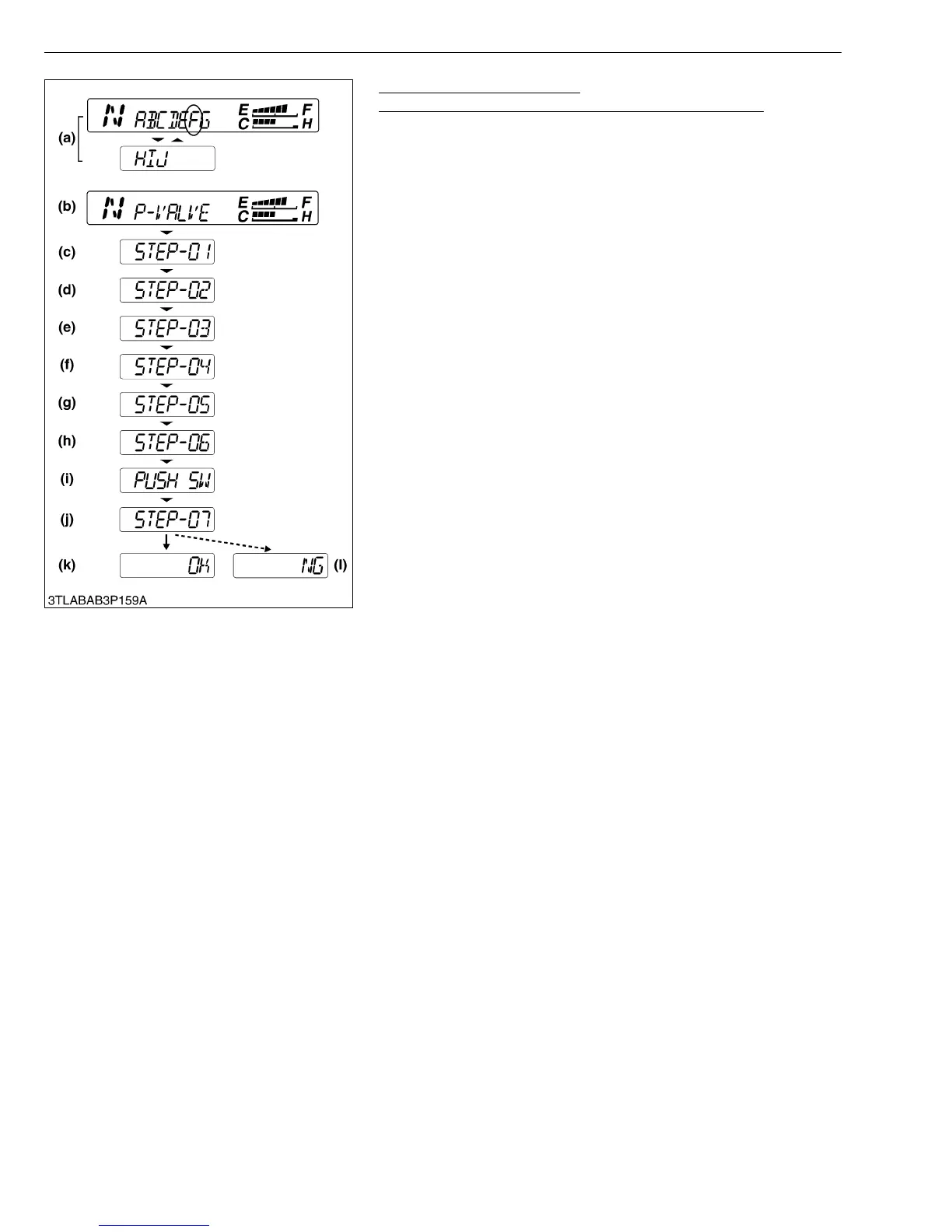
3. “P-VALVE” is displayed (b) and STEP-01 (c) is displayed the
three seconds after.
• To make this adjustment, follow thise steps in the exact
order described. (Otherwise the switch does not work to go
to next step. At “STEP-01” and “STEP-03”, however, the
next step can be moved without their settings.)
• Push the display mode switch to move to the next step.
4. STEP-01 (c) : Release parking brake.
5. STEP-02 (d) : Set the engine speed at 1000 to 1400 min
−1
(rpm).
6. STEP-03 (e) : Set front tires straight ahead.
7. STEP-04 (f) : Operate the speed selection lever (GST lever) as
follows ; disengaged the clutch, select “forward” with the shuttle
lever, and shift the GST lever from 1 thru 12 several times.
Set the GST lever at the positions other than neutrl.
8. STEP-05 (g) : Set the GST lever to Neutral position.
9. STEP-06 (h) : Set shuttle lever to forward and engage clutch.
10.PUSH SW (i) : Push the display mode switch for more than three
seconds.
11.STEP-07 (j) : To preform this function the operator must be
seated on the tractor.
After a short delay the tractor will begin to move slowly. And then,
after it moves a little, the tractor stops automatically. (Fine-
adjustment is being executed.)
12.OK is displayed (k) : The setting has been preserved correctly to
the ECU.
13.NG is displayed (l) : The setting has not been correctly saved in
the ECU. Repeat the entire procedure.
W1029611
(a) Mode Selection Display
(b) Information Display
(c) Setting Display-1
(d) Setting Display-2
(e) Setting Display-3
(f) Setting Display-4
(g) Setting Display-5
(h) Setting Display-6
(i) Adjusting Display
(j) Setting Display-7
(k) Correct Preserving Display
(l) Incorrect Preserving Display



 To Next Page