26 2 Printing
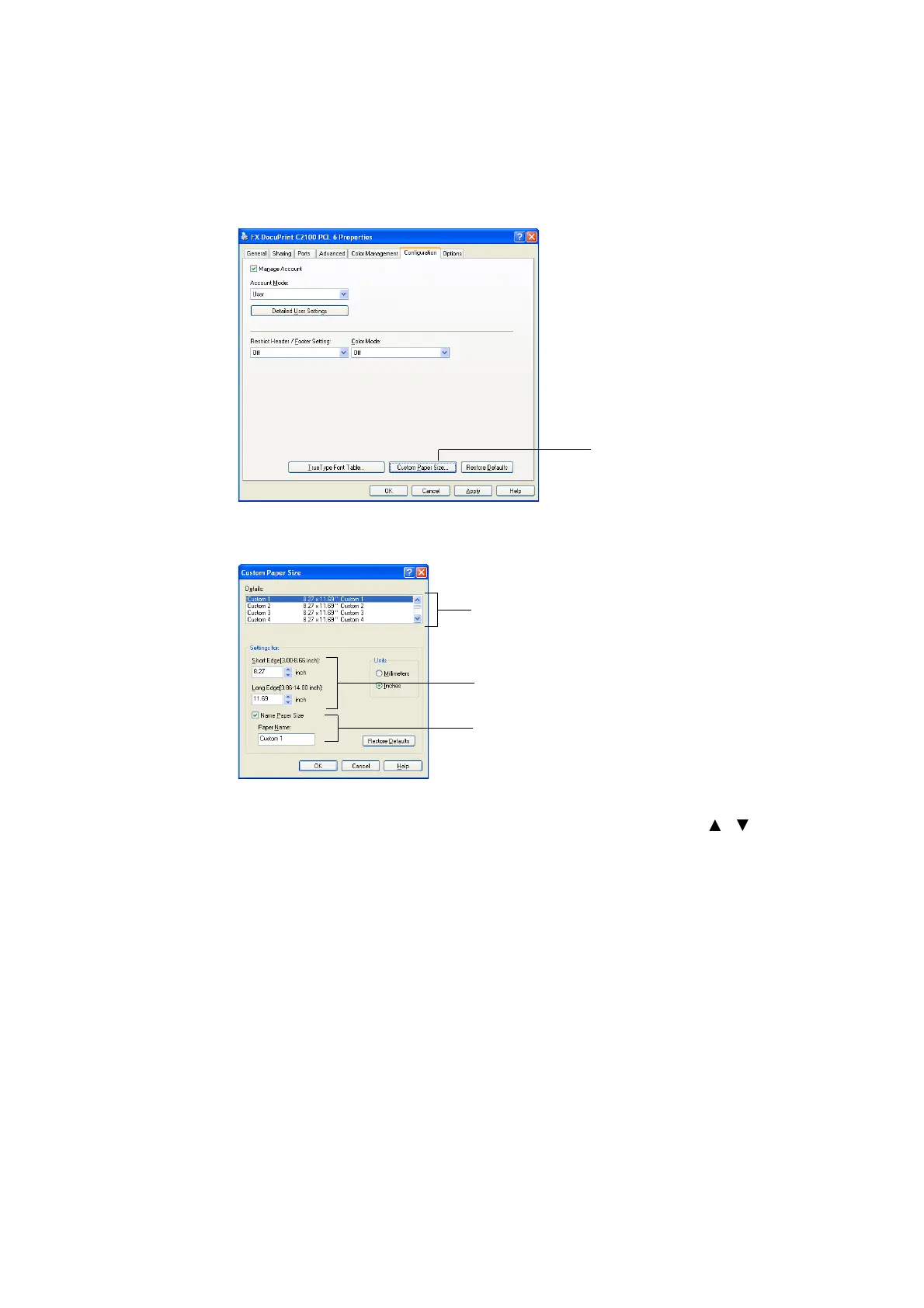
1. From the [Start] menu, click [Printers and Faxes], and then display the properties of
the printer to be used.
2. Click the [Configuration] tab.
3. Click [Custom Paper Size].
4. Use the [Details] list box to select the custom setup you want to define.
5. Specify the length of the short edge and long edge under [Setting For].
You can specify the values either by entering them directly or using [ ] [ ].
The length of the short edge cannot be longer than the long edge, even if it is within
the specified range. The length of the long edge cannot be shorter than the short
edge, even if it is within the specified range.
6. To assign a paper name, select the [Name Paper Size] check box, and then enter the
name in [Paper Name]. Up to 14 characters can be used for the paper name.
7. If necessary, repeat steps 4 to 6 to define another custom size.
8. Click [OK].
9. Click [OK].
3
4
5
6


 To Next Page
 Loading...