32 2 Printing
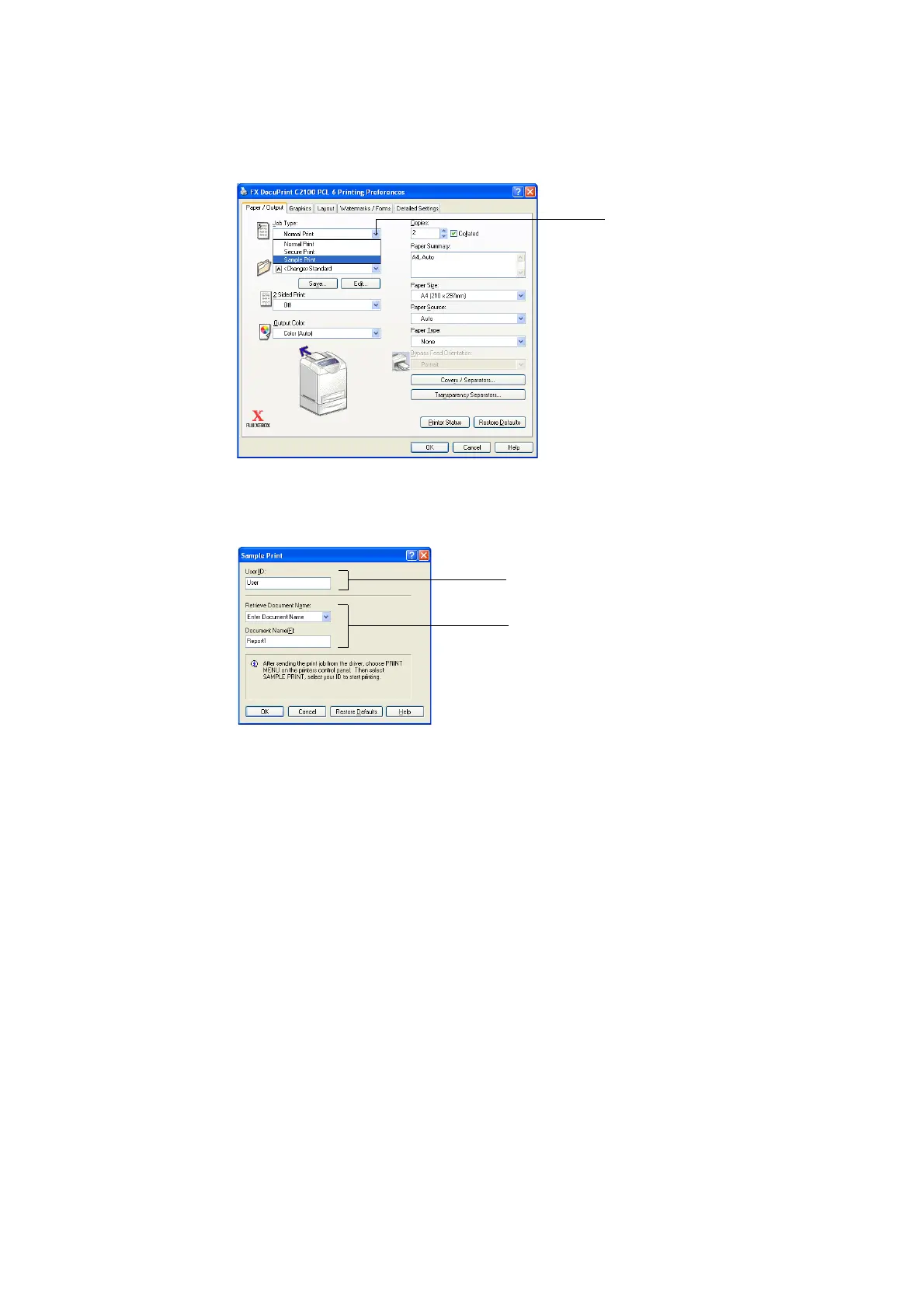
4. Select [Sample Print] from [Job Type] and click [Setting].
Note
• You must specify at least 2 for [Copies] before [Sample Print] can be selected.
5. Enter the user ID in [User ID].
You can enter up to 8 characters for the user ID.
6. From [Retrieve Document Name], select either [Enter Document Name] or [Auto
Retrieve].
If [Enter Document Name] is selected, specify a document name in [Document Name]
using up to 12 characters.
If [Auto Retrieve] is selected, the name of the document to be printed will become the
document name. However, if the printer cannot recognize a document name, it will
become the date/time (e.g. 09/03 10:30).
7. Click [OK].
8. Click [OK].
9. Click [Print] in the [Print] dialog box to start printing.
4
6
5


 To Next Page
 Loading...