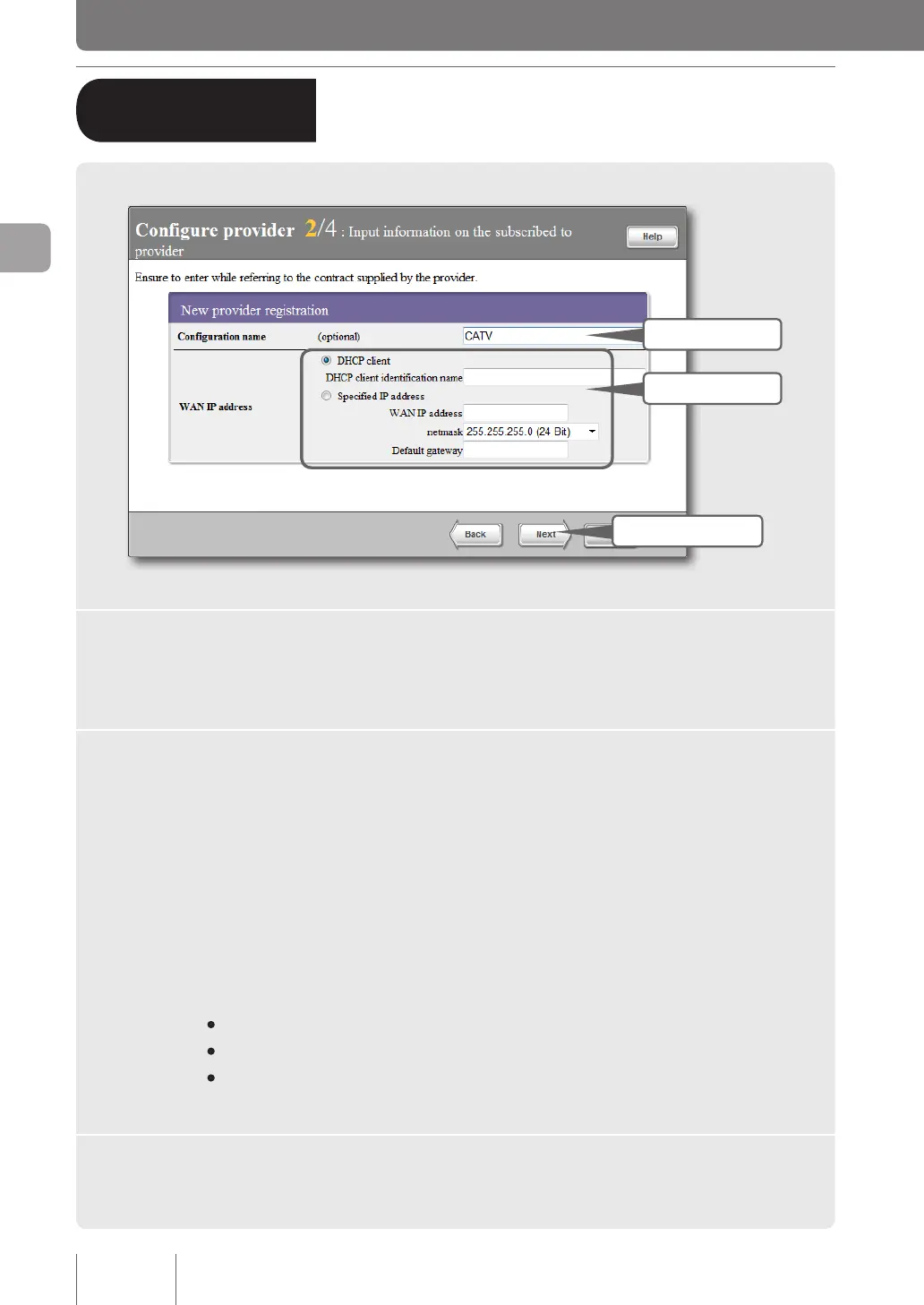
2 - Specifying your provider
information
1 Fill in
3 Click
2 Specify
1
Enter the configuration name.
Enter a descriptive destination name. It is a good idea to name the conguration so that you can
easily identify it when it needs to be modied.
2
Specify the WAN IP address.
If the IP address is not assigned by your provider:
Click “DHCP client” to select it.
If the DHCP client identication name is assigned by your provider, enter that identication name
in the “DHCP client identication name” (there is no need to enter it if it is not assigned by your
provider).
If the IP address is assigned by your provider:
Click “Specied IP address” and then congure the following settings.
• WAN IP address: Enter the IP address assigned by your provider in numeric characters.
• Netmask: Select the netmask assigned by your provider.
• Default gateway: Enter the default gateway address assigned by your provider in numeric
characters.
3
Click “Next”.
The “Congure provider 3/4” screen appears.
40
Connecting to the Internet
3
B
Terminal broadband connection
over DHCP (i.e. CATV Internet)
(from page 35)



 To Next Page