USB-C Cable Requirements
1. Cable should be as short as possible
2. Must have USB-IF certification
3. Must be USB 3.2 Gen2 (2x1 or 2x2)
4. Current rating of 5A
5. Must support USB power delivery of 100W, 20V/5A
6. Video Data specs must be 20Gbps per lane (4K@60Hz) or above. (40Gbps cable)
7. USB Data specs must be 5Gbps (USB 3.0)
8. Must have built in E-Mark IC
Please see Appendix 1 near the end of this document for a list of known good USB-C cables.
ZeeVee is not responsible for damage to any equipment caused by poor or incorrect
USB-C cables.
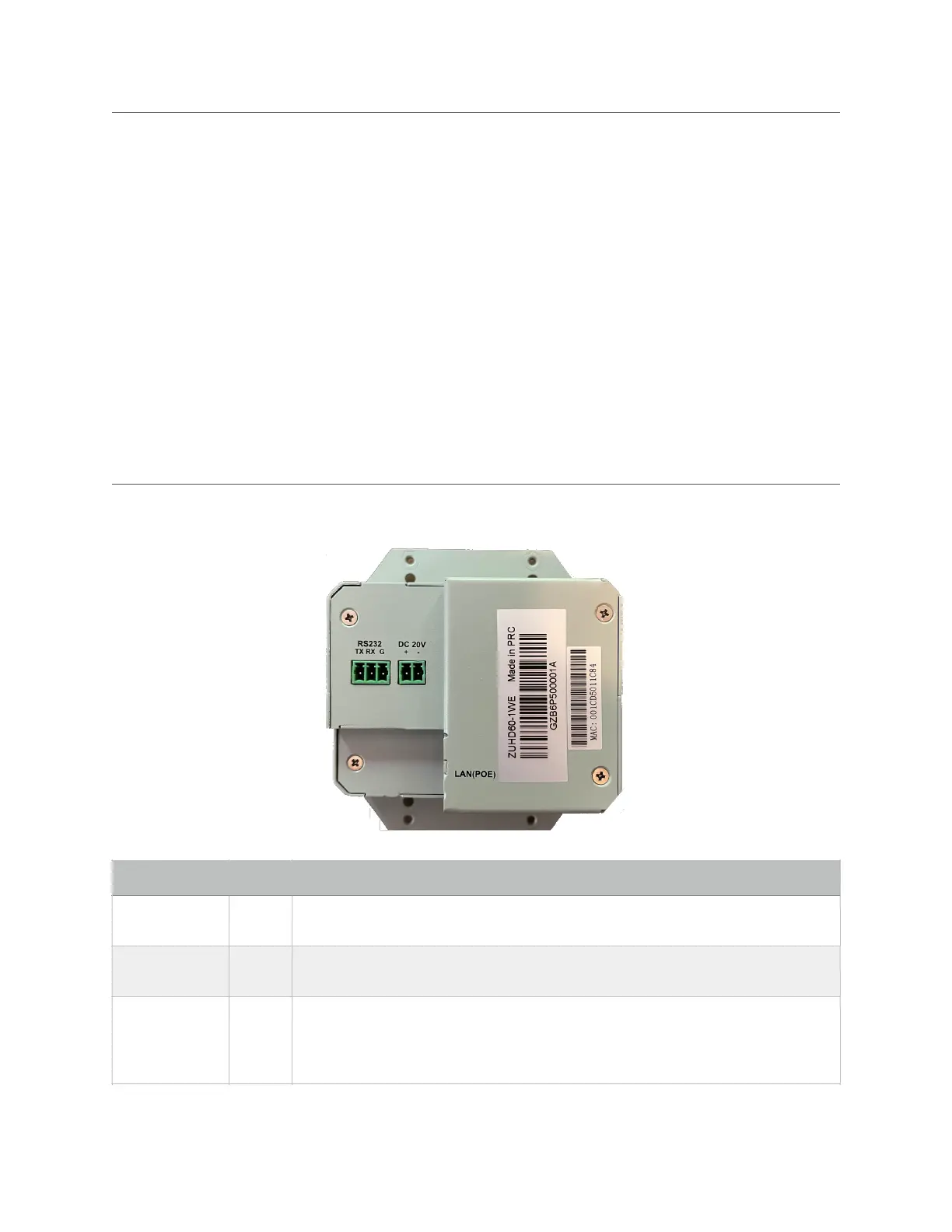
Ports (Wallplate Encoder Back)
RS232 Control Port for sending and receiving side-band serial traffic to/from
decoders as directed by ZyPer Management Platform.
DC 20V power. Only required if PoE not available or to provide up to 60W
output power from USB-C Video Port. Power supply not included with unit.
1Gb Ethernet over Cat6 (or better) cabling. RJ45 with PoE. Important Note:
If using PoE with ZyPerUHD60 units; the ZyPerUHD60 must have a path to
the ground. This grounding can be accomplished by using a shielded network
cable (F/UTP)


 To Next Page