Please consult the ZyPer Management Platform User Manual for additional details on
switching/routing video from sources to displays.
https://www.zeevee.com/documentation-all-products
To set up ZyPerUHD60 in a point-to-point environment, you have to:
•
Connect the Encoder and Decoder to each other via the network cable. Video and
audio will automatically begin streaming.
USB Details
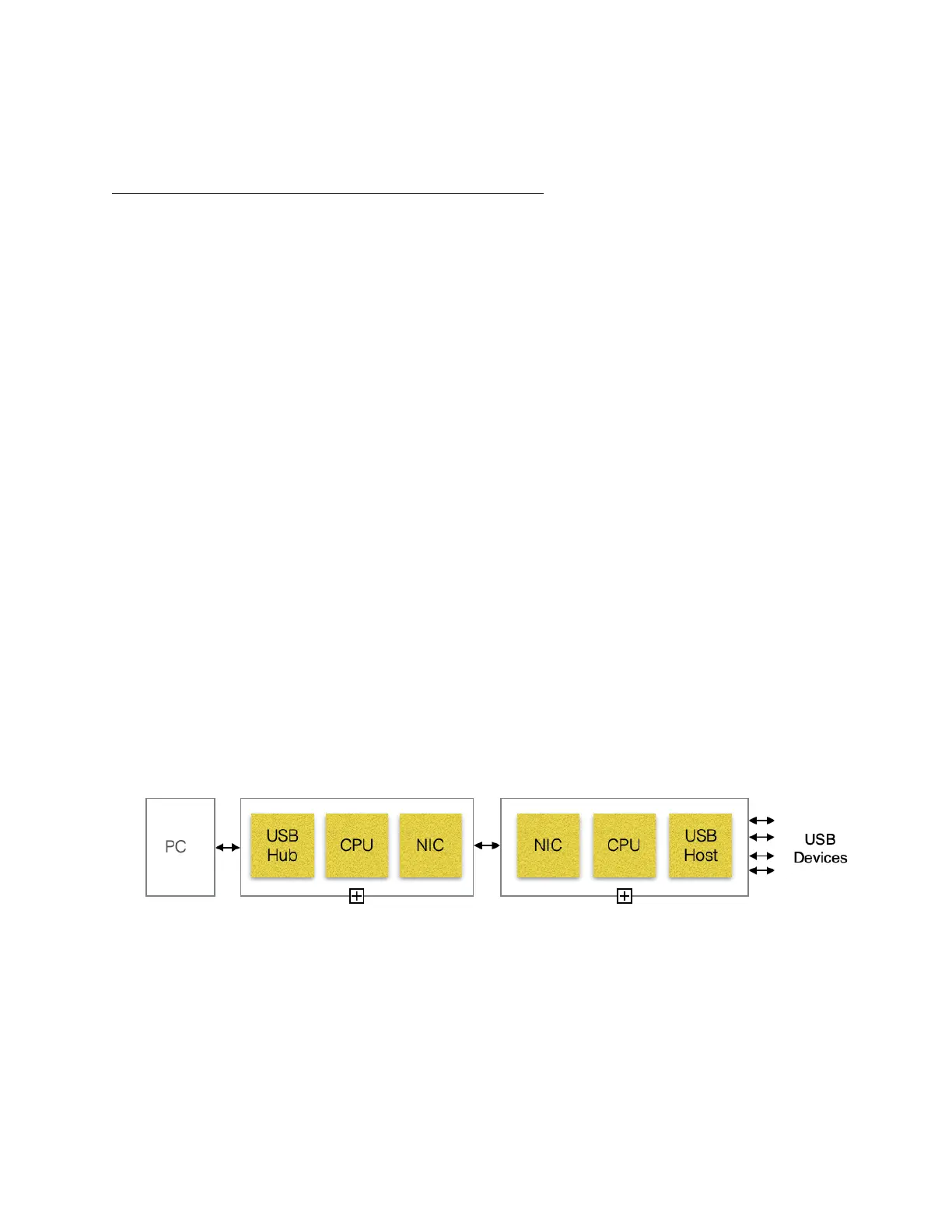
The ZyPerUHD60 provides for USB-over-LAN communications.
The ZyPerUHD60 Encoder contains a USB Hub while the ZyPerUHD60 decoder contains a
USB Host.
Device types include the following:
USB Keyboard
USB Mouse
USB Touch Panels
USB Cameras
USB Pen Table & Signature Pad
USB Card Readers
USB Flash Memory
USB Hard Disk
USB CD-ROM
A ZyPerUHD60 System can support an unlimited number of decoders connected to an encoder
for USB Connections. However, there are practical and bandwidth limitations based on the 1G
network.
"
The maximum number of USB Hops allowed is 7. However the ZyPerUHD60 itself counts as 2
Hops making the real Hop limit = 5.
Note: Only the UHD60 Encoder counts against Hop limit. Encoder = 2 Hops, Decoder = 0 Hops.!


 To Next Page