Carl Zeiss Axiotech and Axiotech
vario
2-20 B 40-020 e 06/99
2.11.2
Connection of Axiotech 100
The Axiotech 100 microscope features an integrated stabilized 12 V 100 W power unit which uses the
two switchable voltage ranges 100 ... 127 V AC or 220 ... 240 V AC.
☞
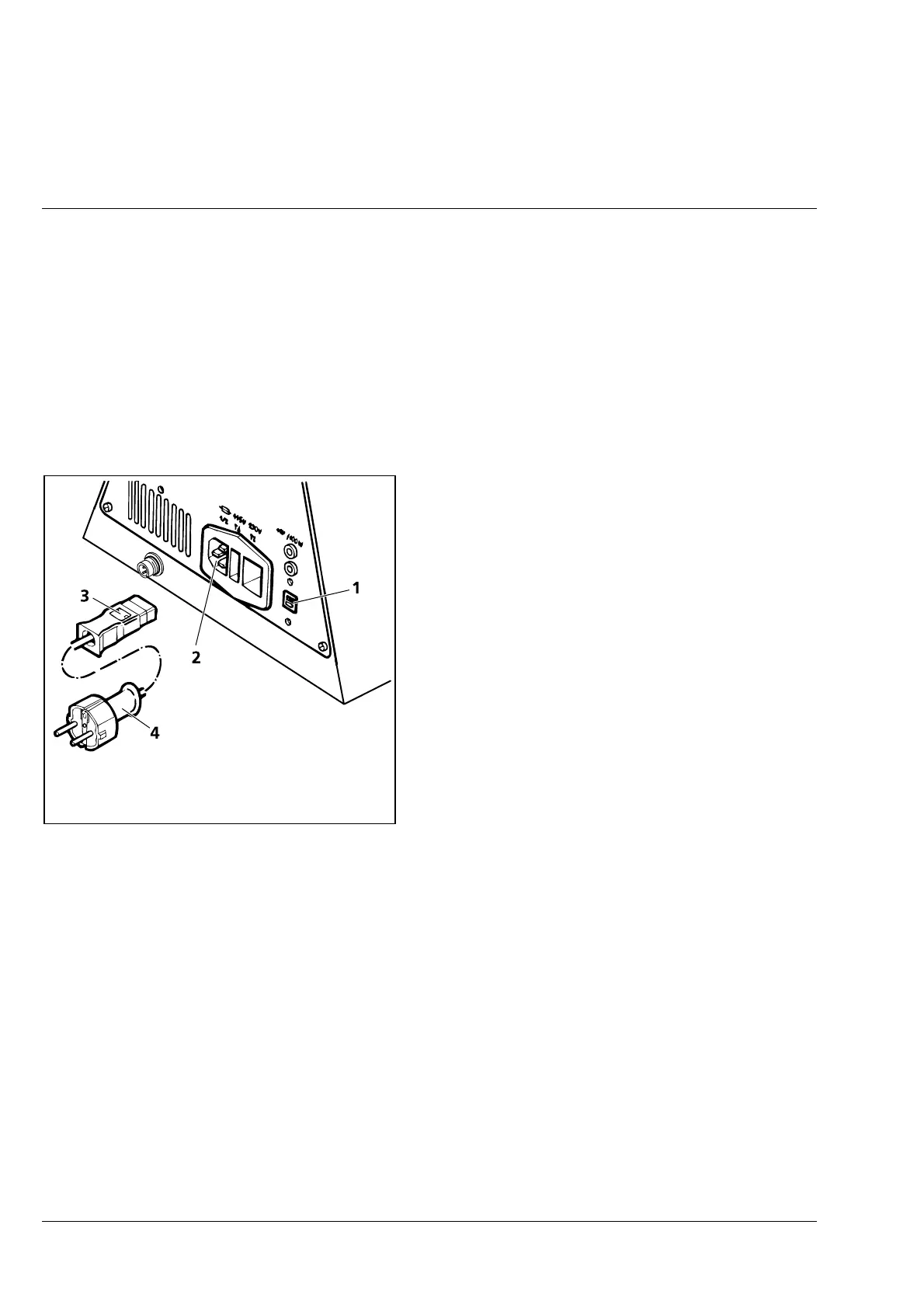
Before the instrument is switched on for the first time, it is therefore absolutely necessary to
check whether the voltage set at the sliding switch (2-26/1) on the back of the stand complies
with the line voltage!
• If the preset instrument voltage does not
comply with the line voltage, make sure to
set the sliding switch (2-26/1) to the correct
line voltage using the SW 3 screwdriver!
• Connect line cable with coupling device (2-
26/3) to the instrument socket (2-26/2) and
make connection to the line via line connector
(2-26/4).
• Switch the 12 V 100 W halogen lamp on and
off again via the on/off switch (2-25/4). In the
ON position, the green line control lamp in the
switch and at least one LED on the lamp
voltage display (2-25/2) must light up if the 12
V 100 W halogen lamp is switched on.
• Set the required image brightness via the
reflected-light illuminance control (2-25/3).
Fig. 2-26 Connecting the Axiotech 100 to the
line











 To Next Page