Axiotech and Axiotech
vario
Carl Zeiss
B 40-020 e 06/99 3-31
3.5
Attachment of photomicrography equipment
The Axiotech and Axiotech
vario
microscopes can be switched from observation to photomicrography via a
pushrod (3-29/7) on the phototube (photomicrography function: pushrod pulled out). Special adapters
allow commercially available 35-mm SLR cameras and special microscope cameras (e.g. MC 80
DX,
MC
200
CHIP
) to be attached to the camera port. For the use of photomicrography equipment, please
observe the relevant, separate manuals in addition to the information provided in this manual, e.g.:
B 40-046 Photomicrography using 35 mm SLR cameras
B 40-036 MC 80
DX
Microscope Camera
B 40-008 MC 200
CHIP
Microscope Camera
3.5.1
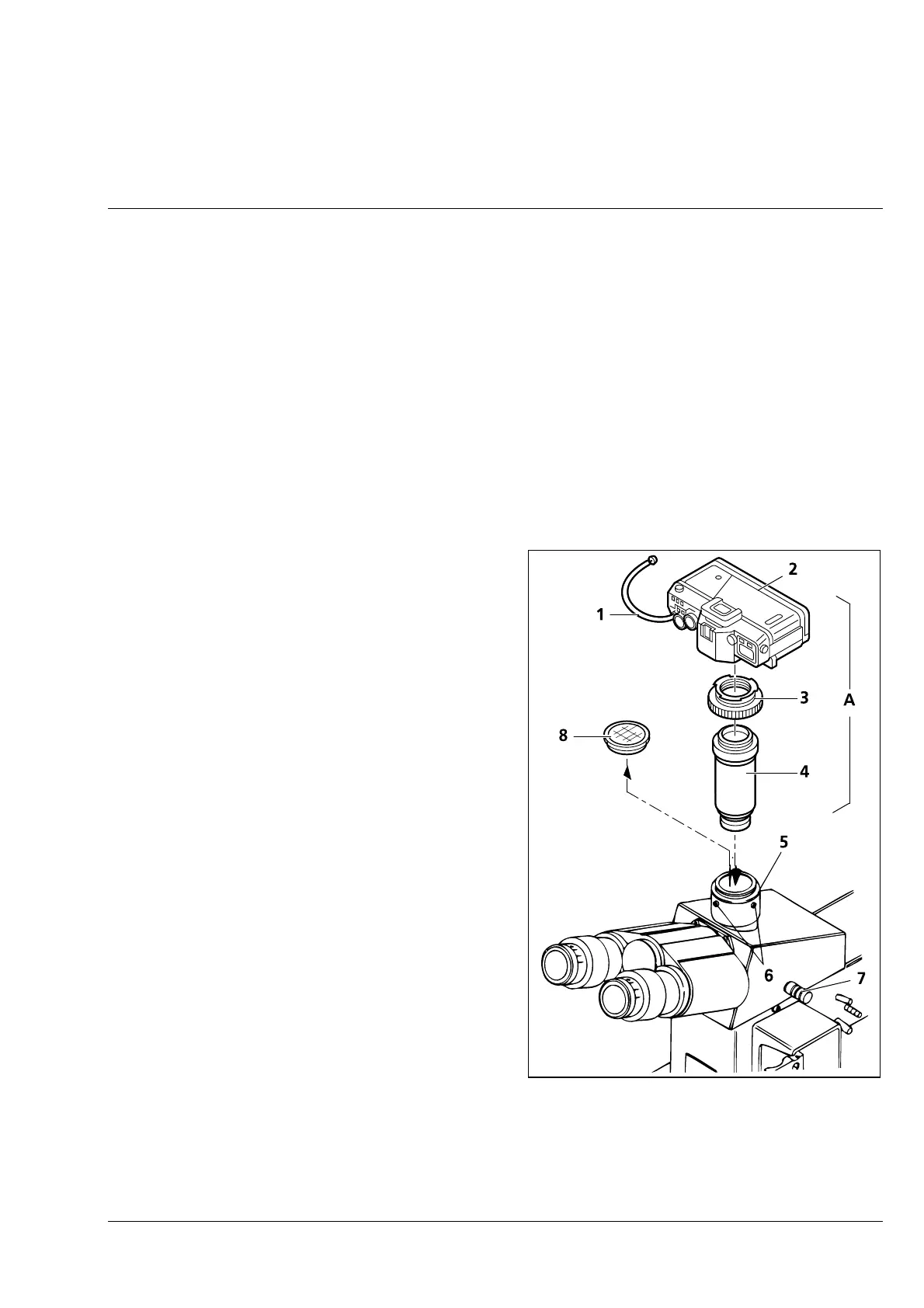
Attachment of SLR camera, e.g. CONTAX Aria
• Screw T2 adapter for the CONTAX bayonet
(3-29/3) on the 2.5× connector for T2 ( 3-29/4)
(456005-0000-000).
• Attach camera housing ( 3-29/2) and cable
release (3-29/1), if required.
• Loosen three hexagonal screws ( 3-29/6),
remove the dust cover ( 3-29/8) from the
phototube (3-29/5) and insert the premounted
unit (3-29/A) into the phototube.
• Align the camera unit in the required position
and tighten three hexagonal screws (3-29/6).
• Pull out pushrod ( 3-29/7) completely for
photomicrography.
• If artificial light color reversal film is used, the
conversion filter CB 3 will provide the correct
color temperature of 3200 K.
• For daylight color reversal film, the CB 12
conversion filter must be used in addition to the
CB 3 conversion filter.
☞
If focusing is not to be performed via
the viewfinder of the camera, the
component with the eyepiece reticle
must be screwed into the eyepieces.
Fig. 3-29 Attachment of SLR camera, e.g.
CONTAX Aria











 To Next Page