Axiotech and Axiotech
vario
Carl Zeiss
B 40-020 e 06/99 3-33
3.5.2
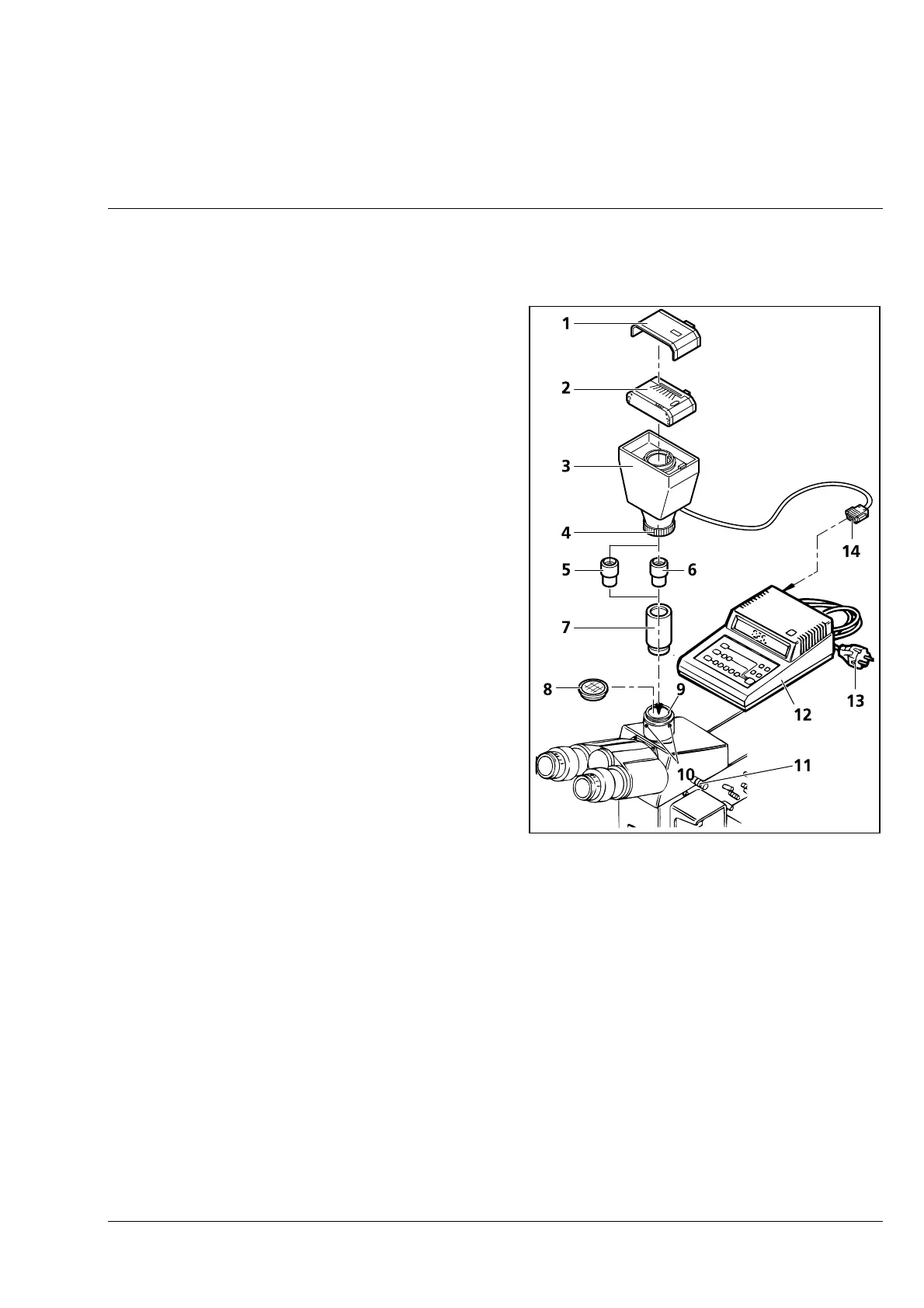
Attachment of MC 80
DX
microscope camera (35 mm format with film cassette
35 mm)
• Loosen three hexagonal screws ( 3-30/10) and
remove dust cap (3-30/8).
• Insert adapter 60 for microscope cameras
(3-30/7) (456006) into phototube ( 3-30/9) and
tighten three hexagonal screws (3-30/10).
• Insert P 2.5× projection lens ( 3-30/5) or P 10
(3-30/6) into adapter 60 for microscope
cameras (3-30/7).
• Attach MC 80
DX
basic body ( 3-30/3) to
adapter 60 for microscope cameras until stop,
align it and fix it by turning the clamping ring
(3-30/4) anticlockwise.
• Attach film cassette 35 mm Mot DX (3-30/2) to
the basic body in such a way that the contact
pins firmly engage in the relevant sockets. If
required, attach data back ( 3-30/1) to the film
cassette.
• Pull out pushrod ( 3-30/11) completely for
photomicrography.
• If artificial light color reversal film is used, the
conversion filter CB 3 will provide the correct
color temperature of 3200 K.
• For daylight color reversal film, the CB 12
conversion filter must also be used.
• Connect plug ( 3-30/14) of the microscope
camera to the control panel (3-30/12).
• Connect line cable of control panel (3-30/13) to
the line.
☞
For detailed information on the MC 80
DX
, please see operating manual B 40-036, MC 80
DX
Microscope Camera, from Carl Zeiss.
Fig. 3-30 Attachment of MC 80
DX
microscope camera (35 mm format)



 To Next Page