Carl Zeiss Axiotech and Axiotech
vario
2-28 B 40-020 e 06/99
2.13.2
Connecting the 6 V, 30 W halogen
illuminator to the line (Axiotech 30
and Axiotech 100)
Power supply of the halogen
illuminator in transmitted light is
always performed via the separate
power unit and not via the integrated
power unit in the stand!
Before connecting and switching on
the 6 V 10 ... 40 W power supply,
check whether the primary power
supply instrument voltage complies
with the line voltage! If this is not the
case, contact your nearest Carl Zeiss
agency immediately.
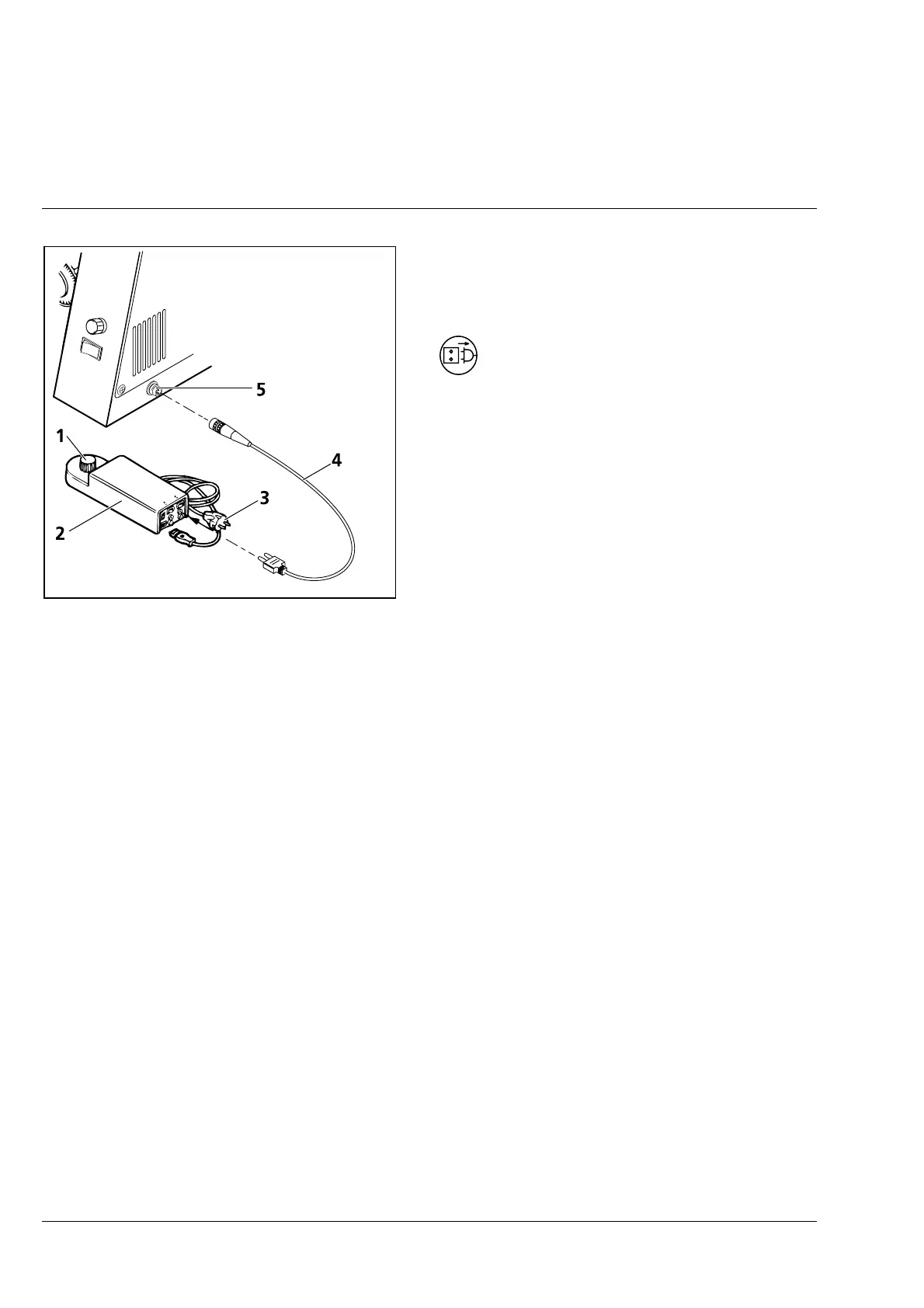
• Connect cable (2-33/4) to the power supply (2-33/2) and the microscope stand (2-33/5).
• Connect cable (2-33/3) to the line and switch the power supply on/off via the assigned On/Off switch
on the instrument rear. The red bar on the switch indicates the ON position.
• Set the required illuminance using the control of the power supply (2-33/1).
Fig. 2-33 Connecting the 6 V 30 W halogen
illuminator to the line
(Axiotech 30 and Axiotech 100)











 To Next Page