EasyManua.ls Logo

Zenith C32V37 - Cable Box Connections

Zenith C32V37
64 pages
Print Icon
To Next Page IconTo Next Page
To Previous Page IconTo Previous Page
Loading...
PAGE 10
206-03890
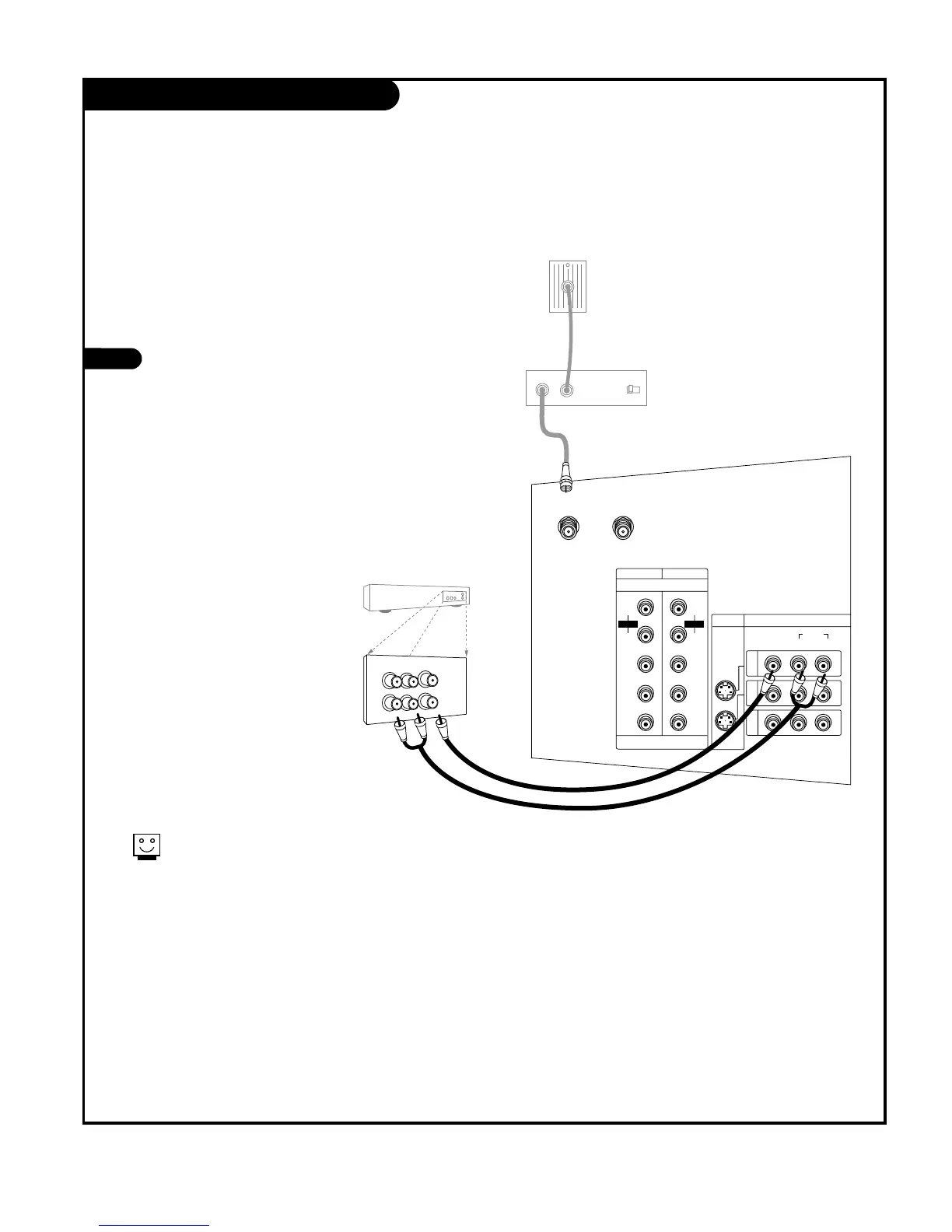
Cable Box Connections
If you’re using a cable box, leave the TV on
channel 3 or 4 and use your cable box to
change channels.
Locate the output jack on the back of
your cable box. Connect this to the
Antenna 1 jack on the back of your TV.
Or find the composite video and audio
jacks on the back of your cable box, and
connect them following the instructions
provided with your equipment.
This can be combined with any other
equipment you may want to hook up.
1

In
Output
Switch
Out
Audio
TV
VCR
L
R
Video
3 4
DVD/DTV INPUT
VIDEO
AUDIO
L(MONO) R
ANTENNA 1 ANTENNA 2
PR
COMPONENT1
(480i/480p/720p/1080i)
COMPONENT2
S-VIDEO VIDEO/AUDIO INPUT
P
B
Y
L
R
IN1
IN2
IN3
AUDIO
P
R
PB
Y
L
R
AUDIO
+75 +75
Cable box
RF coaxial wire
(75 ohm)
Cable box
Back AV panel

Other manuals for Zenith C32V37

Related product manuals