PAGE 35
206-03890
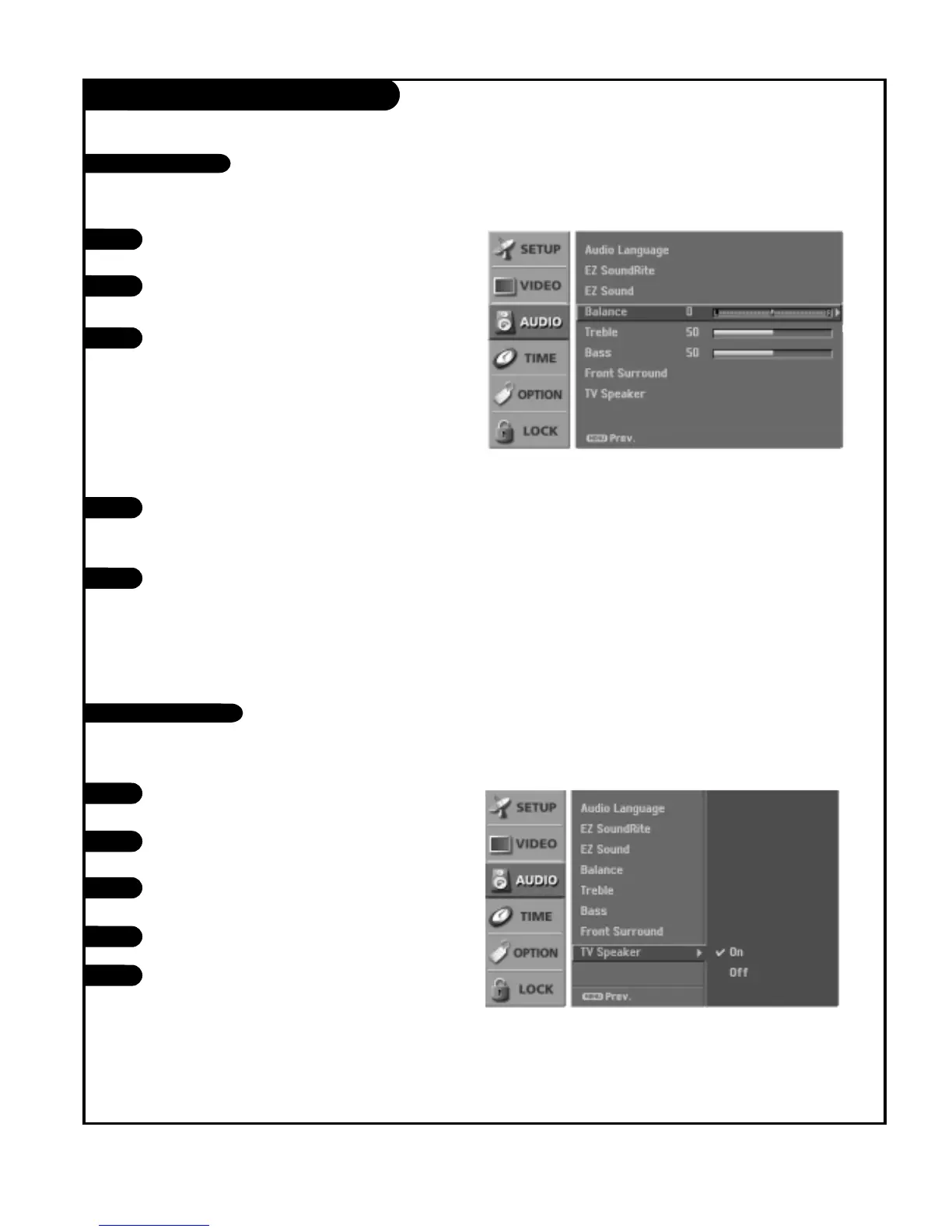
AUDIO Menu
Press the MENU button on the remote control, then use
the UP/DOWN arrow button to select the Audio menu.
Press the RIGHT arrow button to access the Audio
menu.
Use the UP/DOWN arrow button to select one of the
following options: Balance, Treble, or Bass, then press
the Right arrow button.
• Bass: Increases or decreases the lower frequency
sounds from the TV speakers.
• Treble: Increases or decreases the higher frequency
sounds from the TV speakers.
• Balance: Lets you adjust the left to right balance of
the TV speakers.
Use the LEFT/RIGHT arrow button to adjust the option
to your preference. Use the UP/DOWN arrows to select
another option.
Press EXIT button to return to TV viewing or press
MENU button to return to the previous menu.
1
2
3
Adjust the sound to suit your taste and room situations.
Turns the TV Speaker option On or Off.
4
5
Manual Sound Control
Turn TV Speakers On/Off
1
2
Press the MENU button on the remote control, then use
the UP/DOWN arrow button to select the Audio menu.
Press the RIGHT arrow button to access the Audio
menu.
Use the UP/DOWN arrow button to select TV Speaker,
then press the RIGHT arrow button.
Use the UP/DOWN arrow button to select On or Off.
Press EXIT button to return to TV viewing or press
MENU button to return to the previous menu.
3
4
5



 To Next Page