PAGE 9
206-03890
Antenna / Cable Service Hookup
1
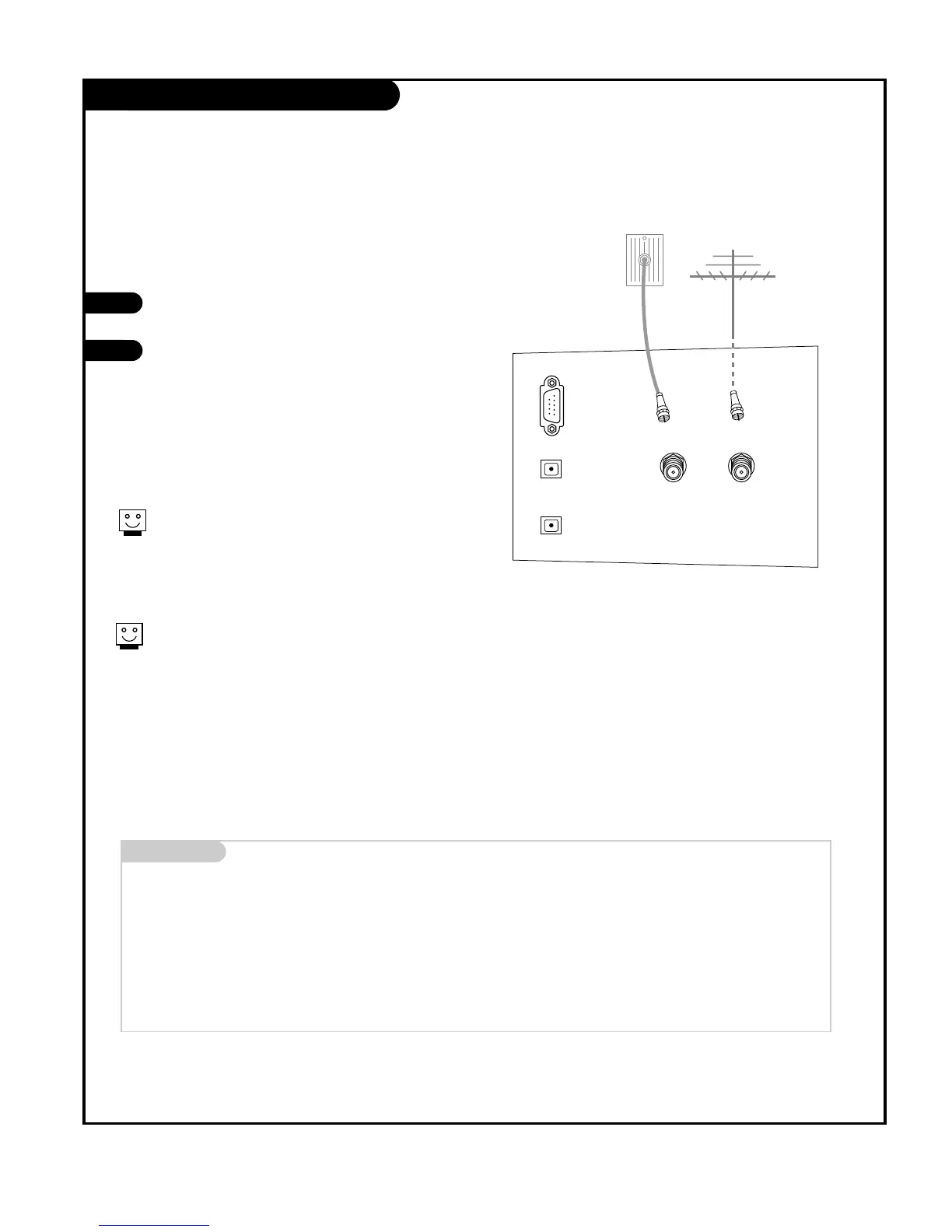
Connect an antenna and/or cable service to
your TV as shown.
Turn to page 20 to do a channel search
with EZ Scan.
For best signal reception, it is recommended to have your Antenna professionally adjusted.
2
If you receive your RF signal through an
antenna that is several years old and con-
nects with two small prongs, you will need to
purchase a 300 to 75 ohm adapter. It should
be available from your local
electronics dealer.
We recommend using a 75 ohm cable for
your antenna connection in order to prevent
interference.
Antenna
Cable TV
Wall jack
RF coaxial wire
(75 ohm)
RF coaxial wire
(75 ohm)
Mini glossary
TV OVER-THE-AIR SIGNALS DTV DIGITAL OVER-THE-AIR SIGNALS
CATV CABLE SIGNALS CADTV DIGITAL CABLE SIGNALS
Combined signals
TV/CATV/DTV Over-the-air, cable, and digital over-the-air signals
TV/CATV/CADTV Over-the-air, cable, and digital cable signals
CAUTION : If you are not sure of the type of signal(s) you are receiving, let EZ Scan complete all the channel signal-type searches. The TV will let
you know when the analog, cable, and digital channel scans are complete.



 To Next Page