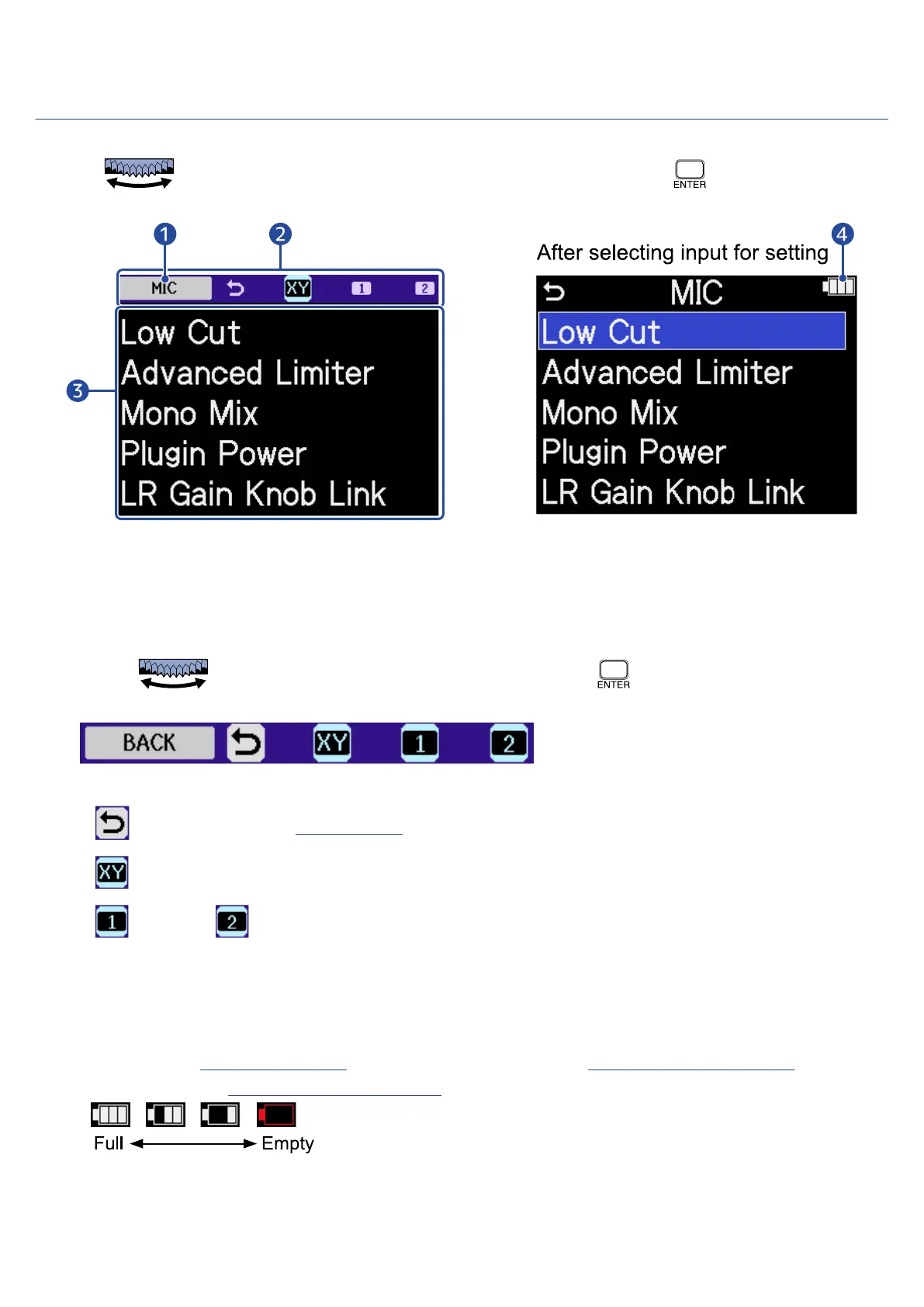
Input Settings Screen
Use this screen to make settings related to inputs.
Use the (selection) dial to select a setting item or value, and press the (ENTER) button to
confirm.
❶
Name of input being set
❷
Menu bar
The inputs that can be set are shown by icons.
Use the (selection) dial to select an input, and press the (ENTER) button to make
settings for that input.
The name of the currently selected item is shown at the left end of the Menu bar.
• BACK: Return to the Home Screen.
• MIC: Make settings for the mic capsule.
• INPUT 1, INPUT 2: Make settings for INPUT 1/2.
❸
Setting items
❹
Remaining battery indicator
This is shown when operating on batteries. When the remaining battery charge becomes low, replace
the batteries (→Installing batteries) or connect an AC adapter (→Connecting an AC adapter) or
portable battery (→Using other power sources).
28



 To Next Page