Chapter 28 Cloud CNM
ZyWALL USG Series User’s Guide
596
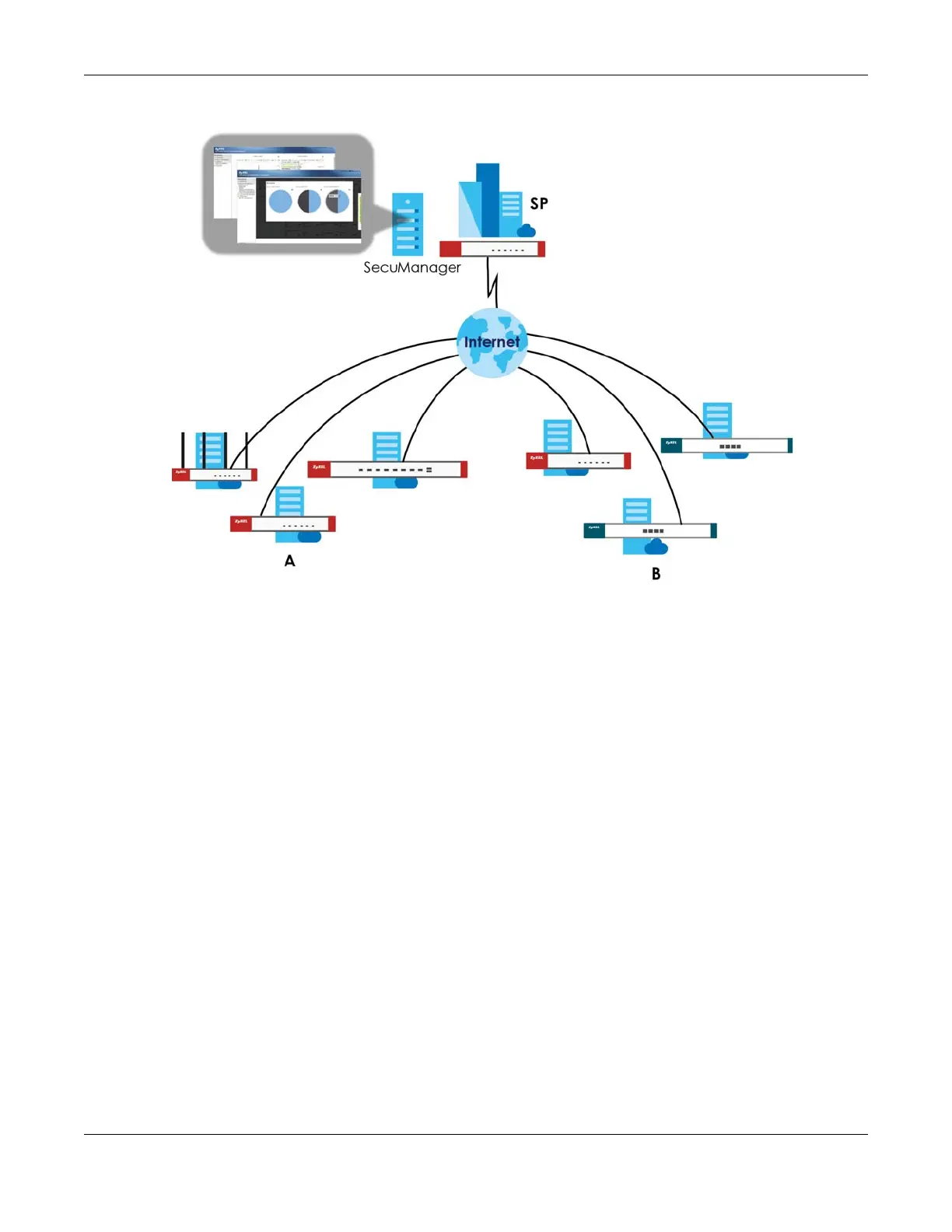
Figure 417 Cloud CNM SecuManager Example Network Topology
Cloud CNM SecuManager features include:
• Batch import of managed devices at one time using one CSV file
• See an overview of all managed devices and system information in one place
• Monitor and manage devices
• Install firmware to multiple devices of the same model at one time
• Back up and restore device configuration
• View the location of managed devices on a map
• Receive notification for events and alarms, such as when a device goes down
• Graphically monitor individual devices and see related statistics
• Directly access a device for remote configuration
• Create four types of administrators with different privileges
• Perform Site-to-Site, Hub & Spoke, Fully-meshed and Remote Access VPN provisioning.
To allow Cloud CNM SecuManager management of your Zyxel Device:
• You must have a Cloud CNM SecuManager license with CNM ID number or a Cloud CNM
SecuManager server URL.
• The Zyxel Device must be able to communicate with the Cloud CNM SecuManager server.
You must configure Configuration > Cloud CNM > SecuManager to allow the Zyxel Device to find the
Cloud CNM SecuManager server.






 To Next Page