27
7-2 Self-Check-Function / Automatic Setting Of Minimum
Weight Value
With the self-diagnosis function confirmation and display of repeatability can be performed in addition to
failure diagnosis, and whether or not the balance's performance is being exhibited can be easily
checked.
It is also possible to display and register the reference value of the minimum weighing value using
repeatability data.
For details of the minimum weighing value, refer to the technical information on our website.
(http://www.aandd.co.jp/adhome/products/balance/tecdoc_balance.html)
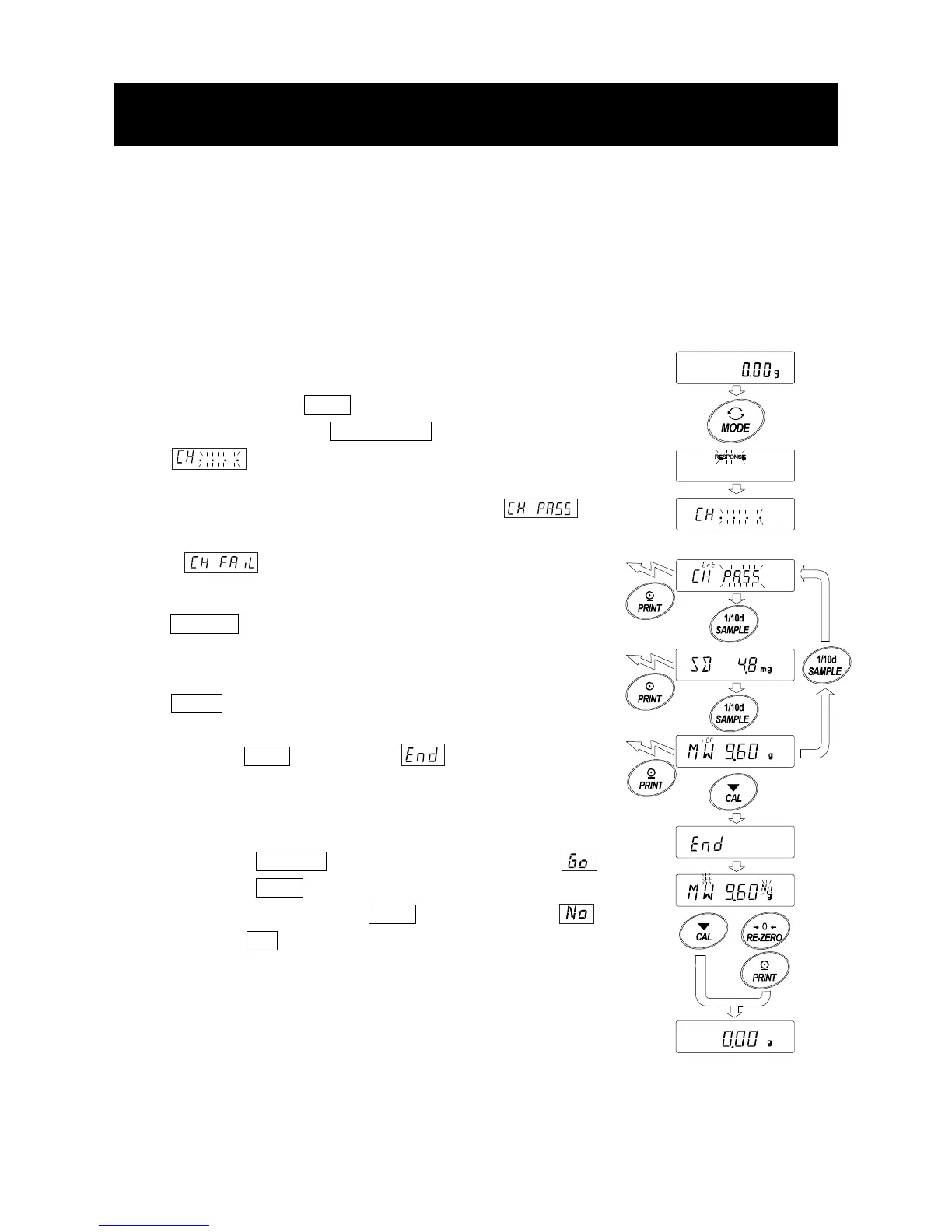
1. Press and hold the MODE key while weighing is displayed.
2. Release the key when RESPONSE display blinks.
3. displays and the self-diagnosis function is started.
4. When the diagnosis is completed, the diagnosis result is displayed.
When there are no problems in the balance, the
display blinks .
If is displayed blinking, there is a possibility that a fatal
fault has occurred in the balance. Please request repair.
SAMPLE key It is possible to switch the display of
diagnostic result, repeatability, minimum
weight value.
PRINT key The displayed contents are output.
5. Press the CAL key to display and move to the display
for minimum weighing value registration.
6. When registering as minimum weighing value of minimum weight value
display warning function performs the following.
Press the RE-ZERO key to change No/Go and display .
Press the PRINT key.
If not registered, press the PRINT key while displaying ,
or press CAL. Return to the weighing display.
* For minimum weighing warning function, refer to " 16.Minimum
Weighting Warning Function".
Note
For the minimum weighing warning function, settings can only be made
when logged in as administrator (AdMin) if the password lock function is
turned on.
No/Go
Switch
setting
Output
Output
Output
No change



 To Next Page