91
20-3 Inputting Password When Turning On The Balance
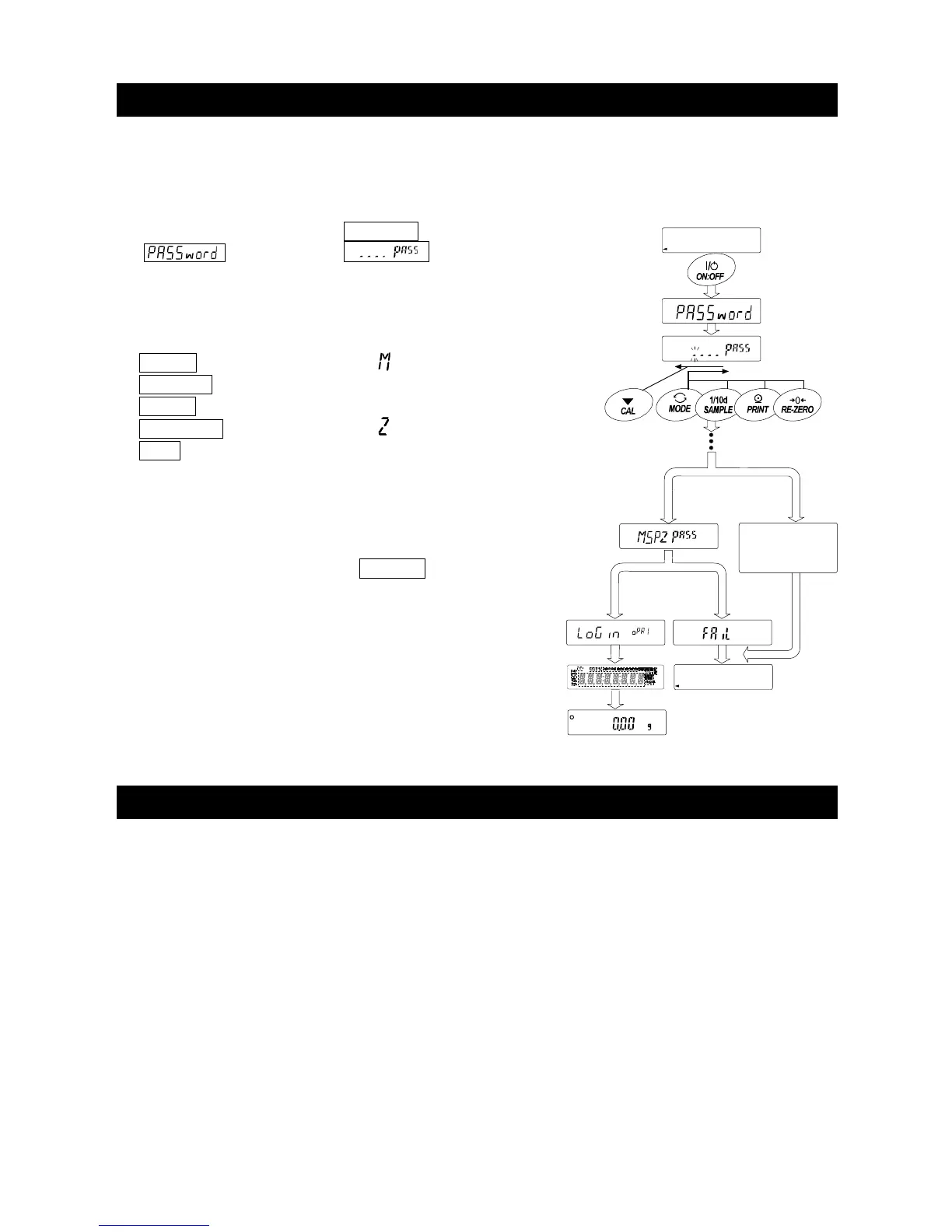
When turning on the balance with the password function ON, the password input is displayed before
the weighing display.
1. Turn on the balance using the ON:OFF key.
2. is displayed and "
of the password input is
displayed.
3. Input the four characters of the correct password using
the following keys.
MODE key .................. Character
SAMPLE key .............. Character 5
PRINT key .................. Character p
RE-ZERO key ........... Character
CAL key ...................... Back key
4. When the password is correct, the balance displays
weighing value after full-segment display.
When the password is incorrect,
fail is displayed
and the buzzer sounds three times.
20-4 Missing Password
If the correct password is missing, the balance can not be used.
Contact your local A&D dealer to reset the password to factory settings.
Password
correct
Password
incorrect
Display the weighing
Display off
No key operation
in ten minutes
Enter the 4th
character
Return the 1 character



 To Next Page