88
20.Password Lock Function
The password function can be specified for an authorized user by using a password stored in the
balance by manager. While the password function is used, the balance can not be weighed without
inputting the correct password.
There are two login levels : administrator ( ) and user ( ~ ).
User can individually set the password for 10 people. Administrators can use all functions and settings.
User can only perform weighing.
Users cannot change function settings including initialization and clock setting.
Login level Weighing
Select
function and
initialization
Function
setting
(Date/time)
Weighing value
Display・Output
Re-zero Calibration
Change
the unit
Change
the minimum
display
Administrator
(AdMin.)
Possible Possible Possible Possible Possible Possible Possible
Operator
(oPR.1~10)
Possible Possible Impossible Impossible Impossible Impossible Impossible
Password: Four digits (4 x 4 x 4 x 4 = 256 outcomes) using MODE , SAMPLE , PRINT and
RE-ZERO keys.At factory setting, the password function is not used.
The management of the password function is performed in "Password function" of the Function table.
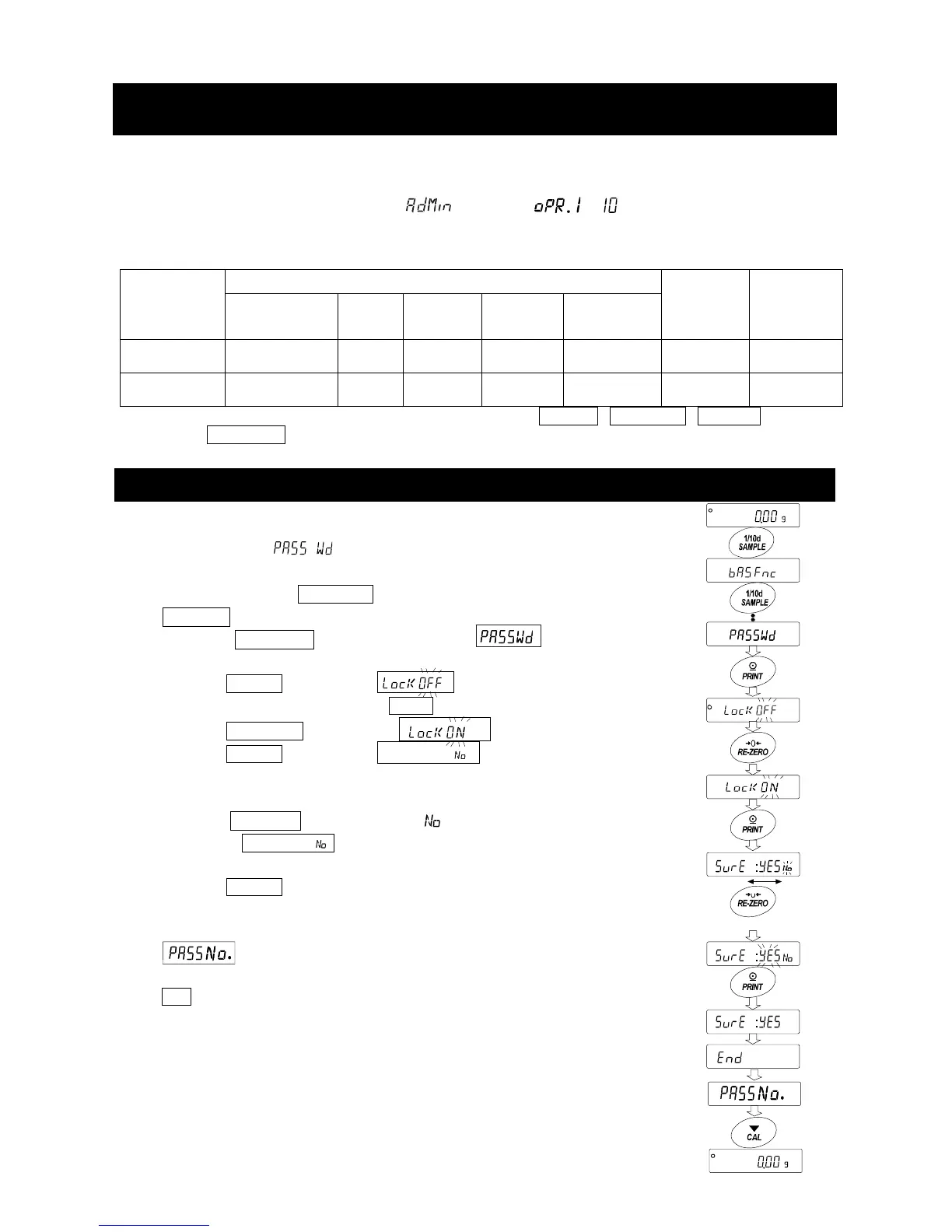
20-1 Using Password Function
The password function can be switched between "Use" or "Not used" at
"Password function ( )" of the Function Table
1. Press and hold the
SAMPLE key in the weighing mode.
ba5fnc is displayed.
2. Press the SAMPLE key several times until
is displayed.
3. Press the PRINT key to display .
To cancel the operation, press the CAL key.
4. Press the RE-ZERO key to display .
5. Press the PRINT key to display 5ure :ye5 " "
where "No" is selected.
(where "No" is blinking when "No" is selected.)
6. Press the RE-ZERO to change ye5 / .
7. Display the 5ure :"y"e"5 .
(where "Yes" is blinking when "Yes" is selected.)
8. Press the PRINT key when "Yes" is selected, the
password function can now be used.
When turning on the balance, input the new password.
9. is displayed. To register or change the password,
proceed the next page "2". If it is not to register, press the
CAL key twice to return to the weighing display.
x2
Press and hold
Press several times
Select No
Select Yes
Change Yes/No



 To Next Page