31
8-3 Calibration Using An External Weight
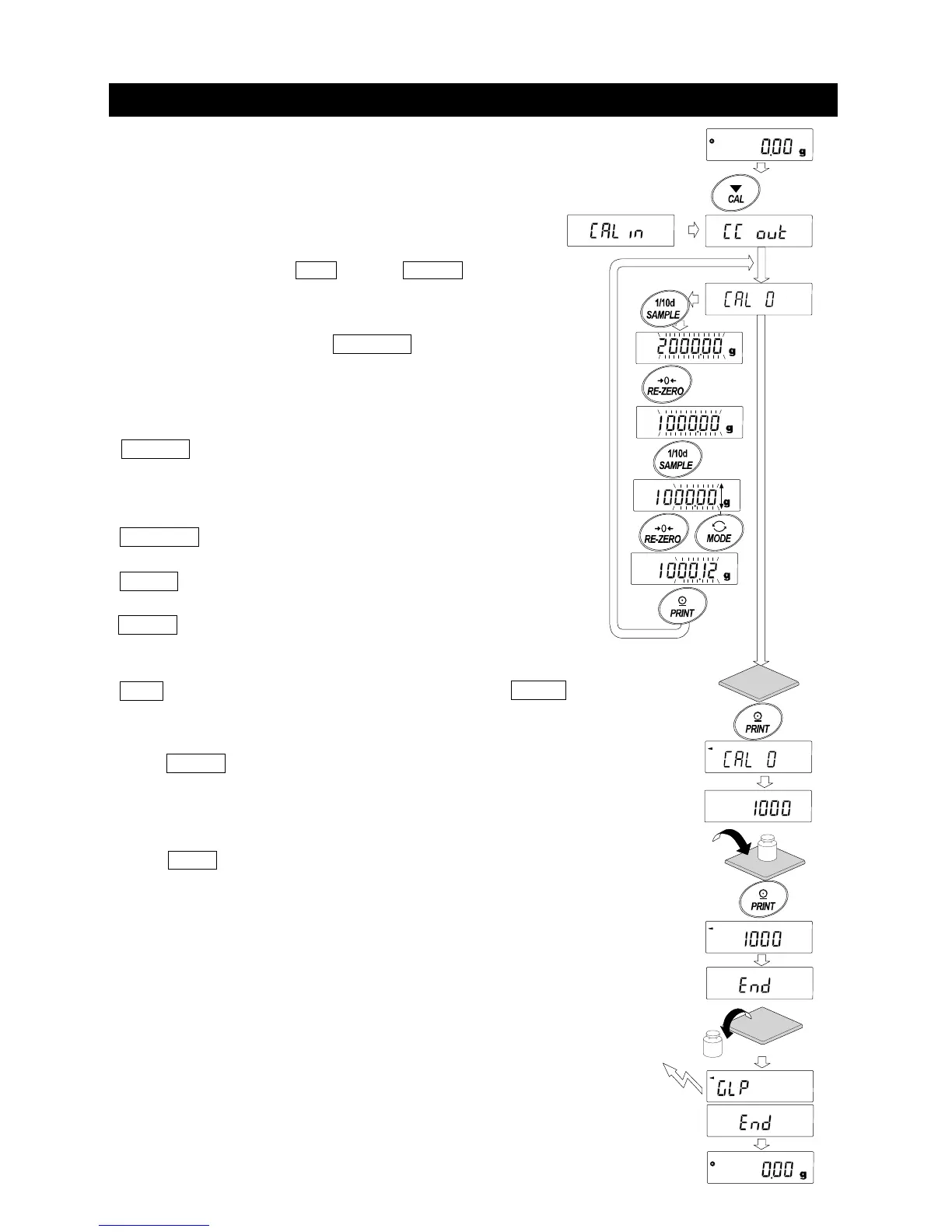
This function calibrates the balance using an external weight.
Step 1 Connect the AC adapter and warm up the
balance for at least 30 minutes with nothing on
the weighing pan.
Step 2 Press and hold the
CAL key until Calout is
displayed, then release the key.
Step3 If you want to change the setting of the external
weight value, press the SAMPLE key and go
to step 4.
If you don't change the setting of the external
weight value, go to step 5.
Step4 Specify the calibration weight value as follows:
SAMPLE key
........
To switch the display condition to: "All of the
segments blinking" (calibration weight
selection mode) or "The last four digits
blinking" (value adjustment mode).
RE-ZERO key
......
To select the calibration weight or adjust the
value.
MODE key............ In the value adjustment mode, -9999 digits
appear after +9999 digits.
PRINT key
...........
To store the new weight value. Even if the AC
adapter is removed, the data is maintained in
non-volatile memory.
CAL key
...............
To cancel the operation and return to Cal 0 .
Step5 Confirm that there is nothing on the pan and press the
PRINT key. The balance measures the zero point.
Do not allow vibration or drafts to affect the balance.
The balance displays the calibration weight value.
Step6 Place the displayed calibration weight on the pan and press the
PRINT
key. The balance measures the calibration weight. Do
not allow vibration or drafts to affect the balance.
Step7 Remove the weight from the pan.
Step8 After calibration, if GLP output is to be set, "Calibration report" is
output or stored in data memory.
Step9 The balance will automatically return to the weighing mode.
Step10 Place the calibration weight on the pan and confirm that the
value displayed is within ±2 digits of the specified value. If it
is not within the range, check the ambient conditions such
as breeze and vibration also check the weighing pan. Then,
repeat steps 1 to 10.
(Displayed only on
GX-A series)
External
weight
GLP output
Select
weight
eg.updated weight value
1000.12g
Press and Hold
Press
Release



 To Next Page