35
8-7 Correcting The Internal Mass Value Of The GX-A series (Manual)
The balance can correct the internal mass value within the range shown below. This function corrects the
internal mass value to conform to an external weight. The corrected mass value is maintained in non-volatile
memory even if the AC adapter is removed. The internal mass value is corrected as follows:
Model Target Range Model Target Range
GX-203A 200.000g
±9.999g
GX-2002A 2000.00g
±99.99g
GX-303A 200.000g
±9.999g
GX-3002A 2000.00g
±99.99g
GX-403A 200.000g
±9.999g
GX-4002A 2000.00g
±99.99g
GX-603A 500.000g
±9.999g
GX-6002A 5000.00g
±99.99g
GX-1003A 1000.000g
±9.999g
GX-10002A 5000.00g
±99.99g
GX-1603A 1000.000g
±9.999g
GX-6001A 5000.0g
±999.9g
GX-10001A 5000.0g
±999.9g
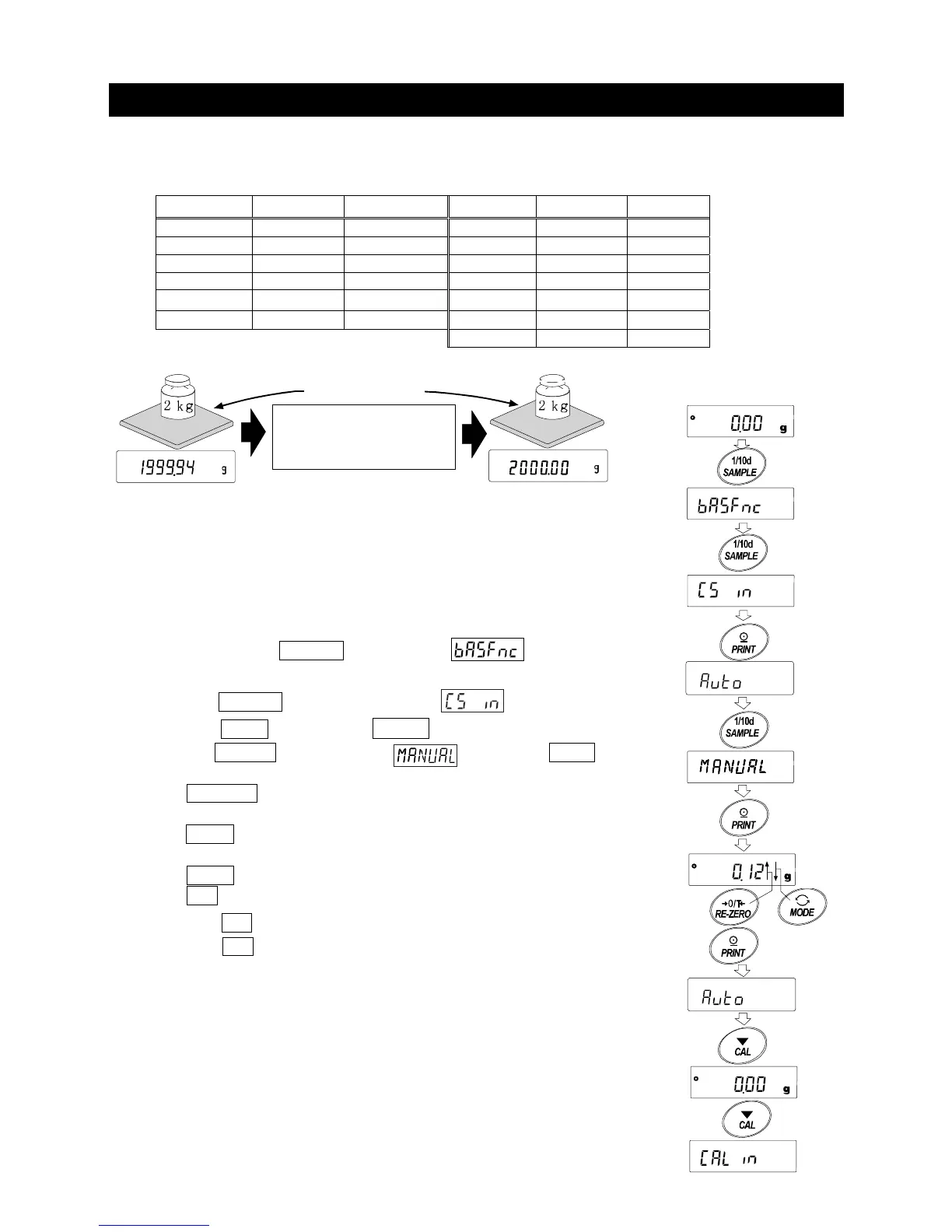
After performing one touch calibration, place the external weight on the
balance and check the correction amount.
(In the example, since there is deviation of -0.06g at 2000g, the correction amount for
the GX-6002A is +0.015g/5kg because the correction target is 5000g)
Setting procedure
1. Press and hold the SAMPLE key to display .
(Enter the function setting)
2. Press the SAMPLE key several times until appears.
3. Press the PRINT key to display auto .
4. Press the SAMPLE key to display and press the PRINT .
Select the following keys.
RE-ZERO key(+) Select the correction value.
(After +9999 digits will be -9999 digits.)
MODE key(-) Select the correction value.
(After -9999 digits will be +9999 digits.)
PRINT key Register and display the following items.
CAL key Cancel and display the following items.
5. Press the CAL key twice, to return to the weighing display.
6. Press the CAL key and calibrate with the internal mass.
7. Place the external weight on the balance check whether the value was
corrected properly. If it is not corrected properly, return to Step 1.
Correct the internal mass value
by+0.15g/5kg
and calibrate with the internal mass
Weighing with
the same weight
GX-6002A
Press
and
hold
Press
several
times
x2



 To Next Page