77
15.Gross Net Tare Function
Even a small tare in the zero range can be recognized as a tare, you can manage the tare value.
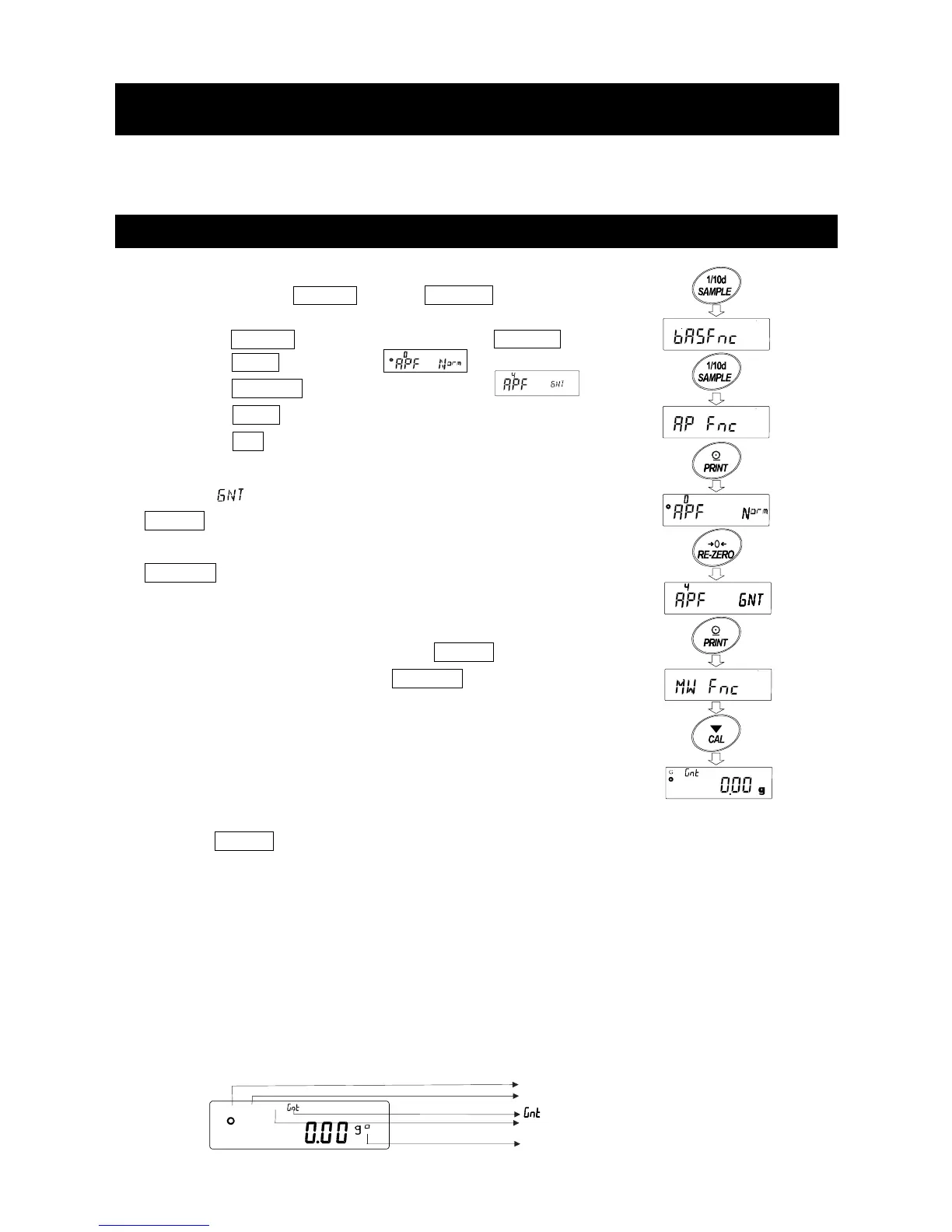
To use this function, enter the Function table as follow, and set "Application Function ap fnc " to "4 " in
"Application mode apf ".
15-1 Preparation Of Gross Net Tare Function
Setting gross
1 Press and hold the SAMPLE key until ba5fnc of the
function table is displayed, then release the key.
2 Press the SAMPLE key several times to display ap fnc .
3 Press the PRINT key to display .
4 Press the RE-ZERO key several times to display .
5 Press the PRINT key to store the setting.
6 Press the CAL key to return to the calculating display.
Key operation
In case of setting, operate with the following keys.
ON:OFF key (Long press) Display ON → OFF
(Short press) Display OFF → ON
RE-ZERO key
1 Gross zero (In the "g" display, the range of the minimum scale is "0".)
Clear a tare value With nothing on the weighing pan,
press the ON:OFF key and press
the RE-ZERO key in the state of gross
zero (Gross zero mark lit *1)
2 When the gross(total amount) is non-zero and positive value.
Store a tare value(Update)
3 When the gross(total amount) is non-zero and negative value.
Do nothing
Press the ON:OFF key
1 When it is within the zero range (±2% from power-on zero)(Refer to *5-1 Basic Operation)
Update the zero point
2 When it is out of the range of zero
Do nothing
Display
"G", "NET", "PT" mark display
"G" mark lit When the tare value is zero
"NET" mark lit When the tare value is out of zero
"NET" "PT" mar k lit When the tare value is set by the PT command (preset tare).
NET G PT
NET mark
G mark
mark
PT mark
*1 Gross zero mark



 To Next Page