65
Store the setting Output statistic calculation
Step 7 Step 5
Press and hold
Press several
times
Press several
times
13.Statistical Calculation Mode
The statistical calculation mode statistically calculates the weight data, and displays or outputs the
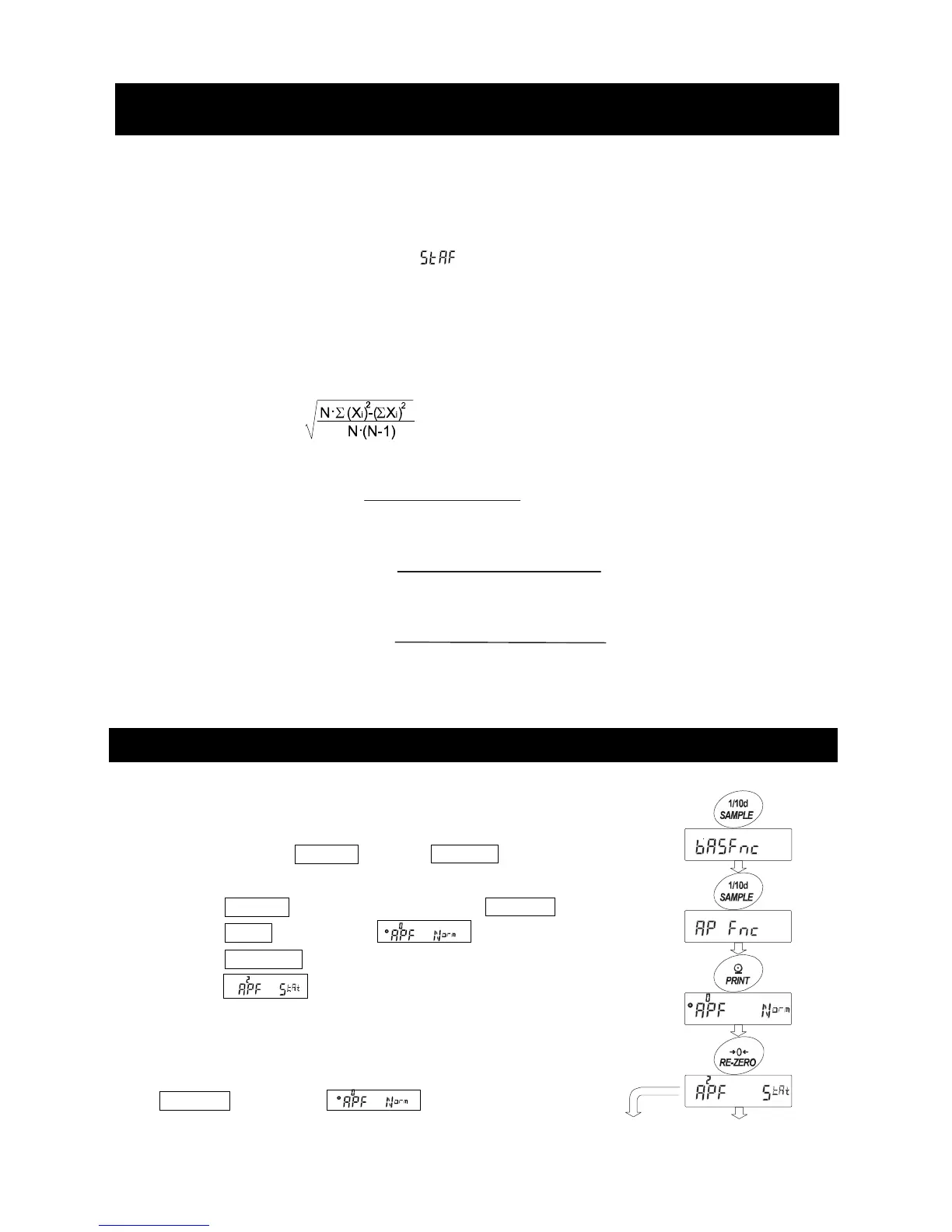
results. To use the statistical calculation mode, set the "Application function (apf)" parameter of
“Application (ap fnc)” in the function table to “2”, as described below.
Statistical items available are number of data, sum, maximum, minimum, range (maximum-minimum),
average, standard deviation and coefficient of variation. What statistical items to output can be selected
from the four modes in the function table ( ) .
□ The wrong data input can be canceled by the key operation, if immediately after the input.
□ Turning the balance off will delete the statistical data.
□ The standard deviation and coefficient of variation are obtained by the equation below:
Standard deviation=
Standard deviation
Coefficient of variation (CV)=
Average
Maximum value
-
Average
Relative error of maximum value =
Average
Minimum value
-
Average
Relative error of minimum value =
Average
□ When there is data with a minimum display digit off, the calculation result is displayed with the
minimum display digit off. (Minimum display digit is rounded off.)
13-1 How To Use The Statistic Calculation
(1) Getting Started
Switching to the Statistical Function Mode (Changing The Function
Tabl e)
1. Press and hold the SAMPLE key until ba5fnc of the function table
is displayed, then release the key.
2. Press the SAMPLE key several times to display 1ap fnc .
3. Press the PRINT key to display .
4. Press the RE-ZERO key several times
to display 1 .
To select statistical items to output, go to step 5.
To store the statistical function mode setting, go to
step 7.
To disable the statistical calculation mode, press the
RE-ZERO key to select
.
where Xi is the i-th weight data,
N is number of data.
x 100 (%)
x 100 (%)
x 100 (%)



 To Next Page