61
Setting the function table
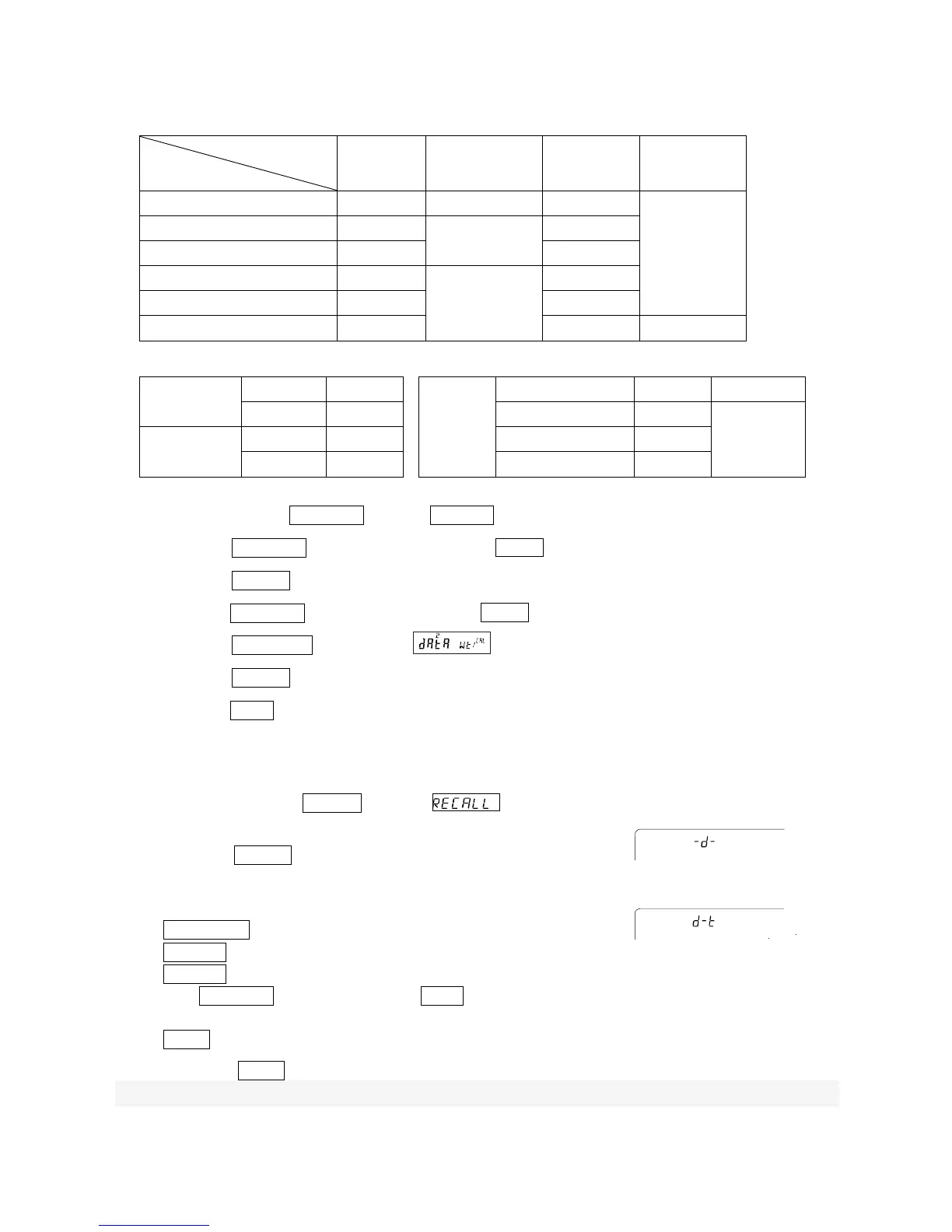
Parameter settings for each output mode are as follows:
Item
Mode
Data output
mode
Auto print
polarity,
difference
Data
memory
function
Interval time
Key mode
prt 0
Not used data 2
Not used
Auto print mode A prt 1
ap-a 0 ~ 2
ap-b 0 ~ 2
data 2
Auto print mode B
prt 2
data 2
Key mode B(immediate) prt 4
Not used
data 2
Key mode C(stable) prt 5 data 2
Interval output mode prt 6 data 2 int 0 ~ 8
Prameter settings for Data number, ID number, Time and Date
Data number
No d-no "0"
TTime
and date
No
5-td 0 -
Yes d-no "1" Time only 5-td 1
Up to 200
pieces
ID number
No 5-id "0" Date only 5-td 2
Yes 5-id "1" Both 5-td 3
Enabling the data memory function
1 Press and hold the SAMPLE key until ba5fnc is displayed, then release the key.
2 Press the SAMPLE key several times to display dout .
3 Press the PRINT key.
4 Press the SAMPLE key three times to display data .
5 Press the RE-ZERO key to display .
6 Press the PRINT key to store the setting.
7 Press the CAL key to return to the weighing mode.
Recalling the memory data
Confirm that the "Data memory (data)" parameter is set to " data 2".
1. Press and hold the PRINT key until is displayed, then
release the key.
2. Press the PRINT key to enter the memory recall mode. The type of
data appears in the upper left of the display as shown to the right "-d- or
d-t" . Recall the data in memory using the following keys.
RE-ZERO key
.....
To proceed to the next data set.
MODE key
...........
To go back to the previous data set.
PRINT key
...........
To transmit the current data using the RS-232C or USB.
With SAMPLE held down, press the CAL key
To delete the current data.
CAL key
...............
To exit the memory recall mode.
3. Press the CAL key to return to the weighing mode.
※
It is also possible to change the time / date output setting after storing the weighing value.
When setting without clock / date
or
When setting with clock / date
Left of the display



 To Next Page