68
Outputting the statistical results
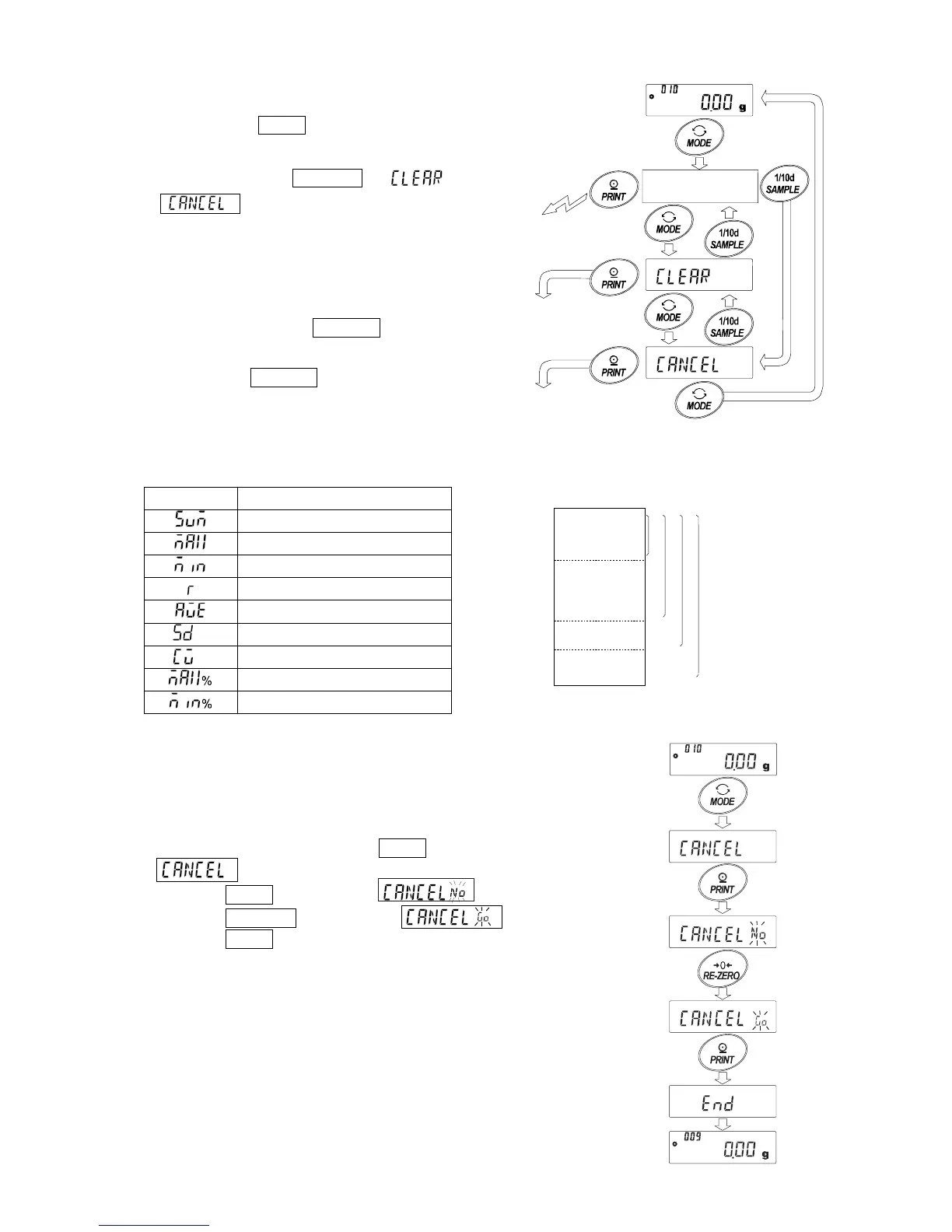
5 Each time the MODE key is pressed, the display changes:
the results as selected in “Statistical function mode output
items (5taf)”, and ,
.
Notes
When the number of data is 1, the coefficient of
variation is displayed as - - - - - - - .
When the average is 0, the coefficient of variation
is displayed as - - - - - - - .
Statistical items are indicated on the upper left of
the display using the following symbols.
Symbol
Statistical item
Sum
Maximum
Minimum
Range (Maximum – minimum)
Average
Standard deviation
Coefficient of variation
Relative error of maximum value
Relative error of minimum value
(3) Deleting the latest data
When the wrong data is entered, it can be deleted and excluded from statistical
calculation. Only the latest data can be deleted.
1 In the weighing mode, press the MODE key to display
1 .
2 Press the PRINT key to display .
3 Press the RE-ZERO key to display .
4 Press the PRINT key to delete the latest data and exclude
it from statistical calculation.
The number of data decreases by 1 when the balance
returns to the weighing mode.
Press several times
Output the statistical result
3. Delete
the latest data
4. Delete
the statistical data
Display
the statistical result
Out



 To Next Page