71
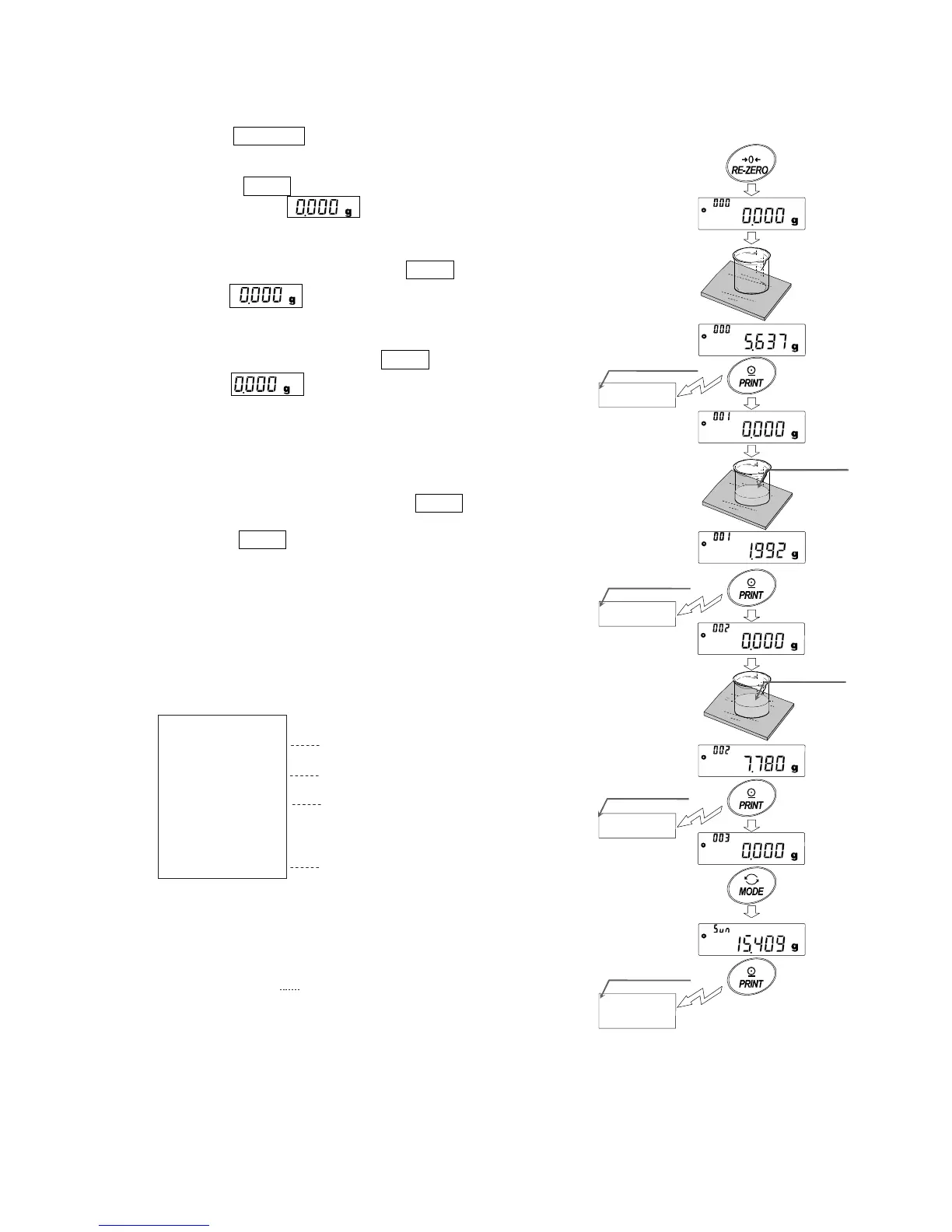
(2) Using The Statistical Calculation Mode
1 Press the RE-ZERO key to set the display to zero.
2 Place a container on the weighing pan.
Press the PRINT key to cancel the weight (tare). The
balance displays . (Storing the tare value)
The tare value data is output when the peripheral output
equipment is connected.
3 Weigh formula 1 and press the PRINT key. The balance
displays . (Storing the weight value of formula 1)
The weight value data is output when the peripheral
output equipment is connected.
4 Weigh formula 2 and press the PRINT key. The balance
displays . (Storing the weight value of formula
2)
The weight value data is output when the peripheral
output equipment is connected.
5 When there are some more formulae to be added, repeat
step 4.
6 After mixing is complete, press the MODE key to display
the statistical results.
7 Press the PRINT key to output the number of data saved
including the tare value and the total weight.
Output example
N0. 1
ST,+0005.637 g
N0. 2
ST,+0001.992 g
N0. 3
ST,+0007.780 g
N 3
SUM
ST,+00+15.409g
Formula
Total weight
Container
Formula 1+2
Tare value
Formula 1
Formula 2
No.
1
ST,+0005.637
g
No.
2
ST,+0001.992
g
No.
3
ST,+0007.780
g
N
3
SUM
+15.409
g
Total weight
Formula 2
Formula 1
Container(tare value)



 To Next Page