74
Ct auto
Change display
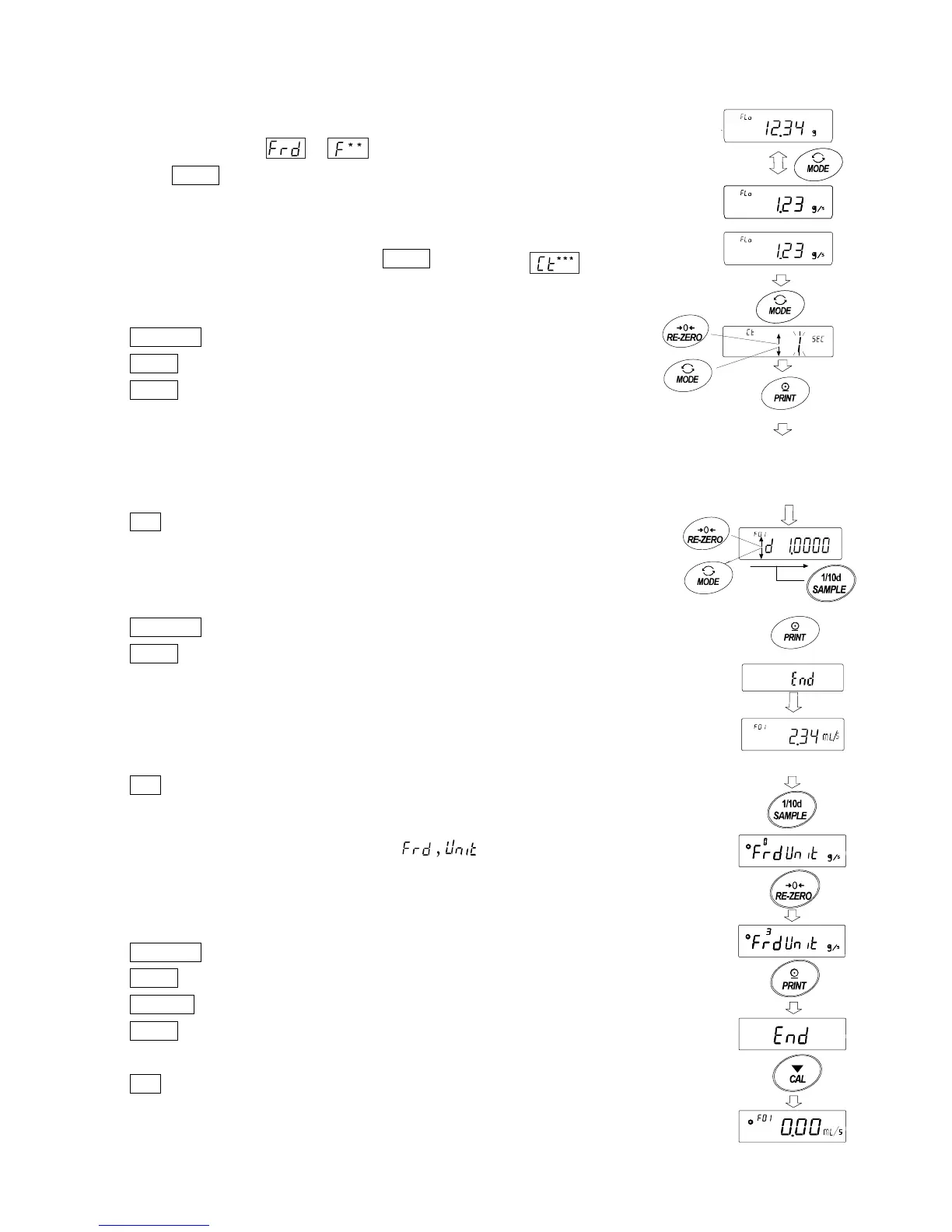
After returning to the weighing value display after setting to flow mode,
the unit is "g" with the or indicator on.
Use the MODE key to switch between flow rate display and "g" display.
By switching, the total amount and flow rate can be checked.
How to set calculation time
In weighing display, press and hold the MODE key to display .
Calculation time can be changed by following key operation.
The setting range is 1 second to 1 hour.
RE-ZERO(+) key Change calculation time
MODE(-) key Change calculation time
PRINT key Store setting value
If the flow rate unit is g / *,
the display will return to weighing display.
When the flow rate unit is mL / *,
the display goes to density setting display.
CAL key It returns to weighing display without storing the set value.
When the calculation time automatic setting is " 1 ",
the resolution of the flow rate calculation result can be set.
The larger the number, the more precision will be calculated.
RE-ZERO(+) key Change the resolution
PRINT(-) key Store setting value
If the flow rate unit is g / *,
the display will return to weighing display.
When the flow rate unit is mL / *,
the display goes to density setting display.
CAL key It returns to weighing display without storing the set value.
How to set the density
When the setting value of function setting is 3, 4, 5,
after setting the calculation time, go to density setting display.
Density can be changed by following key operation.
The setting range is 0.0001g/cm
3
to 9.9999g/cm
3
.
RE-ZERO(+) key Change the number of the blinking digit
MODE(-) key Change the number of the blinking digit
SAMPLE key Move the blinking digit
PRINT key The set value is the display returns to
weighing display.
CAL key The display returns to weighing display without
storing the set value.
Press and hold
Total amount
display
Total amount
display
Decide and display flow rate
or input density



 To Next Page