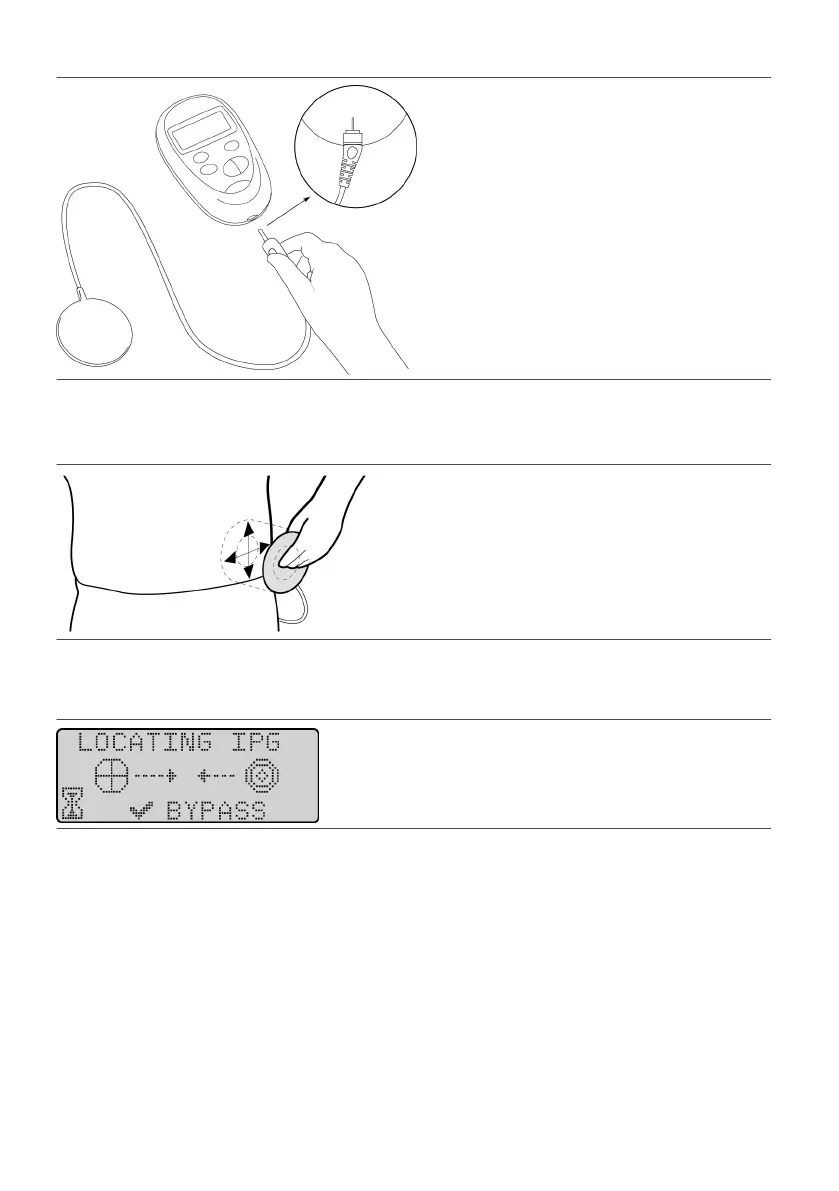
Figure 3. Plug the wand into the programmer
3.
Press the Power key to turn on the programmer. The Diagnosc Test screen appears.
3.
4.
Place the at, circular end of the wand over the IPG site.
4.
Figure 4.
Place the wand over the IPG site
5. Wait for the LOCATING IPG screen to appear, and hold the wand in place. The programmer beeps while it5.
is trying to locate the IPG.
Figure 5. LOCATING IPG screen
NOTE:
▪ The programmer will try to locate the IPG for about 5 seconds before a screen appears to retry▪
communicaon. If the programmer does not establish communicaon, move the wand slowly over the
IPG site in small circular movements unl you achieve communicaon.
▪ Aer you have established communicaon with the IPG, keep the wand in place. If you move the wand▪
from over the IPG site, you may lose communicaon with the IPG.
6.
Check the programmer’s screen to verify that the programmer has established communicaon with the
6.
IPG. When the programmer nds the IPG, the beeping stops and the following screen appears.
8











 To Next Page