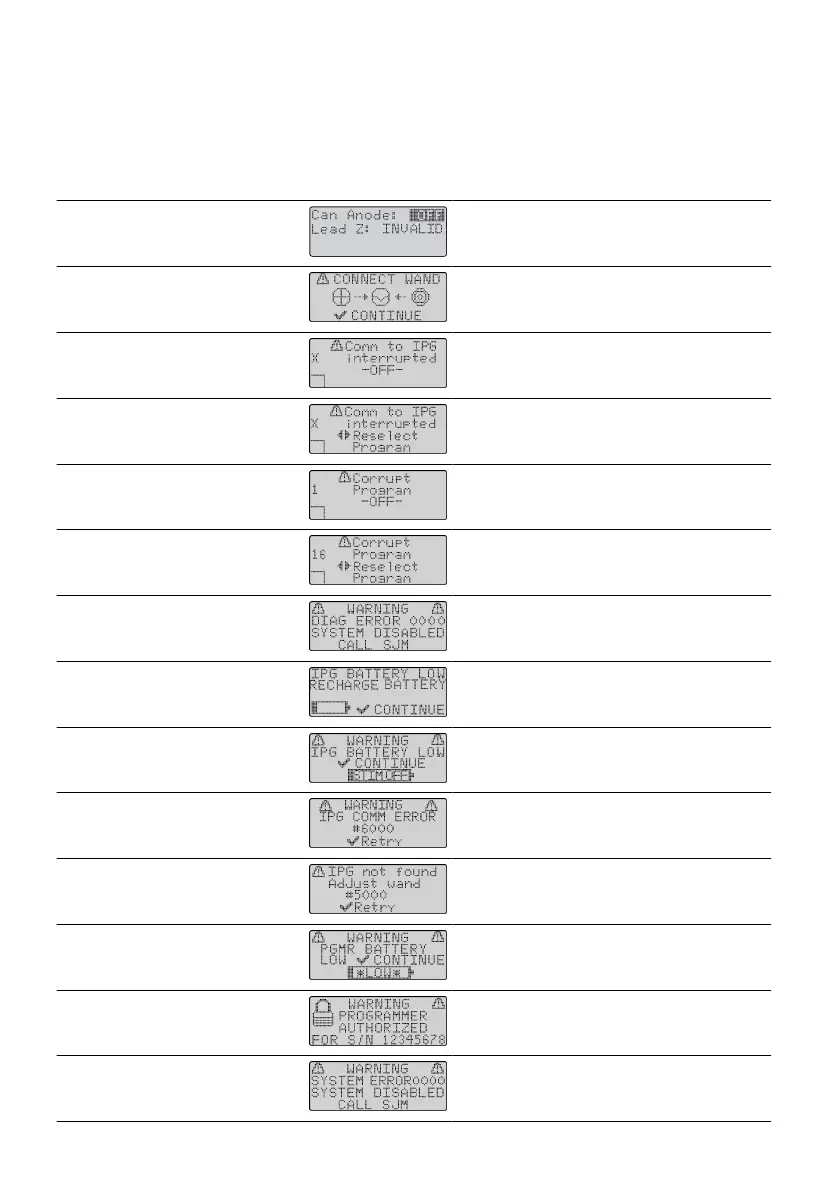
Troubleshoong a Diagnosc Message
The programmer has a program that constantly checks the system while it is running. If a problem with the
programmer, IPG, or wand occurs, the programmer will make a tone and a diagnosc message will appear.
The following table describes how to troubleshoot the common diagnosc messages.
Table 6. Troubleshoong for Diagnosc Messages
Programmer Message Screen Soluon
Can Anode: OFF;
Lead Z: INVALID
Ensure that all connecons are ght. Repeat
impedance check.
Connect wand Ensure the wand is properly connected to the
programmer.
Comm to IPG interrupted (o) Select another program.
Comm to IPG interrupted
(reselect program)
Select the program again, or select another
program.
Corrupt program (o ) Edit the program.
Corrupt program
(reselect program)
Edit the program or select another one.
Diagnosc error Contact Technical Support.
IPG baery low
(recharge baery)
IPG baery is low. Recharge it.
IPG baery low
(sm o)
IPG baery is low and is not delivering
smulaon. Recharge it.
IPG communicaon error Reposion the wand over the IPG and press
the Select key.
IPG not found Reposion the wand over the IPG and press
the Select key.
Programmer baery low Replace the baeries in the programmer.
Programmer authorized for
S/N nnnnnnn
Use the programmer that is authorized for the
IPG or authorize the programmer for the IPG.
System error Contact Technical Support.
33











 To Next Page