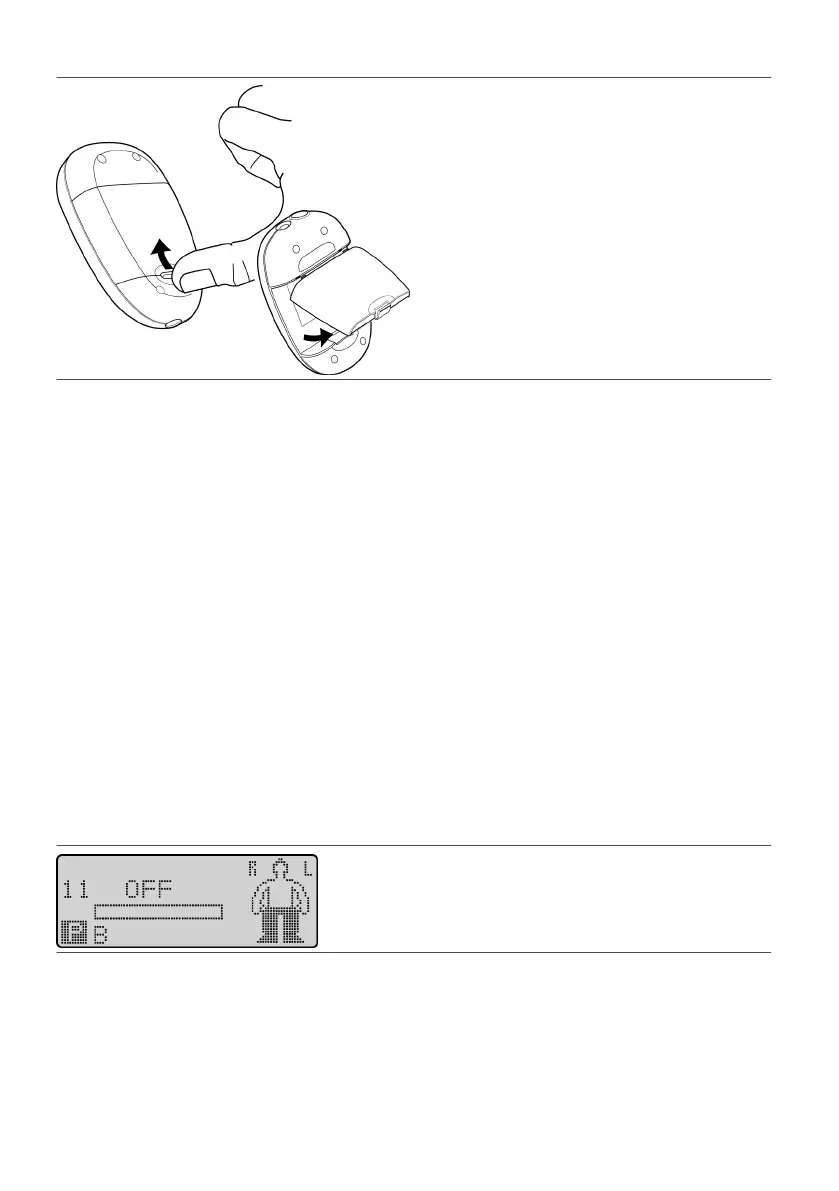
Figure 25. Remove the baery pack from the programmer
3.
Remove the AAA baeries from the baery pack, and insert new AAA baeries into the baery pack,
3.
ensuring that the
+
and
-
signs on the baeries line up with the signs in the baery pack.
4.
Place the baery pack into the baery compartment.
4.
Using the Programmer
This secon provides informaon for using the programmer to select and control programs while it is in its
standard operang mode. It does not provide informaon about programming. For informaon about
programming, see “Creang and Eding Programs” (page 18).
Except for “Browsing Programs” (page 17), you will need to establish communicaon with the IPG before you
start these instrucons. See “Communicang With the IPG” (page 7).
Selecng a Program
If more than one program is saved on the programmer, you can use the programmer to select the desired
program and load it on the IPG.
NOTE:
▪
If the Program icon (P) does not appear, the programmer does not have any more programs to select.
▪
▪ The amplitude keys are sll acve. If you press one during this procedure, the smulaon will change▪
accordingly and the Operaonal Display screen will appear.
To select a program:
1.
From the Operaonal Display screen, press either Scroll key unl the Program icon (P) appears in the user
1.
opon window. The number for the current program appears on the le of the screen.
Figure 26. Scroll to the Program icon (P)
2. Press the Select key. The Program Selecon screen appears showing the currently selected program in the2.
center of the screen.
14











 To Next Page