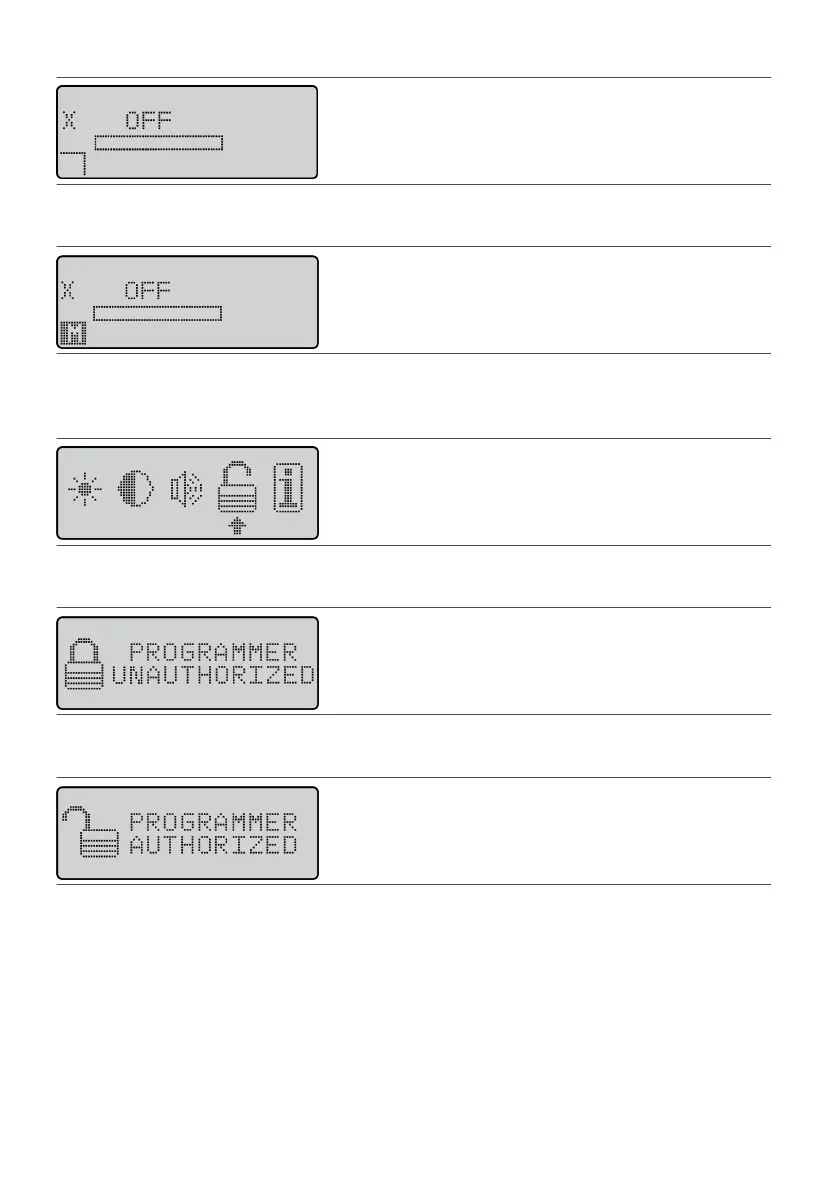
Figure 11. X icon on the Operaonal Display screen
2. Press a Scroll key unl the Menu icon (M) appears in the user opon window.2.
Figure 12. Scroll to the Menu icon (M)
3.
Press the Select key. The Menu screen appears.
3.
4.
Press a Scroll key unl the selecon arrow is under the Authorizaon icon.
4.
Figure 13.
Select the Authorizaon icon
5.
Press the Balance key; then press the Select key. The following screen appears.
5.
Figure 14. Screen showing an unauthorized programmer
6. Press the Balance key; then press the Select key. The following screen appears.6.
Figure 15. Screen showing an authorized programmer
7.
Press the Previous Screen key twice. The Operaonal Display screen appears and the programmer is
7.
authorized to the IPG.
8. Use the programmer to create and save a program for the IPG. The X icon will remain on the Operaonal8.
Display screen unl you save the program.
Reauthorizing a Programmer With a Dierent IPG
When a programmer is not authorized to work with an IPG, an X appears on the Operaonal Display screen.
To reauthorize a programmer:
NOTE: Performing the following steps deletes all the programs in the programmer and reauthorizes the IPG
serial number.
11











 To Next Page