Adding a Sm Set to a Program
To add a sm set in a program:
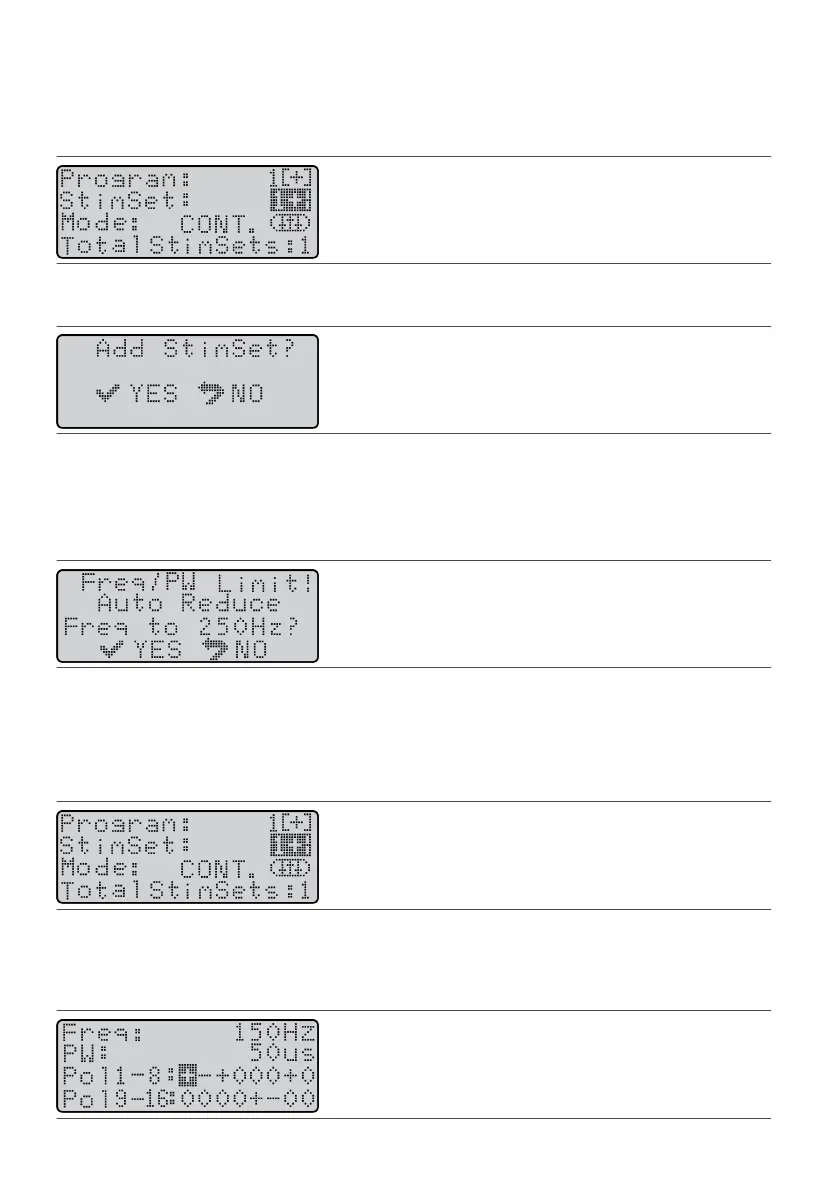
1. From the Program screen, press the Balance key to highlight the SmSet eld.1.
Figure 46. Highlight the SmSet eld
2.
Press the Amplitude Increase key. The Add SmSet screen appears.
2.
Figure 47.
Add SmSet screen
3.
Press the Select key. The Program screen appears with a new SmSet number and the Total SmSets
3.
number increased by one.
NOTE: If the Freq/PW Limit screen appears, the frequency sengs are too high. Press the Select key to
automacally reduce the frequency sengs.
Figure 48.
Freq/PW Limit Screen
Deleng a Sm Set From a Program
To delete a sm set from a program:
NOTE: The last sm set in a program cannot be deleted.
1. From the Program screen, press the Balance key unl it highlights the SmSet eld.1.
Figure 49. Highlight the SmSet eld
2. If the number of the sm set that you want to delete is not shown on the screen, press the Amplitude2.
Increase key unl it appears.
3.
Press the Balance key to highlight the Pol eld.
3.
Figure 50. Highlight the Pol eld
21











 To Next Page