MAX_Kurzanleitung_Brief_Overview_V1.03_de_en 70 / 105
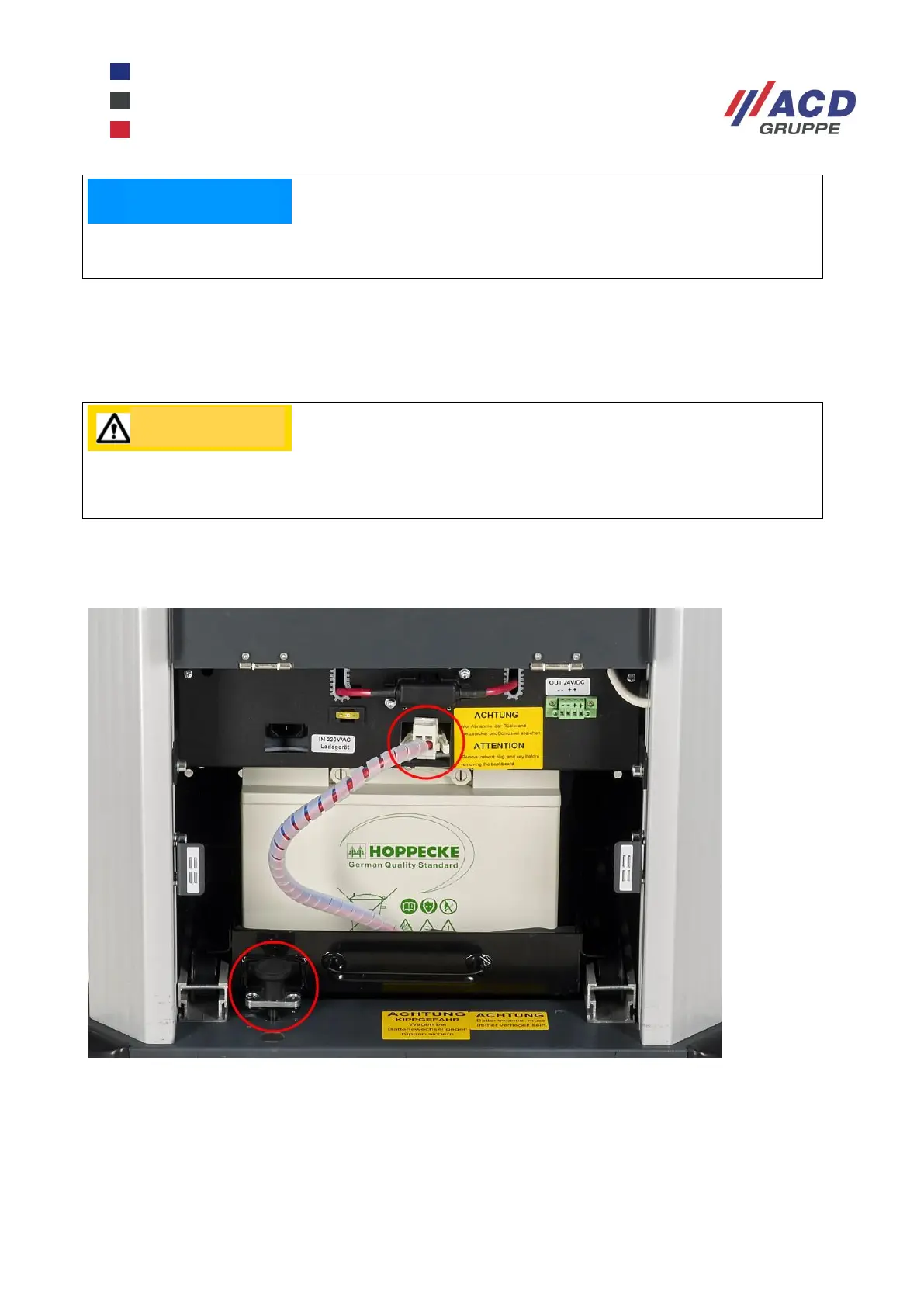
Switch off the mobile workstation and the equipment connected to it by pressing the On/Off switch on the
front (switch light goes out). Turn the cart, e.g. by tiling slightly forward, in such a way that the rear wheels
protrude over the cart, and open the rear panel of the mobile workstation. After you have disconnected the
battery connection cable, pull the tray carefully out of the cart. As soon as possible, have two people grip the
two side handles of the battery tray and lift it out of the change carriage.
Two people must also insert the new, charged battery tray into the changing carriage. Next, unlock the
changing carriage by pulling out the unlocking bolt, then push it back into the cart and lock it. Then re-
connect the battery tray connection cable and check the charge status on the battery controller.
Figure 14: Battery changing tray with unlocking bolt and battery connection cable
Before transporting the mobile workstation, please screw the transport securing screw for the
battery changing tray back in.
Never pull the changing tray out of the mobile workstation on your own. The battery tray must
always be changed by two people who hold the two side handles while pulling the tray out.


 To Next Page