MAX_Kurzanleitung_Brief_Overview_V1.03_de_en 75 / 105
26.2.4 Pull charged changing tray into the cart
1. Move the MAX cart to the charged battery.
2. Lock both rollers.
3. Unplug the charging cable from the charger.
4. Pull the battery changing tray into the cart using the unlocking lever.
5. Lock the battery tray in place.
6. Plug the battery connection cable into the MAX cart.
7. Now the mobile workstation is ready for use again.
27 Special versions of the MAX
27.1 MAX TK Deep-freeze version (TK version)
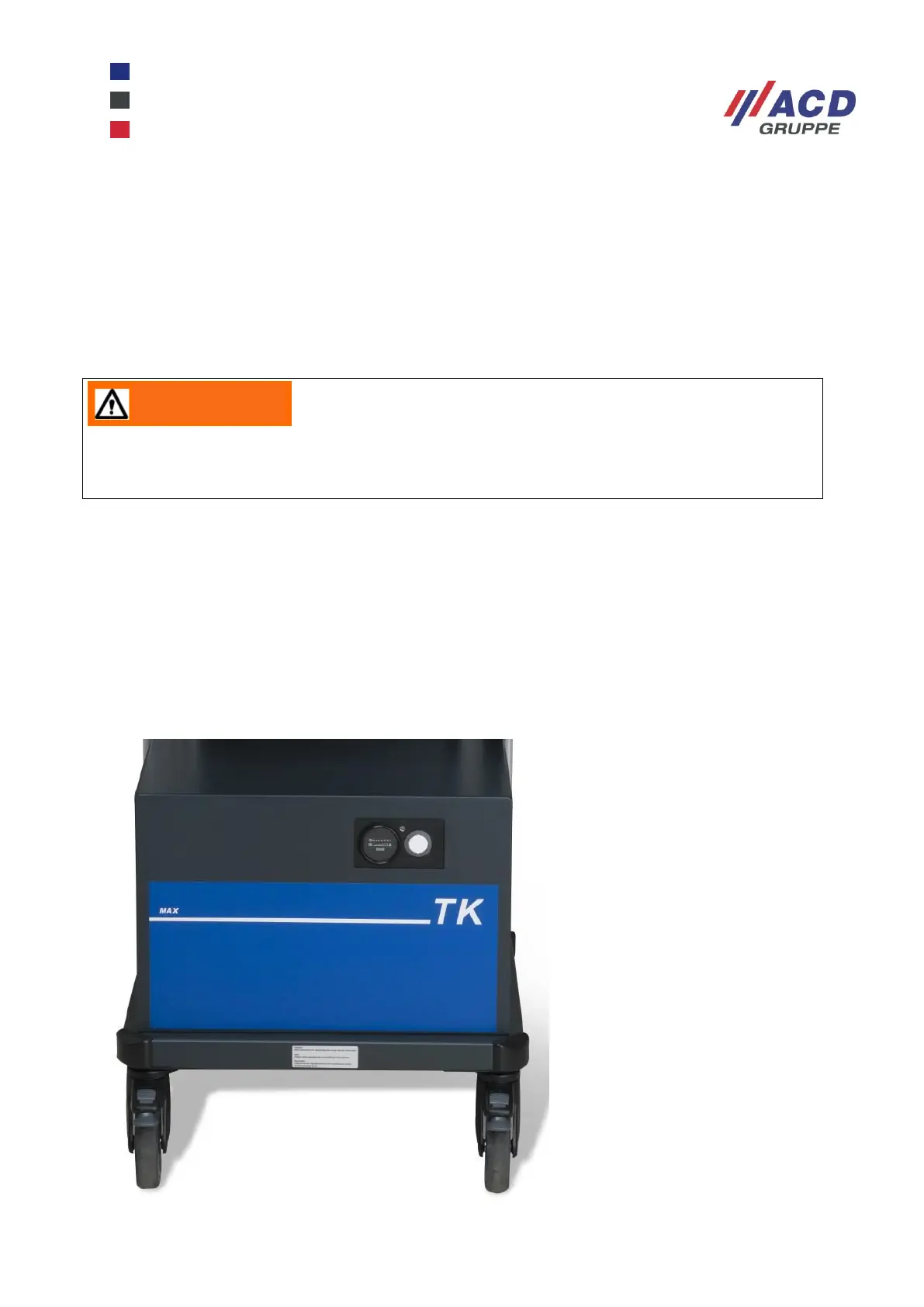
The TK mobile workstation has a blue TK label on the front.
It has an operating temperature of -28 °C to 40 °C.
If the mobile workstation is recharged after use in a deep-freeze zone, the charging LED may flash red. This
means the charger has not yet reached its operating temperature. The battery starts charging automatically
as soon as it has reached operating temperature (charging LED flashes green).
Figure 21: MAX TK Deep-freeze (TK) version of MAX mobile workstation
After changing the battery tray, ensure it is properly locked in place. If the battery tray is not
locked, it can cause damage, including making the cart topple over.


 To Next Page