LCD adjustment
<Menu> 3/3
Moni/Level :AC
AutoPwrOff :OFF
LCD cont :*
Baud rate :9600
< Data Recording >
It is inputting
Save/Set
and can record at any time to record data.
1)Push the
Save/Set
blinks
Save
.
2)Select the recording number with cursor button .
016/016
Total data
The recording number
3)It will be recorded if
Save/Set
is pushed again (a Save display disappears).
If
Save/Set
is pushed continuously, it will be recorded on the newest number. Movement
with cursor button is restricted to a number
[ finishing / record ].
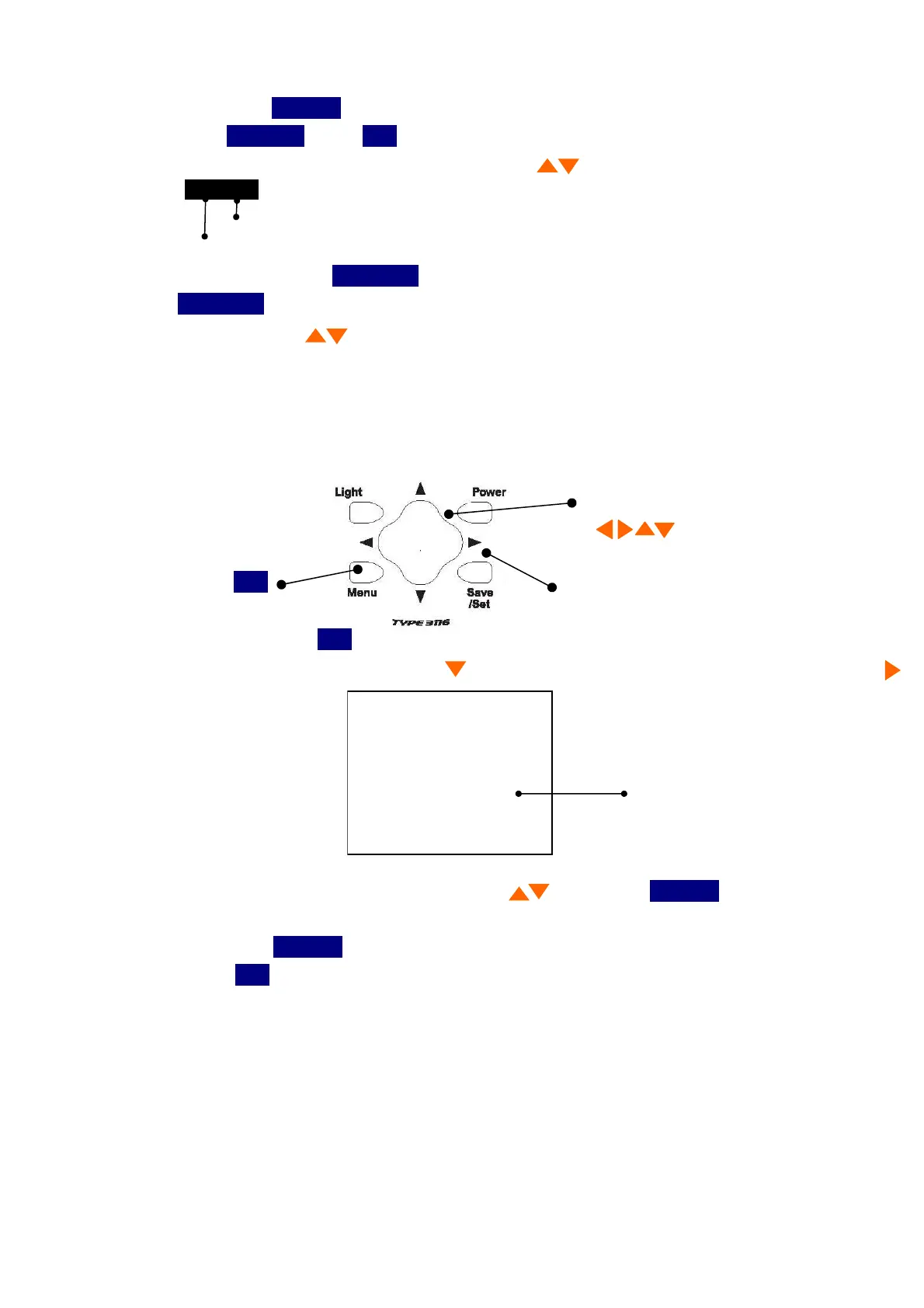
4.LCD contrast adjustment
You can adjust LCD contrast, when the batteries were low, or when the new batteries were
installed. The procedure is as follows.
1) When you press the
Menu
button three to return to the following screen appears.
2)Select
LCD cont
with
Cursor
button , then move the cursor rightward with cursor button.
3)Adjust the LCD contrast with cursor button , then press
Save/Set
button to save
the setting.
After pressing
Save/Set
button, the cursor moves to leftward.
4)Press the
Menu
button one to return to the measurement screen.
The four directions of cursor button
Menu
Save/Set



 To Next Page