EasyManua.ls Logo

ACT apricot - Page 256

ACT apricot
328 pages
Print Icon
To Next Page IconTo Next Page
To Previous Page IconTo Previous Page
Loading...
SCREEN DRIVER
13-CR
14-S0
15
-SI
Moves
the
cursor to
the
beginning of
the
current
line
Switches
in
the
second
character
set
Selects
the
default character
set
24 -
CAN
Cancels
any
escape sequence
currently
in
operation
27 -
ESC Herald
the
start
of
an
escape
sequence
Physical Screen Layout
The
Apricot screen
has
a 4K
byte
block of
memory
which
acts as a screen buffer.
This
memory
is
located
at
FOOOO
hex
and
is
utilised
as follows:
For every
character
on
the
screen,
there
is
one
word.
The
first word
in
the
screen buffer is for
the
first top left-hand
character
on
the
screen,
the
last
word is for
the
bottom
right-hand character.
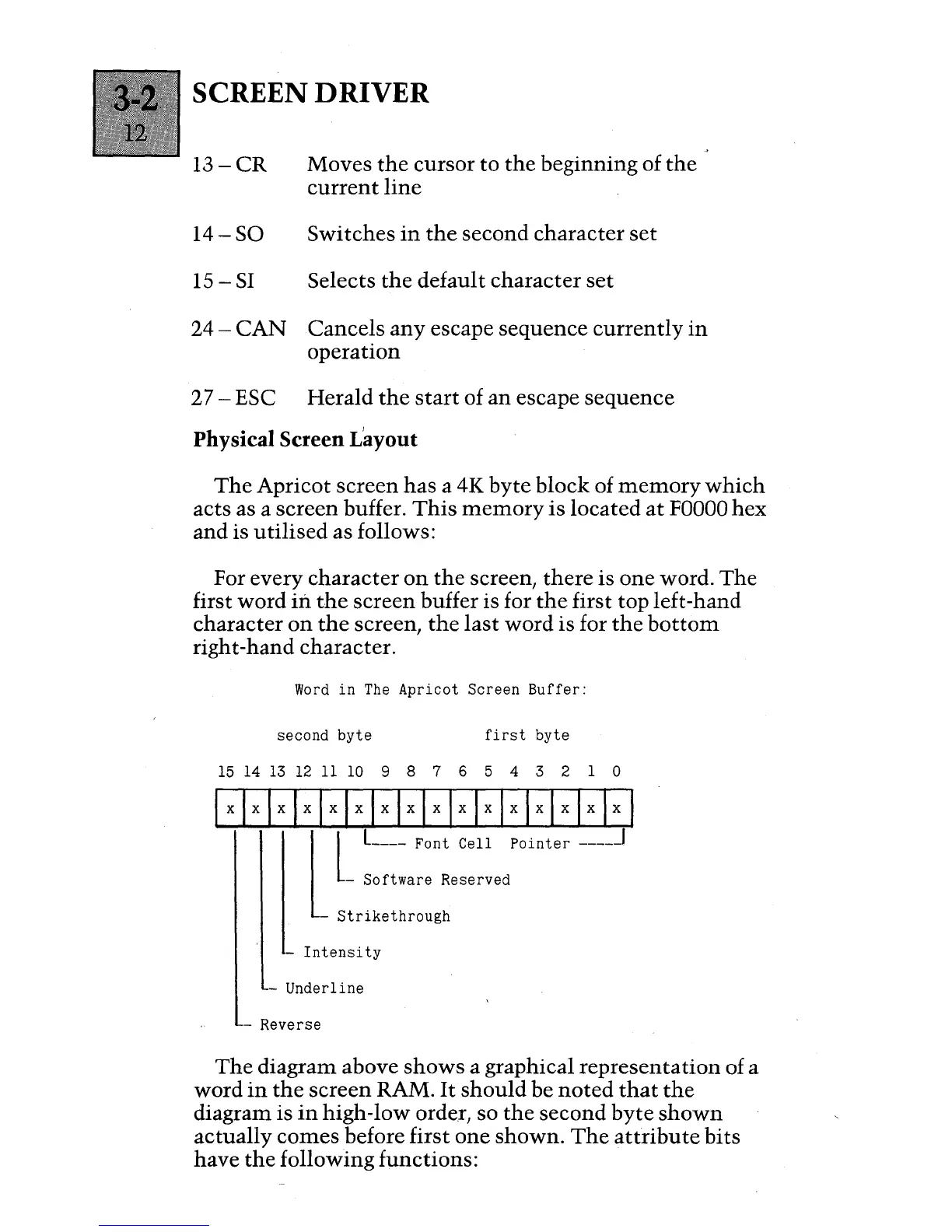
Word
in
The
Apricot Screen
Buffer:
second
byte
first
byte
15
14
13
12
11
10
9 8 7 6 5 4 3 2 1 0
Ixlxlxlxlxlxlxlxlxlxlxlxlxlxlxlxl
l
l
L
____
Font
Cell
Pointer
-----1
- Software Reserved
-
Strikethrough
-
Intensity
- Underline
- Reverse
The
diagram above
shows
a graphical
representation
of a
word
in
the
screen RAM.
It
should
be
noted
that
the
diagram is
in
high-low order, so
the
second
byte
shown
actually
comes
before first
one
shown.
The
attribute
bits
have
the
following functions:

Table of Contents

Other manuals for ACT apricot