EasyManua.ls Logo

ACT apricot - Page 258

ACT apricot
328 pages
Print Icon
To Next Page IconTo Next Page
To Previous Page IconTo Previous Page
Loading...
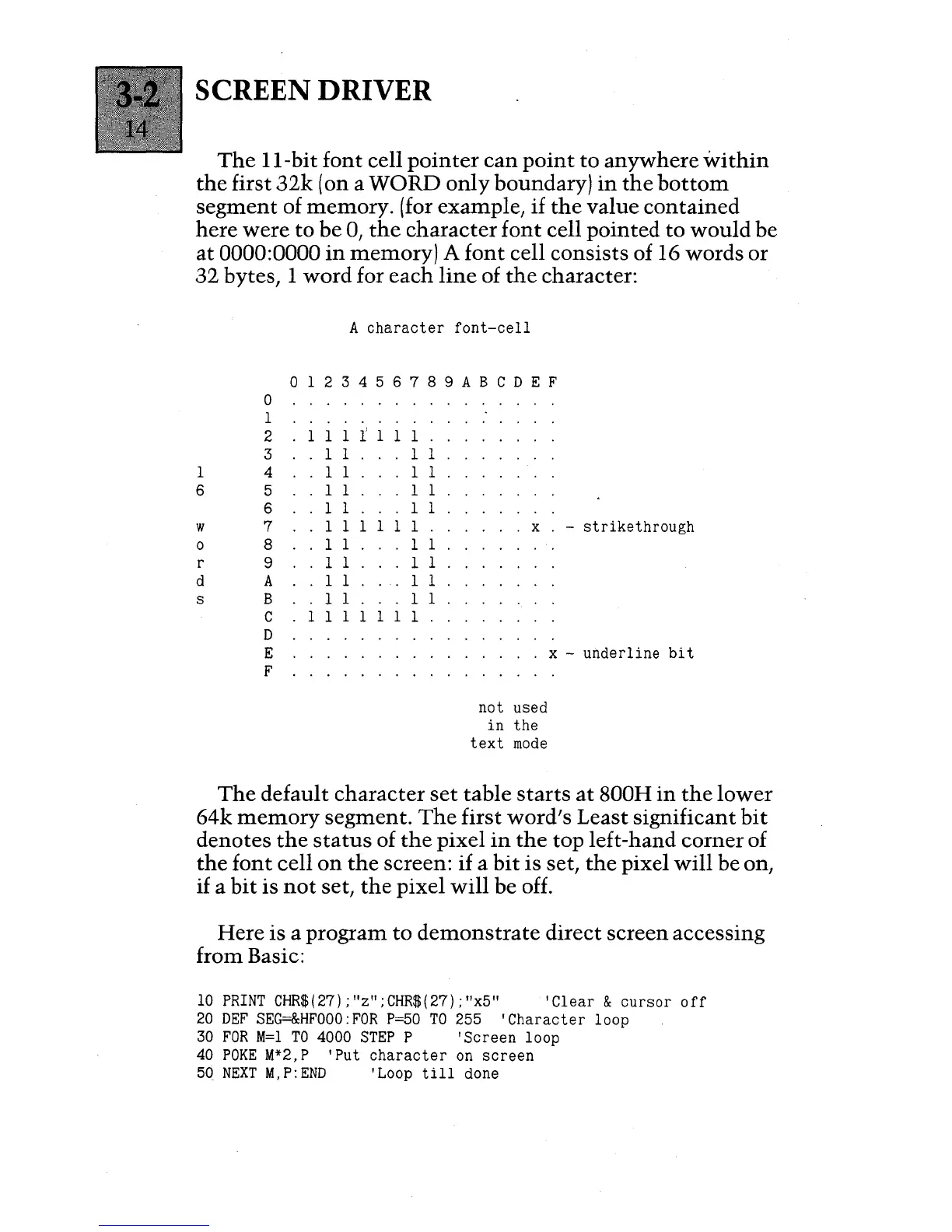
SCREEN DRIVER
The
II-bit
font
cell
pointer
can
point
to
anywhere
within
the
first
32k
(on a WORD
only
boundary)
in
the
bottom
segment
of memory. (for example,
if
the
value
contained
here
were
to be
0,
the
character
font
cell pointed to
would
be
at
0000:0000
in
memory) A
font
cell consists of 16 words or
32
bytes, 1 word for
each
line
of
the
character:
0
1
2
3
1
4
6 5
6
w
7
0 8
r
9
d
A
s B
C
D
E
F
A
character
font-cell
o 1 2 3 4 5 6 7 8 9
ABC
D E F
1 1 1 l' 1
11.
1 1 1 1
1 1 1 1
1 1 1 1
1 1
.11
1 1
1111.
1 1 1 1
1 1
.11
1 1
.11
1 1
.11
III
III
1
x -
strikethrough
not used
in
the
text
mode
x -
underline
bit
The
default character
set
table
starts
at
800H
in
the
lower
64k
memory
segment.
The
first word's Least significant
bit
denotes
the
status
of
the
pixel
in
the
top left-hand corner of
the
font
cell
on
the
screen: if a
bit
is set,
the
pixel
will
be on,
if
a
bit
is
not
set,
the
pixel
will
be off.
Here is a program
to
demonstrate
direct screen accessing
from Basic:
10
PRINT
CHR$(27);"z";CHR$(27);"x5"
'Clear
&
cursor
off
20
DEF
SEG=&HFOOO:FOR
P=50
TO
255
'Character
loop
30
FOR
M=I
TO
4000
STEP
P
'Screen
loop
40
POKE
M*2,P
'Put
character
on
screen
50
NEXT
M,P:END
'Loop
till
done

Table of Contents

Other manuals for ACT apricot