4-46 ADS TRITON+
®
Manual
Editing the Long Range Device
This section describes the parameters for the Long Range Depth
device.
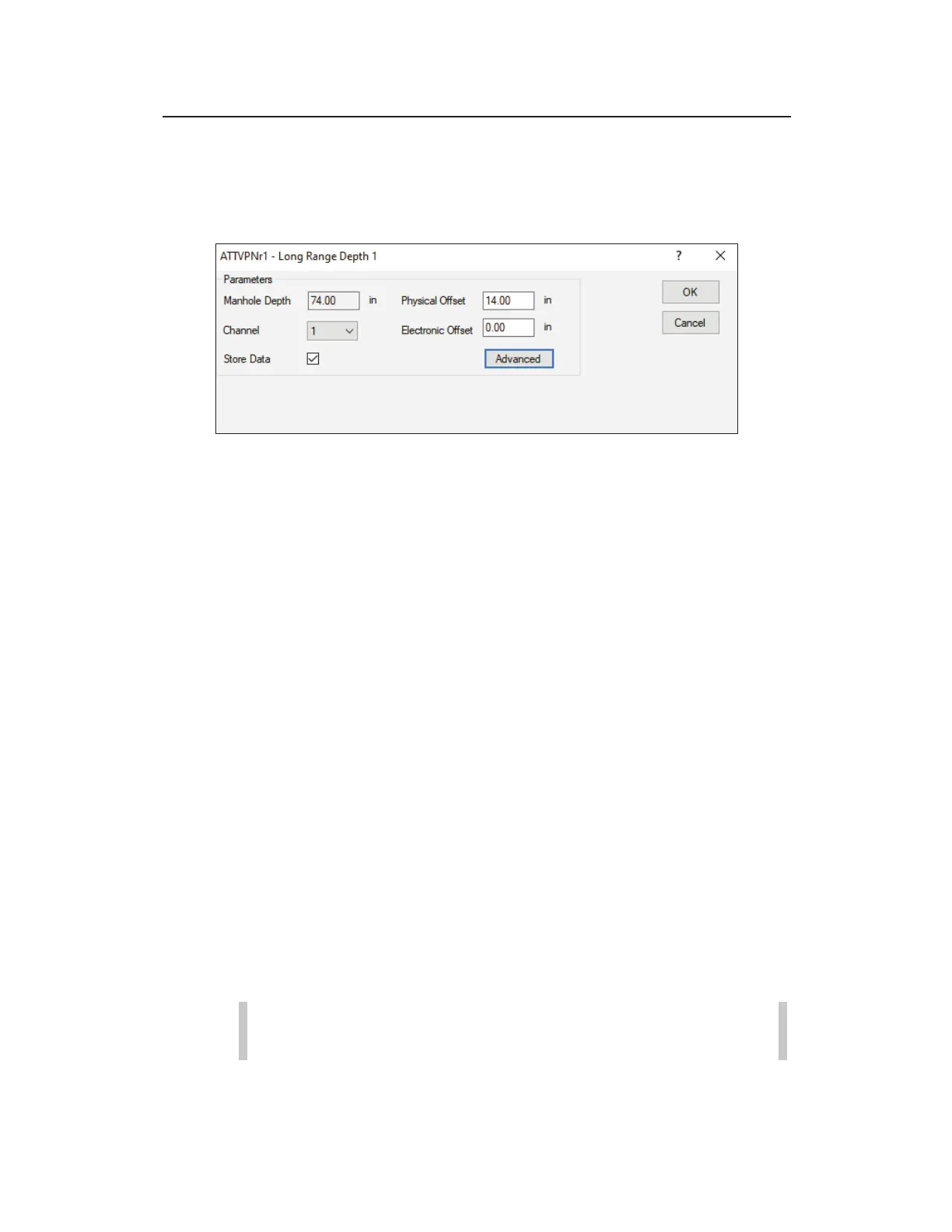
[location name] Long Range dialog
Edit the parameters in the following way:
x Manhole Depth
This is a read-only field. Manhole Depth is
entered on the Main screen of
Qstart
XML
.
x Physical Offset Distance (in inches or millimeters) from the
manhole rim to the bottom of the Long Range Depth sensor.
Reference Chapter 3 for more detailed instructions on how to
take this measurement.
x Channel Select the channel number of the port on the top of
the monitor to which the sensor device is connected.
x Electronic Offset (optional) Enter the difference that exists
between the Long Range Depth readings and manually
measured depth within the invert. The default value is 0.
x Store Data Select this checkbox to ensure the monitor logs to
depth data to memory.
This option is selected by default.
x Advanced Select this button to access the Advanced
Parameters dialog.
Note: Modifications to the Advanced Parameters
should be performed only by or under the guidance of



 To Next Page