
 Need help?
Do you have a question about the AEQ XPEAK and is the answer not in the manual?
Details the system's purpose in AV production and its basic operational capabilities.
Provides descriptions and specifications for Xpeak_R, Xpeak_D, Xpeak_BP, Xplorer, Xpeak_IF, and Xpeak Virtual.
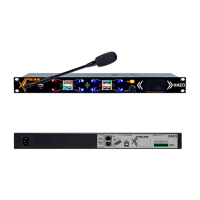
Describes the front and rear panel features and connectors of the stationary panels.
Details the physical attributes, ergonomics, and connectors of the wired beltpack.
Covers the ergonomics, dimensions, and functional aspects of the wireless beltpack.
Outlines the physical characteristics and connectivity options of the I/O interface module.
Explains the menu structure and options for Xpeak_R and Xpeak_D user panels.
Details the menu options and navigation for the Xpeak_BP wired beltpack.
Describes the menu system and features accessible on the Xplorer wireless beltpack.
Outlines the menu options for configuring the Xpeak_IF I/O interface.
Guides users through installing the Xpeak Virtual application and activating its license.
Introduces the AEQ Xpeak software, covering installation, layout, menus, and operation.
Explains the concept and functionality of Xpeak virtual network connections.
Outlines the information needed to install and activate virtual network services.
Details configuration for local and remote panels in virtual network setups.
Describes customization of panel keys for remote operation.
 General
| Brand | AEQ |
|---|---|
| Model | XPEAK |
| Category | Intercom System |
| Language | English |

 To Next Page