A
A
B
B
C
C
D
D
E
E
F
G
H
28
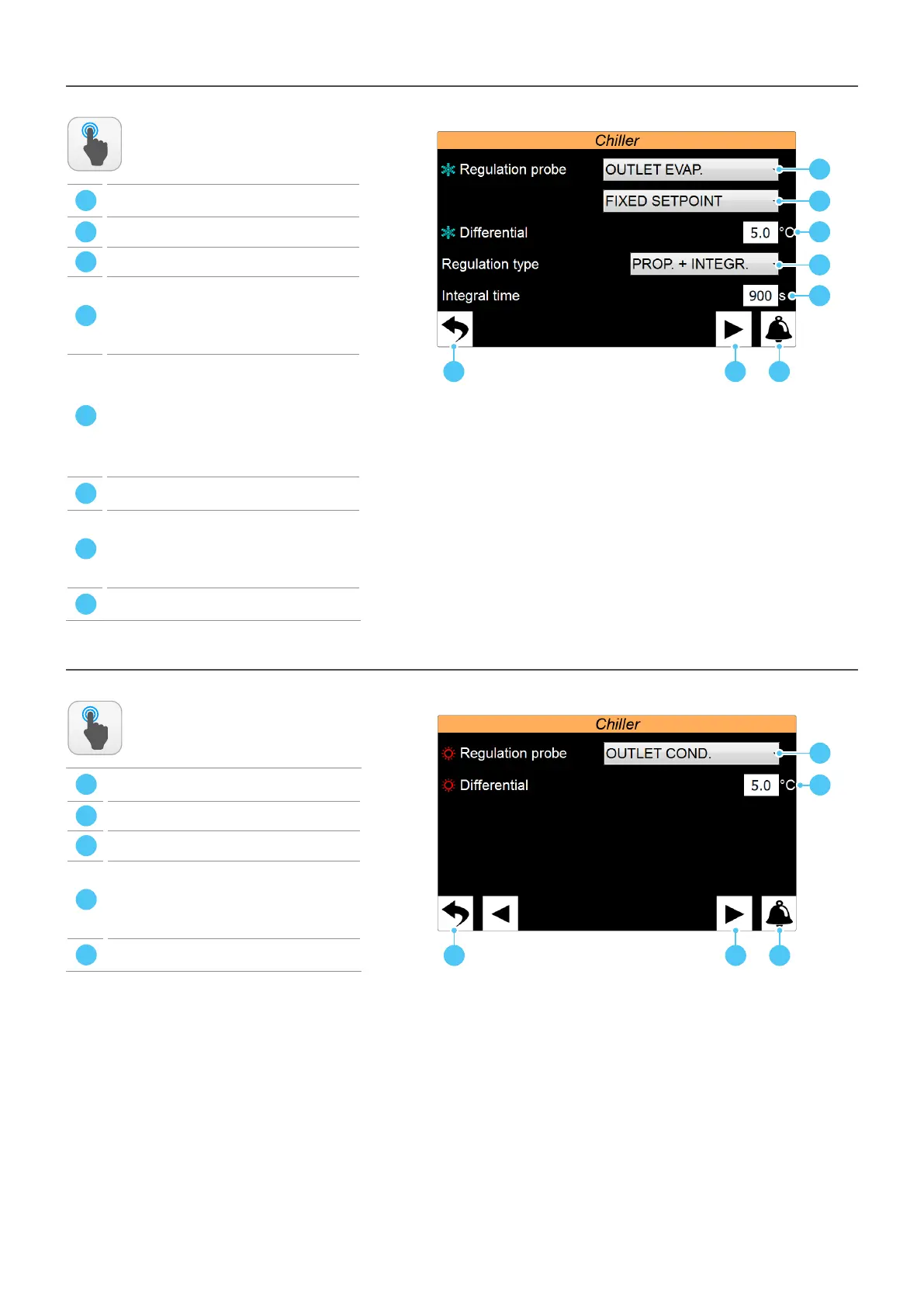
INSTALLER menu - CHILLER submenu - Selecon of the adjustment logic in cooling
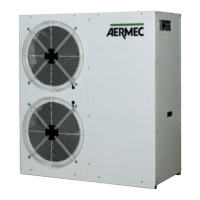
INSTALLER menu - CHILLER submenu - Selecon of the heang adjustment logic (heat pumps only)
ACTIONS
AVAILABLE:
ACTIONS
AVAILABLE:
A
Return to the submenu selection page for the
INSTALLER menu
B
Go to alarm menu
C
Go to next page
D
Sets the probe on which to base cooling adjustment.
The potenal choices are:
EVAP.INL. = Evaporator inlet;
EVAP.OUT. = Evaporator outlet;
COM.OUT. = Common evaporator outlet;
E
Sets the seng to be used for cold setpoint adjustment.
The possible choices are:
FIXED SETPOINT = The adjustment does not perform
any dynamic correcon on the cold setpoint value;
SETPOINT COMPENS. = The cold setpoint is
compensated based on the external temperature
by using the climac curve (this adjustment is not
available on the water/water units);
F
Sets the dierenal value to be applied to the cold
setpoint
G
Select the type of adjustment to be used. The possible
choices are:
PROPORTIONAL: Applies the proporonal error;
PROP.+INTEGR
: Applies proporonal + integral error;
PID
: NOT AVAILABLE;
H
Sets the integral me to be used in the adjustment
algorithm
A
Return to the submenu selection page for the
INSTALLER menu
B
Go to alarm menu
C
Go to next page
D
Sets the probe on which to base heang adjustment.
The potenal choices are:
COND.INL. = Condenser inlet;
COND.OUT. = Condenser outlet;
COND.COM. = Condenser common outlet;
E
Sets the dierenal value to be applied to the hot
setpoint



 To Next Page