Cleaning the print head
WARNING:
Print head cleaning must be done when image quality problems
occur.
To clean the print head:
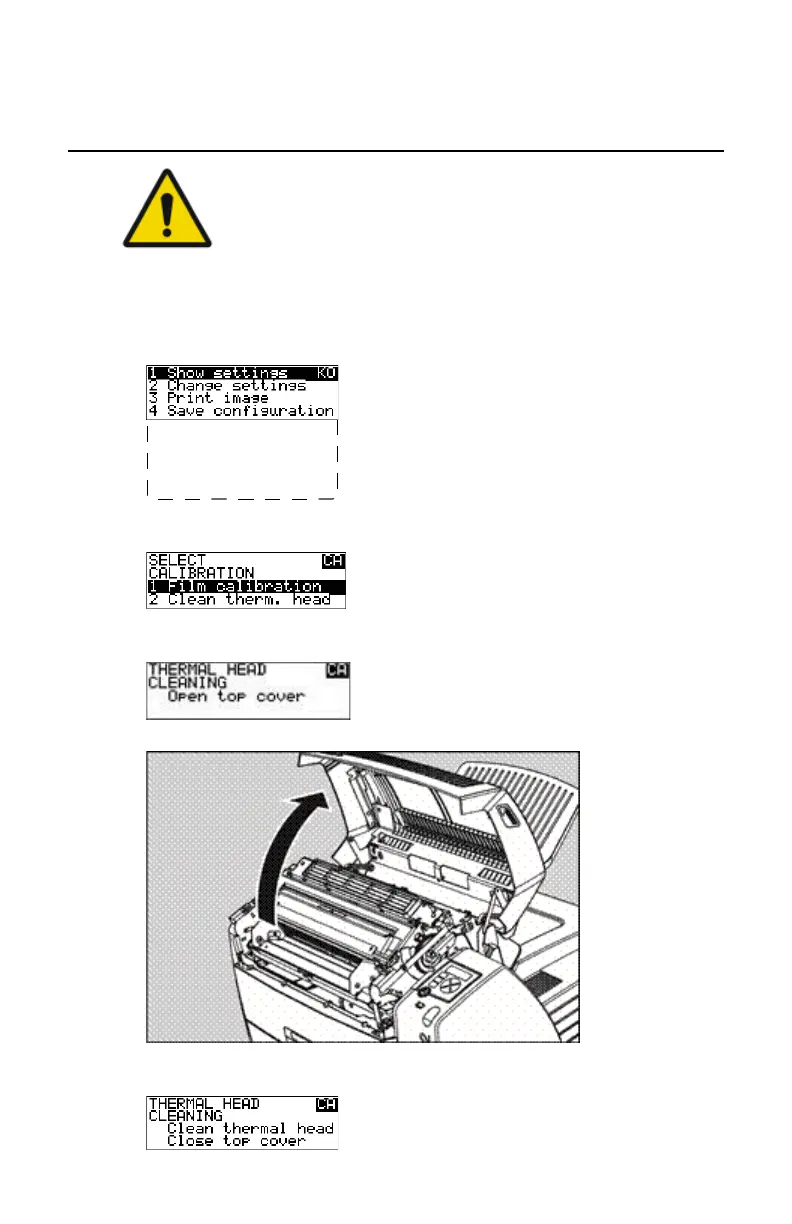
1. Press the Key-operator key to enter the Key-operator mode.
2. On the Key-operator main menu, press the Down key five times, followed
by the Confirm key to select ‘Calibration’.
5 Restore config.
6 Calibration
7 Service Actions
8 Quality Control
9 Installation
Reachable with Up/Down arrow keys
Visible
3. On the Select calibration menu, press the Down key, followed by the
Confirm key to select ‘Clean therm. head’.
4. The ‘Thermal head cleaning’ screen will give step-by-step instructions on
what to do:
5. Open the top cover.
6. As soon as the top cover is opened, the ‘Thermal head cleaning’ screen
continues giving the following instructions:
Drystar 5301, Drystar 5302 | Preventive maintenance schedule | 109
2831F EN 20210601 1655



 To Next Page