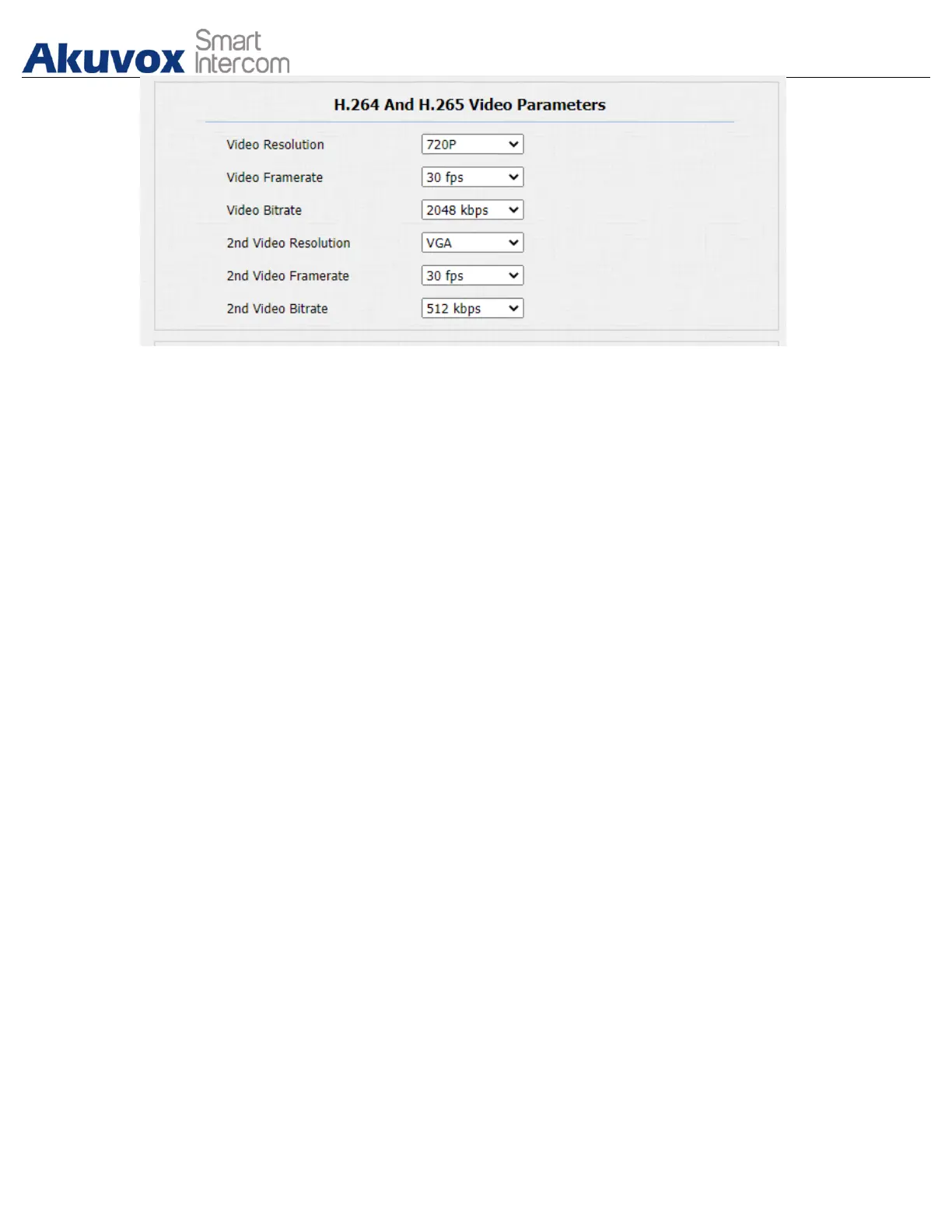
Parameter Set-up:
● Video Resolution: select video resolutions among seven options: “QCIF”,
“QVGA”, “CIF”,”VGA”,”4CIF”,”720P”. The default video resolution is “4CIF”.
and the video from the door phone might not be able to be shown in the
indoor monitor if the resolution is set higher than “4CIF”.
● Video Framerate: “30fps” is the video frame rate by default.
● Video Bitrate: select video bit-rate among six options: “64 kbps”,
“256kbps”, “512 kbps”, “1024 kbps”, “2048 kbps” according to your
network environment. The default video bit-rate is “ 2048 kpbs”.
● 2nd Video Resolution: select video resolution for the second video stream
channel. While the default video solution is “VGA”.
● 2nd Video Framerate: select the video framerate for the second video
stream channel. “25fps” is the video frame rate by default for the second
video stream channel.
● 2nd Video Bitrate: select video bitrate among the six options for the second
video stream channel. While the second video stream channel is “512 kpbs”
by default.
17.1.3.NACK
NACK (Negative Acknowledgement) is used to ensure the smooth and
continued data transmission for the video call. To enable NACK, navigate to
Phone > Call Feature > Others.


 To Next Page
 Loading...









