— 84 —
REMOTE ACCESS
Motion and Motion Area Options
u
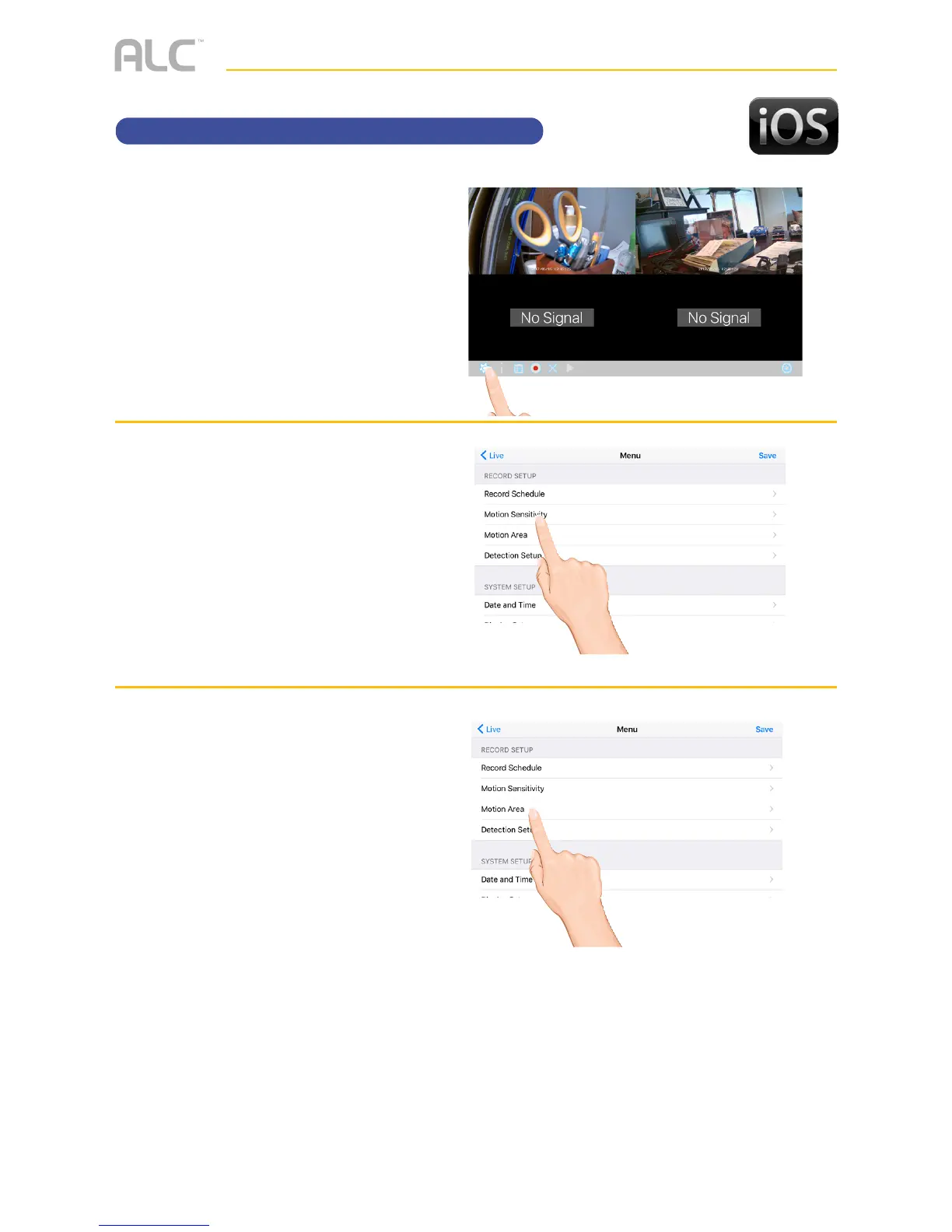
Tap the camera in the Devices
menu followed by the 4 button
to view the cam.
Tap the System
Menu icon to access the System
Setup screen.
v
Tap Motion Sensitivity. Tap
the desired camera and then set
the desired motion setting to PIR
(Uses Advance Motion settings),
PIR Low, PIR Mid or PIR High.
w
This Motion Mask feature will
allow you to mask areas of the
screen from detecting motion and
activating the motion detector
recording for that area. For
example, if a pet sets off the
sensor, you can mask the lower
areas that the pet would be visible
in, or if a tree branch moving in
the wind sets it off, you can mask
the areas where the tree branch is
in the video.
Tap Motion AREA. Tap the
desired camera.
Tap a block to
mask it; a check will disappear.
To un-mask a block, simply tap it
again; a check will appear.



 To Next Page