Getting to know your telephone
8AL91446ENAA ed02 19 /113
2.3.3.4 Use cases
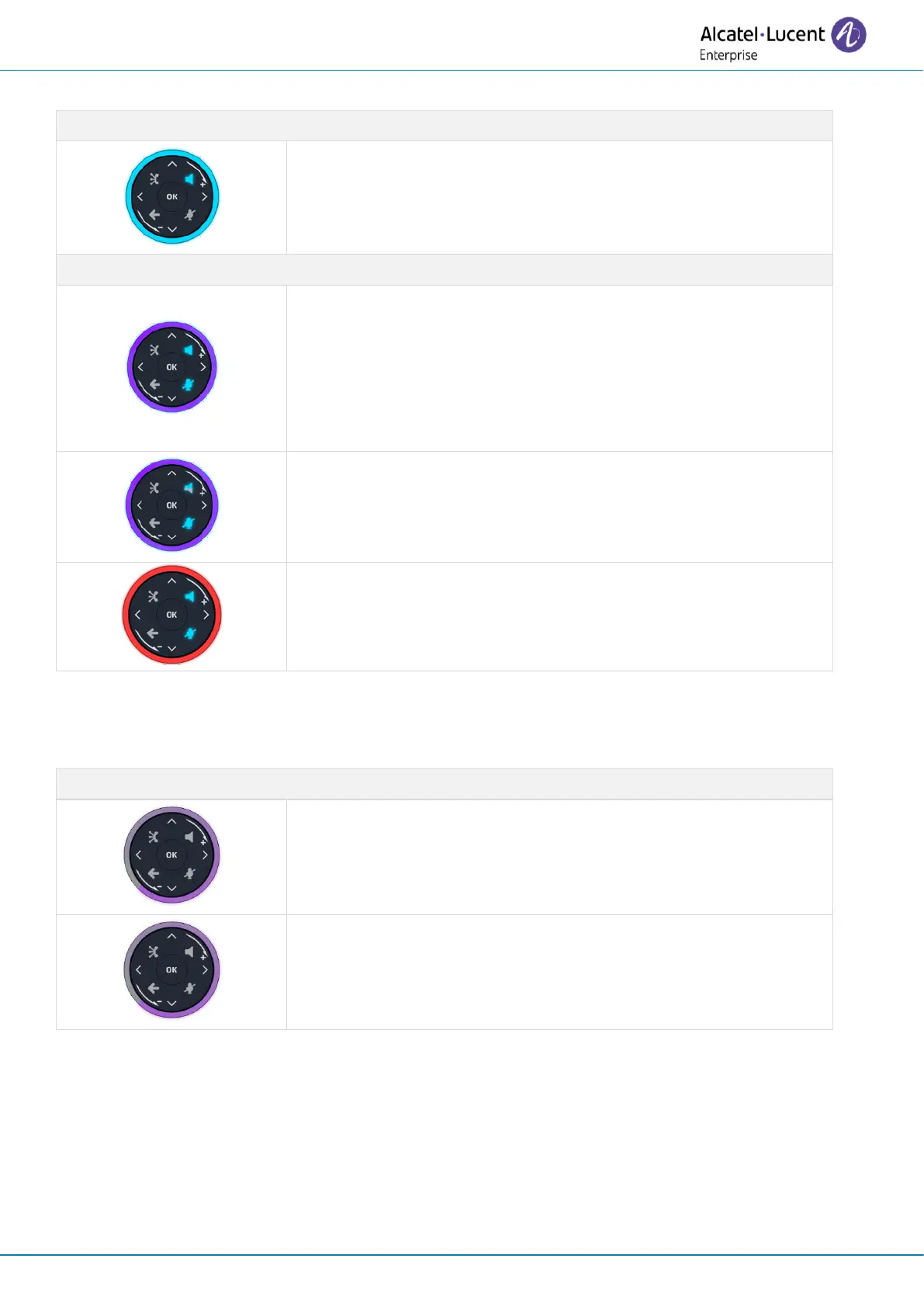
The Smart Pad ring is blinking blue.
The hands-free/loudspeaker key is lights up in blue to show
hands-free off-hook status
(1)
.
You are in conversation with the handset or the headset.
• The Smart Pad ring lights up in purple.
• The hands-free/loudspeaker key is lit in blue
(2)
: hands-free
mode is available if desired.
• The 'mute' key is lit up in blue
(2)
: you can mute the
microphone if desired.
Press the hands-free/loudspeaker key to switch in hands-free
mode. The key is flashing slowly in blue
(1)
. The 'mute' key is lit up
in blue
(2)
.
You are in conversation. Press the mute key. The key is slowly
flashing blue
(1)
. The Smart Pad ring is lit in red. The microphone
is muted.
(1)
In 'legacy' mode, the key lights up continuously in blue (
2)
In 'legacy' mode, the key is dimly lit in
blue
2.3.3.5 Other use cases
Boot
During boot phase, the Smart Pad ring rotates clockwise in
purple until the boot is finished.
Update
During software update, the Smart Pad ring rotates clockwise in
purple until the update is finished.


 To Next Page