Getting started
8AL91446ENAA ed02 8 /113
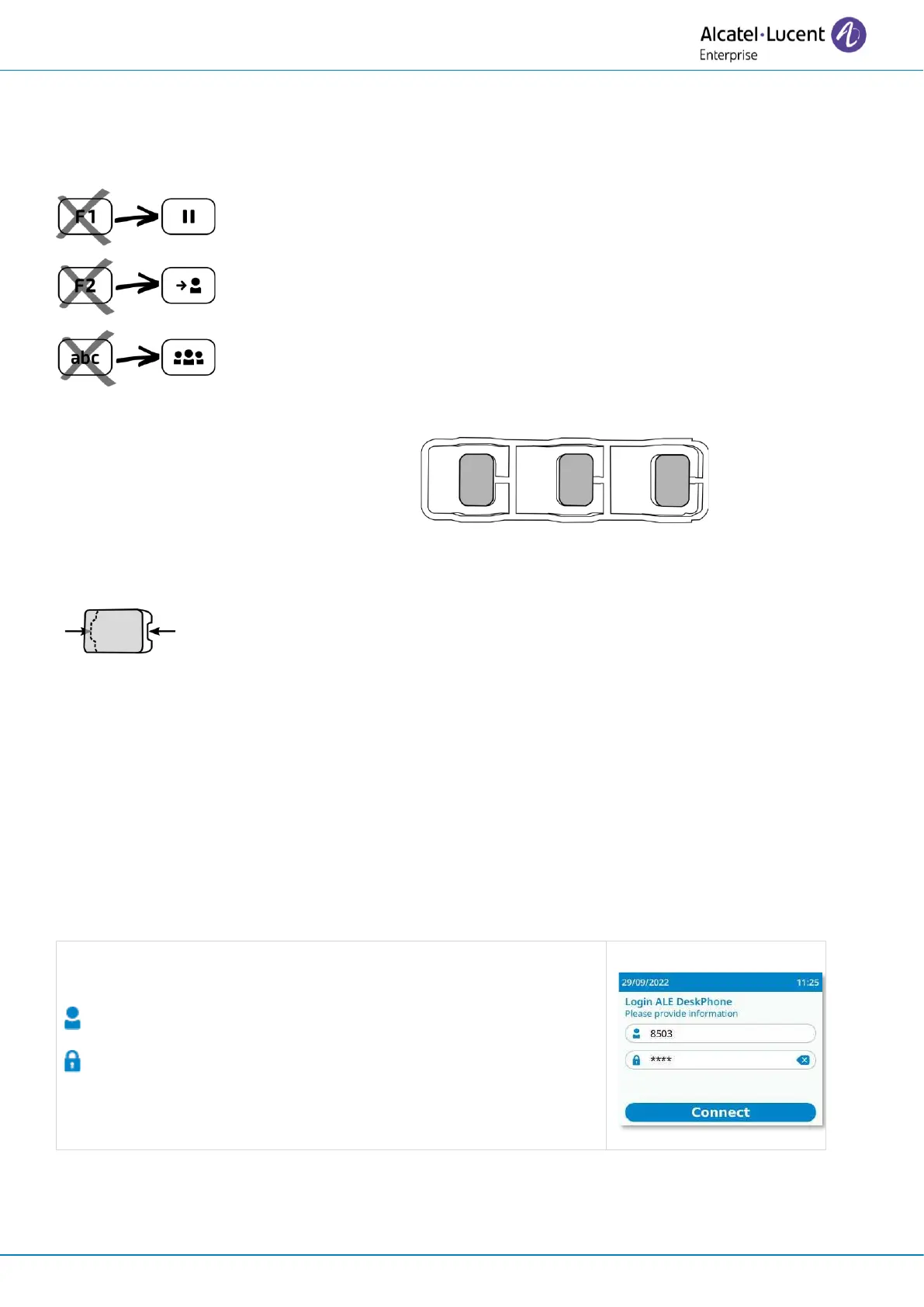
1.3 Install Hold, Transfer and Conference keys
If you have not already done so, install the Hold, Transfer and Conference keys provided with your
desk phone instead of the F1, F2 and 'abc' keys.
To install new keys:
The extra keys are provided hanging on a
support so that they do not get lost. The
new key is easily detached.
• On the desk phone, take the key to replace between thumb
and forefinger and pull gently to remove it. Two small
notches on the side of the key allow you to lift it with your
fingernail if necessary.
• Insert the new key into its slot by gently pressing it (as if you
were using this key).
• Keep the old keys if necessary.
1.4 Login
Typically, your administrator will have set up your account and desk phone on the
communication server. In this case, the phone will be ready for use. If this is not the case, you
will be asked for a login/PIN code when you first connect.
Contact your administrator to find out your login/PIN code.
: Enter your login.
: Enter PIN code.



 To Next Page