Getting to know your telephone
8AL91446ENAA ed02 30 /113
2.10 Connectors
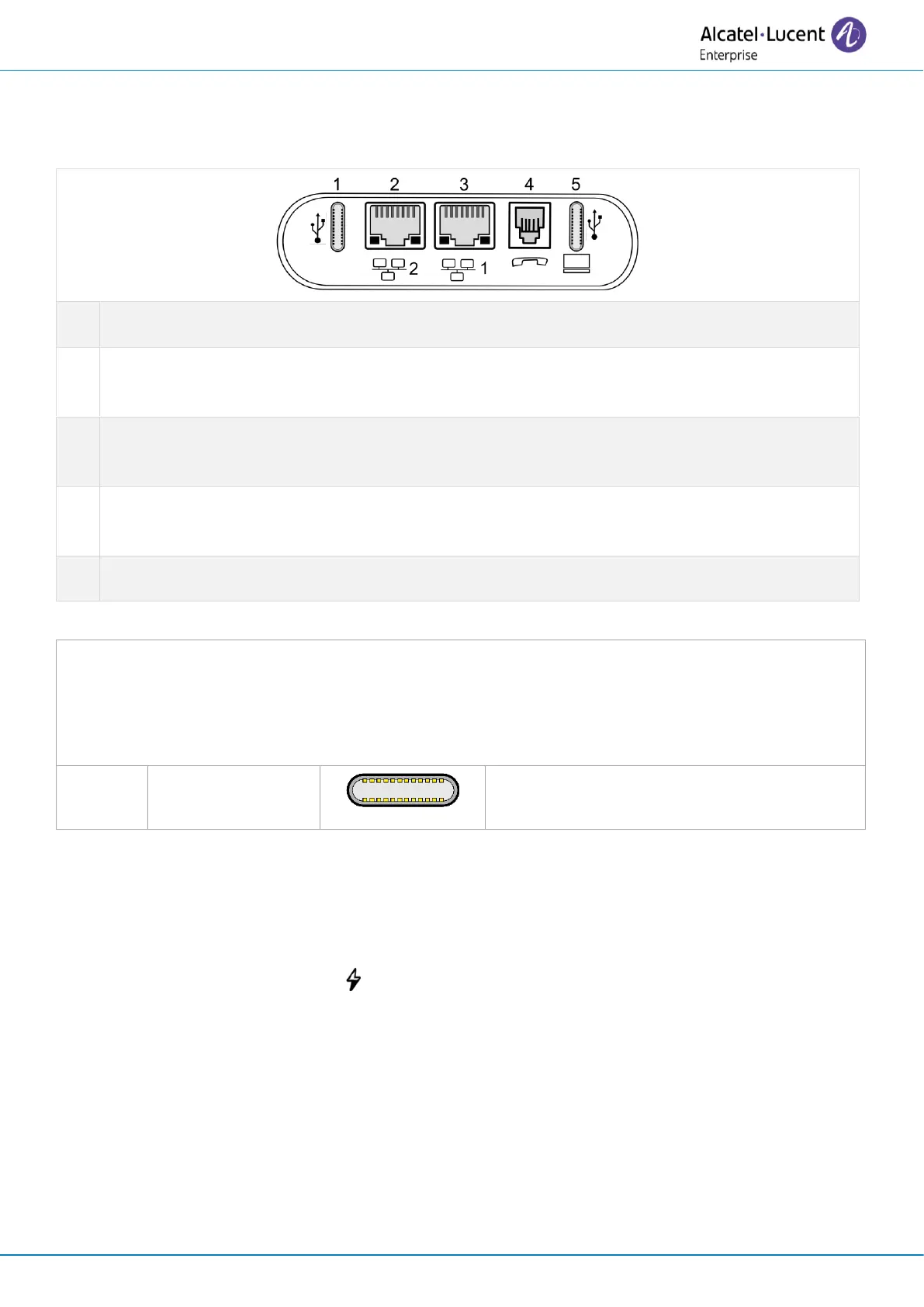
2.10.1 Description of the connectors
Universal Serial Bus type C Power Delivery (USB-C PD) connector
(1)
.
10/100/1000 Mbps Ethernet connectors to a PC (RJ45). Use this port to connect your PC to
your enterprise network.
10/100/1000 Mbps Ethernet connectors to the enterprise network (LAN - RJ45). Use this
port to connect the desk phone to the enterprise network.
Wired handset connector (RJ11). Use only Alcatel-Lucent Enterprise compatible handset
(ALE-150 SWB Corded Handset).
Universal Serial Bus type C Power Delivery (USB-C PD) connector
(1)
.
(1)
USB connectors (Universal Serial Bus) – UDB-C PD - USB type C Power Delivery.
These connectors are agnostic, meaning that you can use either connector to connect USB-C
power adapter, USB keyboard, USB headset, an audio equipment, a USB stick, a Bluetooth
®
USB
dongle provided with a Bluetooth
®
headset.This connector can be used to charge a smartphone.
USB type C Power
Delivery
The USB Type C is reversible and full duplex.
It is able to transmit data or power.
2.10.2 Powering the desk phone
The phone can be powered either via a power adapter (5V/3A - sold separately) or via Power over
Ethernet (PoE). The power adapter can be connected to a USB-C connector (1 or 2).
If the phone cannot detect a 5V/3A PD power adapter, the following icon will be displayed in the
status bar at the top of the screen: . In this case, the phone can reduce the amount of power it
consumes (USB current limitation, volume limitation, brightness).



 To Next Page